
Subclip
Subclip is an AI video editor that helps you edit, caption, and dub videos with voice cloning in one platform.
Visit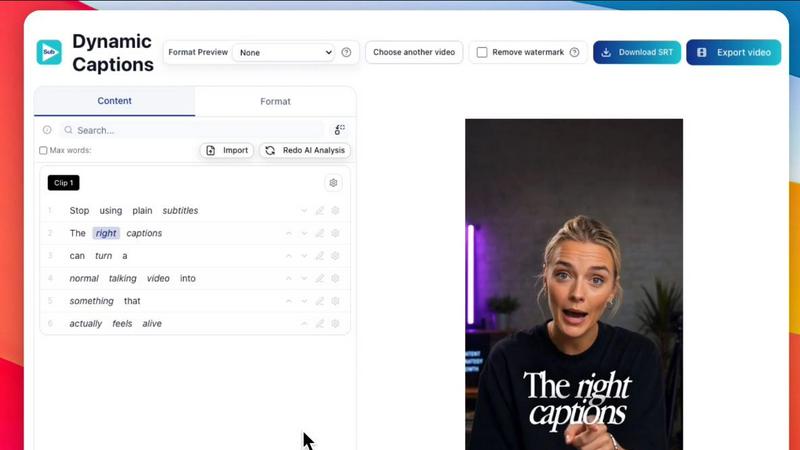
About Subclip
Subclip is an AI-powered video editor designed to fundamentally change how creators, marketers, and educators approach video production. At its core, Subclip treats video editing like editing a document. You upload your video, and the platform transcribes the audio into text. From there, you can edit the transcript directly, and the video timeline updates automatically. This removes the need to scrub through hours of footage on a traditional timeline, saving you an enormous amount of time. The platform is built for anyone who produces video content regularly, including YouTubers, podcasters, course creators, coaches, vloggers, agencies, and freelancers. Its main value proposition is reclaiming up to 80% of your editing time by automating the most tedious tasks. Subclip offers a suite of powerful features including automatic transcription, subtitle generation, voice cloning for dubbing, silence and filler word removal, and AI-powered clipping that identifies your best moments. The entire workflow happens in your browser, with no need to upload and download large files repeatedly. Subclip also supports direct export to professional editing software like DaVinci Resolve, Final Cut Pro, and Adobe Premiere Pro, as well as scheduling directly to social media platforms like YouTube and X. Whether you are a solo creator looking to speed up your workflow or a team needing to collaborate on projects, Subclip provides a streamlined, intuitive, and AI-driven alternative to complex traditional editing tools.
Features of Subclip
Text-Based Video Editing (Rough Cut)
This feature allows you to edit your video by simply editing the automatically generated transcript. You can delete mistakes, reorder sentences, or trim sections by highlighting and removing text. The video timeline updates instantly to match your text edits, eliminating the need to manually cut and splice clips. This document-style approach is intuitive and fast, making it easy to create a rough cut of your video in minutes. You can then export this edited timeline as an NLE file to advanced editors like DaVinci Resolve, Final Cut Pro, and Adobe Premiere Pro for final polishing.
AI Dubbing with Voice Clone
Subclip enables you to translate your video into over 21 languages while preserving your original voice, tone, and emotion. The AI analyzes your voice and creates a digital clone. When you dub your video into a new language, the clone speaks the translated words with your unique vocal characteristics. This feature is crucial for going global with your content without the expense and time of hiring voice actors or re-recording audio. It maintains the personal connection with your audience, even when they are watching in a different language, and it seamlessly preserves the original background music.
One-Click Auto-Captions and Subtitles
Subclip allows you to generate unlimited, accurate subtitles for your videos with a single click. It supports local transcription in over 48 languages, meaning your data stays private and processing is fast. Once generated, you can customize the text and formatting of the captions to match your brand style. This feature is essential for improving accessibility for viewers who are deaf or hard of hearing, as well as for boosting engagement on social media platforms where videos are often watched without sound. You can export your final video with the captions burned in or as a separate subtitle file.
AI Clipping and Audio Enhancement
The AI Clipping engine automatically scans your long-form video for high-energy segments, punchlines, and key emotional shifts. It identifies the most engaging moments and assigns them a viral score, helping you quickly create short, high-retention clips for social media without manually searching through hours of footage. Complementing this is the Audio AI feature, which lets you enhance your voice with one click. It removes background noise, cleans room echo, polishes podcast audio, and automatically removes silences and filler words like "um" and "ah," making every clip sound studio-ready.
Use Cases of Subclip
For Creators and Podcasters
Long-form podcasters and video creators can use Subclip to dramatically increase their output. They can upload a one-hour podcast and use the AI Clipping feature to automatically identify the best moments and punchlines, creating multiple short clips for platforms like YouTube Shorts, TikTok, and Instagram Reels. The text-based editor allows for rapid trimming and restructuring of the main episode. Finally, they can add auto-captions and dub the content into multiple languages to reach a global audience, all without spending hours on manual editing.
For Coaches and Course Creators
Coaches and educators who record training videos or online courses can use Subclip to scale their reach effortlessly. They can record a single course in their native language and then use the AI dubbing with voice clone feature to translate the entire course into 20+ languages, making it accessible to students worldwide without re-recording. The silence removal and voice enhancement tools ensure the audio is clear and professional. The text-based editing also makes it simple to update a specific section of a course by editing the transcript, rather than re-recording the entire segment.
For Vloggers
Vloggers can streamline their entire production pipeline with Subclip. After recording their day, they can upload the footage and use the text-based editor to quickly cut out boring parts or mistakes by editing the transcript. They can add B-roll and audio overlays, and then use the one-click auto-captions feature to ensure their vlog is accessible and engaging for viewers watching without sound. The platform allows them to export the final video in the correct aspect ratio (16:9, 9:16, 1:1) for different platforms, all in one click without file size limits.
For Agencies and Freelancers
Marketing agencies and freelance video editors can use Subclip to increase their output and lower costs for clients. The platform supports team collaboration, allowing editors to share projects, collect feedback, and work in a single workspace. The unlimited transcription and export capabilities mean they can handle multiple client projects without worrying about overage fees. The ability to export directly to DaVinci Resolve, Final Cut Pro, and Adobe Premiere Pro ensures a seamless handoff for projects that require advanced finishing work, saving hours of project setup time.
Frequently Asked Questions
How does the text-based video editing work?
When you upload a video to Subclip, the platform automatically transcribes the audio into a text transcript. You can then edit this transcript just like you would a Google Doc. If you delete a sentence or a word in the transcript, that corresponding section of the video is removed from the timeline. If you move a paragraph, the video clip moves with it. This allows you to make a rough cut of your video by simply reading and editing the text, which is much faster and more intuitive than manually scrubbing through a video timeline.
Can I dub my video into other languages and keep my own voice?
Yes. Subclip uses AI voice cloning technology. You first allow the system to analyze a sample of your voice from the uploaded video. It then creates a digital clone of your voice. When you select a target language for dubbing, the AI uses this clone to speak the translated text, preserving your original tone, emotion, and speaking style. The background music from your original video is also preserved in the dubbed version, creating a seamless and natural final product.
What formats and platforms does Subclip support for export?
Subclip supports a wide range of export options. You can export your final video in standard aspect ratios like 16:9, 9:16, and 1:1, which are optimized for different social media platforms. For advanced editing, you can export your timeline as an NLE file (.fcpxml) that can be opened in professional software like DaVinci Resolve, Final Cut Pro, and Adobe Premiere Pro. Additionally, Subclip has a built-in scheduling feature that allows you to post videos directly to YouTube and X (formerly Twitter), with support for Instagram and TikTok coming soon.
Is there a limit on video length or number of captions I can generate?
Subclip offers a free tier that allows you to test the platform. For paid plans, one of the key differentiators is the removal of limits. Subclip offers unlimited subtitle generation and unlimited video minute exports on its paid plans. This is designed for power users, such as agencies and high-volume creators, who need to process large amounts of content without worrying about hitting a cap or incurring extra fees. The local transcription feature also ensures fast processing for videos of any length.
Pricing of Subclip
Subclip operates on a Freemium pricing model. It offers a free tier that allows new users to test the core features of the platform, such as transcription and basic editing. For users who need more volume and advanced features, Subclip provides affordable paid plans. These paid plans unlock unlimited subtitle generation, unlimited video minute exports, and access to premium features like AI dubbing with voice clone and team collaboration. Specific pricing for each tier is available on the Subclip website's pricing page.
Similar to Subclip


Create complete faceless videos with AI -- scripts, voices, visuals, music and captions in one workflow.

PicRevamp is an all-in-one AI platform that helps you generate images, videos, and audio using powerful models like Flux and Gemini, with free daily.

Oravaa uses human-like Voice AI to handle your calls, qualify leads, and automate support around the clock.

Transform documents into engaging audio, podcasts, or lectures for active learning and deeper understanding on the go.

Hush Touch transforms your voice into text on MacOS, learning your vocabulary and ensuring privacy with offline.

Glossa provides real-time AI translation of sermons into over 100 languages, connecting your church to a global.

Bantr is an offline text-to-speech app for Mac that offers unlimited, private access to over 150 natural-sounding.