
PicRevamp
PicRevamp is an all-in-one AI platform that helps you generate images, videos, and audio using powerful models like Flux and Gemini, with free daily.
Visit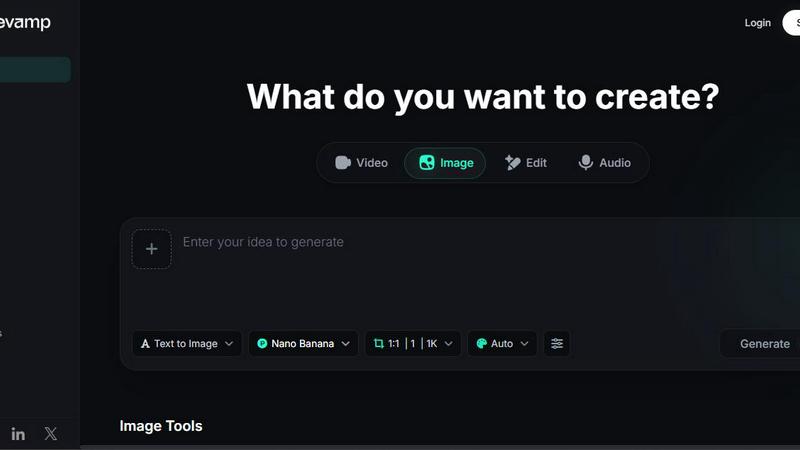
About PicRevamp
PicRevamp is a comprehensive AI-powered creative platform that brings together image generation, video creation, and audio production into one unified workspace. Instead of jumping between different tools for each creative task, you get access to industry-leading AI models all in one place. The platform supports models like Google Gemini (Nano Banana series, Imagen 3), Black Forest Labs (Flux Schnell, Flux Dev, Flux Pro), and Google DeepMind (Veo 3.1 for video). This means you can generate stunning visuals from simple text prompts, transform images into different artistic styles, create cinematic videos with native audio, and produce natural-sounding speech from text using over 5000 voices across multiple languages. PicRevamp is built for a wide audience, from social media content creators and marketers to digital artists, video producers, and anyone needing quick creative prototyping. The platform offers 30 plus artistic styles including 3D Pixar render, Ghibli, Cyberpunk, Pixel Art, Watercolor, and Ultra Realism, so you do not need to be a prompt engineering expert to get professional results. A free daily credit system makes it accessible for casual creators, while premium plans unlock higher resolutions, faster generation speeds, and advanced model access. With tools like image upscaling to 4K resolution, background removal, image expansion, and object erasing, PicRevamp covers the entire creative workflow. It is trusted by a growing global community of creators who value having a single, reliable platform for all their visual and audio content needs.
Features of PicRevamp
AI Image Generation
Generate high-quality images from text descriptions using multiple top-tier AI models. You can choose from models like Nano Banana Pro for ultra-fast high-fidelity results, Imagen 4 for pixel-perfect detail, or Flux Schnell for quick iterations. The platform supports various aspect ratios and resolutions up to 4K. With over 30 built-in artistic styles, you can create everything from photorealistic portraits to Ghibli-inspired landscapes or Cyberpunk cityscapes without needing to write complex prompts. This feature is ideal for quickly visualizing ideas, creating social media graphics, or producing unique digital art.
AI Video Generation
Create cinematic-quality videos with integrated audio using the latest video models like Veo 3.1 from Google DeepMind. You can direct your next video with AI, generating complete scenes that include both visual content and synchronized sound. The platform supports various video styles and lengths, making it suitable for short-form social media content, marketing videos, or creative storytelling projects. Video generation works from text prompts, so you can describe the scene and let the AI handle the production. This feature removes the need for expensive equipment or complex editing software.
AI Audio Generation
Convert text into natural-sounding speech using over 5000 voices across multiple languages. The platform includes the Gemini 2.5 Pro Audio model for multimodal speech-to-speech and audio intelligence generation. This is perfect for creating voiceovers for videos, generating audio narration for presentations, or producing multilingual content. The voices are realistic and expressive, with options for different tones and styles. You can also generate audio that matches the mood of your visual content, creating a cohesive multimedia experience from a single platform.
Image Editing and Enhancement Tools
A comprehensive suite of tools for refining and transforming your images. This includes an AI Image Upscaler that enlarges images up to 4K or 8K resolution without losing quality, an AI Image Unblur tool to sharpen blurry photos, and a Background Remover that instantly isolates subjects. The AI Image Expander lets you extend your canvas to different aspect ratios, while the Magic Eraser removes unwanted objects from your photos. Additional tools include AI Clothes Changer for professional wardrobe swaps, AI Background Changer to place subjects in new environments, and AI Face Swap for creative projects. These tools are designed for quick, one-click edits that save hours of manual work.
Use Cases of PicRevamp
Social Media Content Creation
Social media managers and influencers can use PicRevamp to generate consistent, high-quality visuals for posts, stories, and reels. You can create branded graphics, transform product photos into different styles, generate background music or voiceovers, and quickly edit images to fit platform-specific dimensions. The free daily credits make it easy to experiment with different looks, while the variety of artistic styles helps maintain a unique visual identity across your channels.
Marketing and Advertising Visuals
Marketers can produce professional-grade visuals for campaigns, landing pages, and promotional materials without hiring a design team. Use AI image generation to create product mockups, generate lifestyle imagery, or produce variations of ad creatives for A/B testing. The background removal and image expansion tools are particularly useful for creating consistent product photos for e-commerce listings. Video generation can produce short promotional clips with voiceovers, all from text descriptions.
Digital Art and Creative Prototyping
Artists and designers can use PicRevamp as a rapid prototyping tool to explore ideas before committing to a final piece. Generate concept art in different styles, experiment with color palettes and compositions, or create base images to refine further in other software. The platform supports high-resolution outputs suitable for printing or digital display. The variety of AI models allows you to choose between speed for quick iterations and detail for final pieces.
Video Production and Audio Narration
Video producers can streamline their workflow by generating footage, adding voiceovers, and editing visuals all within one platform. Use Veo 3.1 to create background footage for documentaries or explainer videos, then generate synchronized audio narration using the text-to-speech feature. The image tools can be used to create thumbnails, title cards, and promotional graphics. This all-in-one approach reduces the need to switch between multiple applications and speeds up the entire production pipeline.
Frequently Asked Questions
How do I get started with PicRevamp?
Getting started is simple. Visit the PicRevamp website and sign up for a free account. You will receive 10 free AI credits instantly to begin creating. No credit card is required for the free tier. Once logged in, you can choose from the image, video, audio, or edit options on the main dashboard. Select a tool, describe what you want to create, and the AI will generate your content. The platform includes templates and popular styles to help you get started quickly without needing any technical skills.
What AI models are available on PicRevamp?
PicRevamp offers access to several industry-leading AI models. For image generation and editing, you have Nano Banana Pro, Nano Banana 2, Nano Banana, Nano Banana 2 Lite, Flux Schnell, Flux Dev, and Flux Pro. For video creation, the platform uses Veo 3.1 and Gemini Omni Flash. For audio and speech, Gemini 2.5 Pro Audio is available. Each model has different strengths, such as speed, resolution, or style fidelity, allowing you to choose the best tool for your specific project. The platform clearly labels which model is being used for each task.
Can I use PicRevamp for commercial projects?
Yes, PicRevamp can be used for commercial projects depending on your subscription plan. The free tier allows you to test the platform and create content for personal use. Premium plans provide the necessary licensing and higher usage limits for commercial applications such as marketing materials, social media content for businesses, product photography, and client work. Always review the specific terms of service for your plan to understand the usage rights for generated content.
What image resolutions and video formats are supported?
PicRevamp supports a range of output resolutions to suit different needs. Images can be generated and upscaled up to 4K and even 8K resolution using the AI Image Upscaler tool. The platform supports standard aspect ratios like 1:1, 16:9, 4:3, and more. Video generation with Veo 3.1 produces cinematic-quality content. The specific resolution and format options depend on the AI model you choose and your subscription tier, with premium plans offering higher resolution outputs and faster generation speeds.
Similar to PicRevamp

Restore old photos with RestoreOldPhoto.ai: repair scratches, creases and fading, sharpen faces and details, and optionally colorize family memories.

Turn text ideas or reference images into videos through conversation, with agent-assisted prompts and a choice of video models.

Turn two portraits into a lip-synced AI rap video. Pick framing and length, get a share-ready 9:16 MP4 for TikTok and Reels.

Create and edit AI images through conversation, using text or reference images and refining results in chat.

All-in-one AI workspace to generate images, videos, and audio with multiple leading AI models.

Every key you press lights up on an on-screen keyboard, and each shortcut is named. For screen recordings, demos and learning shortcuts.

Free AI age filter: upload an adult portrait, add 10-40 years, meet your older self. No app needed.

Generate iOS and Android app icons from any image and export all platform sizes for free.