
Sprite-AI
Sprite-AI turns your words into pixel sprites instantly with no drawing skills required.
Visit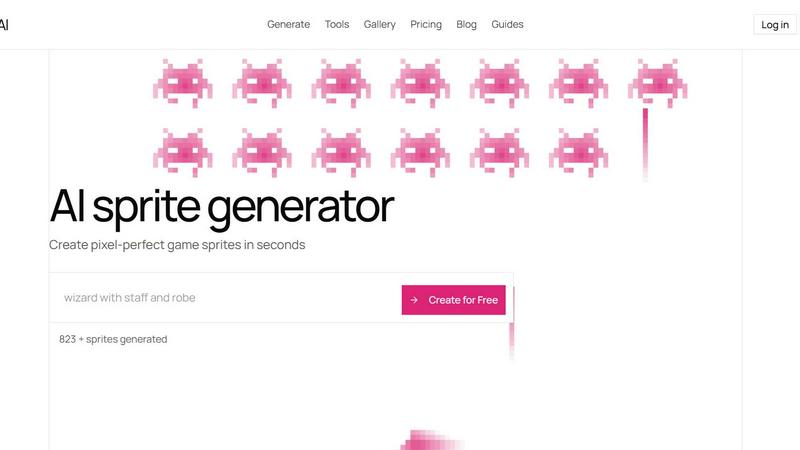
About Sprite-AI
Sprite-AI is a practical, no-nonsense tool built for anyone who needs game-ready pixel art but does not have the time or skill to draw it by hand. At its core, this is an AI-powered pixel art generator designed specifically for indie game developers, hobbyists, and prototypers who need 2D assets fast and without fuss. You describe a sprite in plain English, and the app produces a clean, game-ready pixel art image in your choice of 32 by 32, 64 by 64, or 128 by 128 pixel sizes. The output is correctly sized for the role you need, whether that is a small icon, a collectible item, a character, or a hero or boss art piece. Once a sprite is generated, a built-in pixel editor lets you paint, erase, fill, and color-pick to fine-tune every single pixel before exporting a transparent PNG that drops straight into Unity, Godot, GameMaker, or Unreal. The platform also includes a community gallery for inspiration, prompt guides to help you write better descriptions, and a token-based pricing model so you only pay for what you generate. The entire philosophy is about getting back to basics: describe it, get it, make it yours, and drop it into your game. No art skills are required, and you can start creating for free right away.
Features of Sprite-AI
AI Sprite Generator from Text
The core of the tool is a text-to-pixel-art engine that understands plain English descriptions. You type what you imagine, such as a fire-breathing dragon with red scales or a medieval knight with a sword and shield, and the AI generates a clean, game-ready sprite in seconds. You can choose from three standard sizes: 32 by 32 for icons and small items, 64 by 64 for standard characters, and 128 by 128 for hero or boss art. This feature eliminates the need for any drawing skills and turns your ideas directly into usable game assets.
Built-in Pixel Editor
After the AI generates your sprite, you are not stuck with the result. A simple but powerful pixel editor is built directly into the platform. This editor includes essential tools such as paint, erase, fill, and color-pick, allowing you to tweak colors, fix small details, and add your personal touch to every pixel. The editor is designed to feel like magic, with intuitive controls that are easy to learn, even if you have never edited pixel art before.
Game-Ready Export
Every sprite you create can be exported as a transparent PNG file that is ready to use in popular game engines. The export is optimized so your sprite drops straight into Unity, Godot, GameMaker, or Unreal without any extra conversion steps. You can download the sprite at the exact size you generated it, ensuring it fits perfectly into your game's asset pipeline. This feature saves you the headache of resizing or reformatting images after export.
Community Gallery and Prompt Guides
Sprite-AI includes a public community gallery where you can browse thousands of sprites created by other users. This gallery serves as a source of inspiration and a way to see what is possible with the tool. Additionally, the platform provides prompt guides that teach you how to write better descriptions for the AI generator. These guides cover topics like using specific adjectives, describing poses, and specifying color palettes, helping you get exactly the sprite you envision on the first try.
Use Cases of Sprite-AI
Rapid Prototyping for Game Jams
When you are participating in a game jam, time is your most limited resource. Sprite-AI lets you generate a full set of pixel art assets in minutes instead of hours. You can describe a character, an enemy, a weapon, and a background element, and have them all ready to import into your game engine before the first day of the jam is over. This speed allows you to focus on gameplay and programming rather than getting stuck on art creation.
Indie Game Development on a Budget
Small indie teams often cannot afford a dedicated pixel artist. Sprite-AI provides a cost-effective alternative by allowing you to generate professional-looking sprites yourself. You can create all the assets for your game, from icons and items to characters and bosses, without hiring an artist or spending weeks learning pixel art. The token-based pricing model means you only pay for the sprites you actually generate, keeping your development costs under control.
Creating Art for Hobby Projects
Hobbyists working on personal projects, such as fan games, mods, or small interactive stories, can use Sprite-AI to bring their ideas to life quickly. If you have a specific vision for a character or object but lack the artistic skill to draw it, you can simply describe it in plain English and get a usable sprite. The built-in editor then lets you make minor adjustments to ensure the final result matches your mental image.
Generating Placeholder Assets for Prototyping
During the early stages of game development, you often need placeholder art to test mechanics and level layouts. Sprite-AI is perfect for generating these temporary assets. You can create a rough sprite for a player character, an enemy, or a collectible item in seconds, use it to test your game logic, and then replace it with final art later. This speeds up the prototyping loop and helps you validate your game design faster.
Frequently Asked Questions
How does the AI sprite generator work?
You type a description of the sprite you want in plain English, such as "cute slime monster green and blue" or "flaming sword icon with orange glow." The AI then processes your text and generates a pixel art image based on that description. You can choose the output size from three options: 32 by 32, 64 by 64, or 128 by 128 pixels. The whole process takes only a few seconds, and you can regenerate as many times as you like until you are satisfied with the result.
Can I edit the sprites after they are generated?
Yes, every sprite you generate comes with access to a built-in pixel editor. This editor includes basic tools like paint, erase, fill, and color-pick. You can use these tools to tweak colors, fix small details, or add your own creative touches. The editor is designed to be simple and intuitive, so you do not need any prior experience with pixel art software to make effective edits.
What file formats can I export, and are they game-engine ready?
You can export your sprites as transparent PNG files. These PNGs are ready to use in popular game engines such as Unity, Godot, GameMaker, and Unreal. The export preserves the exact pixel dimensions you chose during generation, so the sprite fits directly into your game's asset pipeline without any need for resizing or conversion. You can also download SVG files on certain plans.
Is there a free way to try Sprite-AI before paying?
Yes, you can start using Sprite-AI for free by signing up on the website. The free Starter plan gives you a limited number of sprites each month so you can test the generator and the editor. If you need more sprites or additional features like private generations and SVG export, you can upgrade to a paid plan at any time. There is no risk, and you can cancel your subscription whenever you want.
Pricing of Sprite-AI
Sprite-AI offers three pricing tiers designed to fit different levels of use, from hobbyists to professional teams. All paid plans come with a cancel anytime policy. Currently, there is a launch pricing promotion offering 38 percent off the Creator and Studio plans, with 386 out of 500 spots still available. Locking in this price now ensures it stays the same forever, even after the full release.
The Starter plan costs 5 dollars per month and is designed for game jams and side projects. It includes 8 game-ready sprites every month, the ability to drop sprites straight into any game engine, and the option to share your creations in the community gallery.
The Creator plan is priced at 13 dollars per month, reduced to 8 dollars per month during the launch promotion. It is built for indie developers shipping real games. This plan includes everything in the Starter tier, plus 20 unique sprites every month, PNG and SVG export formats ready for Unity or Godot, private generations so your art stays yours, and uncensored generations. There is also a full refund guarantee if the sprites are not game-ready.
The Studio plan costs 39 dollars per month, reduced to 24 dollars per month during the launch promotion. It is intended for teams and serious production work. This plan includes everything in the Creator tier, plus 75 sprites per month for full production needs.
Similar to Sprite-AI

Create and edit AI images through conversation, using text or reference images and refining results in chat.

Clone any webpage pixel-perfect, export HTML/CSS/ZIP or React/Vue components.

Generate iOS and Android app icons from any image and export all platform sizes for free.

Free, open-source 2D CAD in Rust for precise drafting, layers, dimensions, plotting, and AI-agent automation.

Paste a URL and AI designs on-brand Open Graph images from your page's colours, fonts and logo. Free, no sign-up.

Free Online Screen Test Tool - Instantly diagnose dead pixels, lines, color issues, and flickering. Multiple test modes, no download needed.

Create and edit AI images, videos, music, and designs in one workspace, with multiple models, reusable characters, and API access.

Free ad creative hub: 1,750+ prompts behind viral AI ads, 118 hook frameworks, teardowns, swipe files and 27 free AI ad tools. Copy, remix, ship.