
retroshelf
Retroshelf automatically logs your retro handheld gaming sessions so you can track your play history and discover what the community is playing.
Visit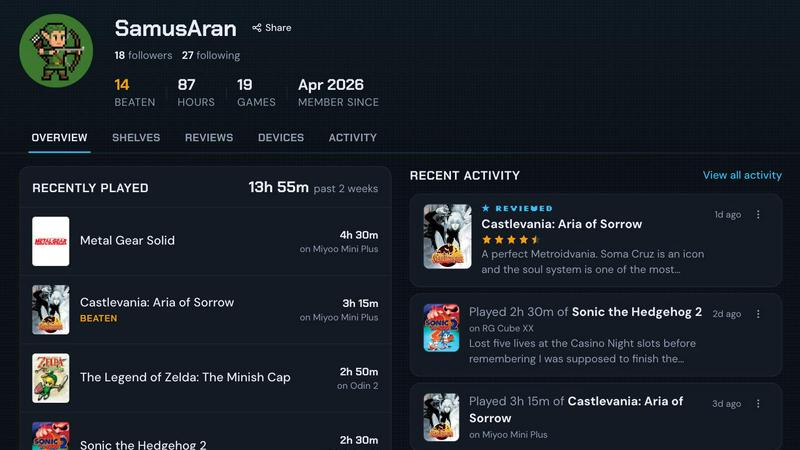
About retroshelf
retroshelf is a play-tracking and discovery app built specifically for retro handheld gaming enthusiasts. At its core, it solves a simple problem: remembering what you played, on which device, and for how long. If you own multiple retro handhelds like the Miyoo Mini, Anbernic RG series, or an Odin, you know how quickly your gaming sessions can become scattered across different devices. You might start a game on one handheld, finish it on another, and then lose track of where you left off. retroshelf fixes this by providing one central place where all your gaming history lives.
The main value proposition is automatic logging. A tiny plugin runs directly on your handheld device and captures every session as you play. It records the game title, the minutes you played, and which specific handheld you used. This happens without you having to do anything extra. You simply drop the plugin onto your SD card, link your device to your retroshelf account, and your sessions log themselves. Your shelf updates while you are still on the cushion playing.
retroshelf is for anyone who loves retro gaming and wants to see their year of play become legible. Instead of relying on spreadsheets, notes, or memory, you get a browsable timeline of what you played, where you played it, what you finished, and the notes you left along the way. It also connects you with the wider retro handheld community. You can see what other players are picking up, finishing, and replaying right now. You can browse games by device, see reviews that include the handheld they were played on, and discover new titles through real shelves rather than algorithm-driven recommendations. retroshelf turns your scattered sessions into a meaningful record of your gaming journey.
Features of retroshelf
Automatic Session Logging
The core feature of retroshelf is that your games log themselves. A lightweight plugin runs on your retro handheld and captures every session automatically. It records the game title, the exact minutes you played, and the specific handheld device you used. There is no manual entry required. You just play your games, and the plugin does the rest. This means you never have to guess how much time you spent on a particular game or which device you used for a specific session. The data is captured in real time and synced to your shelf as you play.
Public Shelf with Device Context
Every user gets a public shelf that displays their gaming activity with full device context. Your shelf shows what you are currently playing, what you have finished, what you are reviewing, and what you are replaying. Crucially, each entry includes the handheld you played it on. This means visitors to your shelf can see not just that you played a game, but that you played it on a Miyoo Mini, an Anbernic RG35XX, or an Odin 2. This device context adds a layer of meaning to your gaming history that simple lists cannot provide.
Browseable Timeline of Play
retroshelf turns scattered sessions across multiple handhelds into a single, browseable timeline. You can look back at any point in your year and see exactly what you played, when you played it, and for how long. The timeline is organized chronologically, making it easy to reflect on your gaming journey. You can see patterns in your play, identify games you abandoned, and celebrate the ones you finished. This feature transforms raw session data into a narrative of your year in retro gaming.
Community Discovery Through Real Shelves
Instead of relying on algorithms or curated lists, retroshelf lets you discover games by looking at what real players are doing. You can see which games are popular this week based on what people are picking up, finishing, and replaying. You can filter shelves by device to see what players on Miyoo, Anbernic, Odin, and other handhelds are playing. Reviews come with context too, showing star ratings alongside the handheld they were played on. This gives you a genuine sense of how a game performs on the specific hardware you care about.
Use Cases of retroshelf
Tracking Your Full Gaming Year
For anyone who plays across multiple retro handhelds, it can be hard to remember what you played six months ago. retroshelf solves this by automatically building a complete timeline of your gaming year. You can look back and see the games you started in January, the ones you finished in March, and the ones you revisited in the summer. This is useful not just for nostalgia, but for understanding your own habits. You might discover that you finish more games on one device than another, or that you tend to play certain genres on specific handhelds. retroshelf makes your year of play finally legible.
Discovering New Games Through Community Activity
If you are stuck on what to play next, retroshelf offers a way to find games based on real community activity. You can browse the popular section to see what other players are currently picking up, finishing, and replaying. This is more trustworthy than a generic top list because it reflects actual play behavior. You can also filter by device. If you own an Anbernic RG40XXV, you can see what other Anbernic players are enjoying. This helps you find games that are a good fit for your specific hardware.
Sharing Your Gaming Journey with Friends
Your public shelf becomes a way to share what you are playing with friends and the wider community. Instead of posting screenshots or writing in forums, your shelf automatically updates with your current play, finished games, and reviews. Friends can visit your shelf to see your activity, discover games you recommend, and even see the device context behind your play. This turns your personal gaming history into a social tool for connection and discovery within the retro handheld community.
Keeping Notes on Games You Play
As you play through games, you can leave notes on your sessions. These notes stay attached to the game and the device you played it on. This is useful for remembering details about a playthrough, such as which ending you got, a tricky puzzle you solved, or your overall impressions. Over time, these notes build up into a personal journal of your gaming experiences. When you look back at your timeline, the notes help you recall not just what you played, but what you thought and felt during those sessions.
Frequently Asked Questions
How does the automatic logging plugin work?
The plugin is a small piece of software that you drop onto the SD card of your supported retro handheld. It runs in the background while you play and captures each session automatically. It records the game title, the duration of the session, and the device identifier. This data is then synced to your retroshelf account when your device connects to the internet. You do not need to manually start or stop logging. The plugin is designed to be lightweight and unobtrusive, so it does not affect your gaming experience.
Which handheld operating systems are currently supported?
retroshelf currently supports muOS and OnionOS. These are two of the most popular custom firmware options for retro handhelds. Support for additional operating systems is planned as the platform grows. If you are using a device that runs muOS or OnionOS, you can start using retroshelf right away by downloading the plugin and following the setup instructions. For devices on other operating systems, you can join the beta to stay informed about future support.
What information does my public shelf show?
Your public shelf shows the games you are currently playing, have finished, are reviewing, and are replaying. Each entry includes the game title, the handheld device you played it on, and the total playtime. Your shelf also displays any notes you have chosen to make public. You have control over your privacy settings and can adjust what is visible to others. The goal is to create a meaningful record of your play that you can share with the community while maintaining your personal preferences.
How can I join the closed beta?
retroshelf is currently in closed beta, which means access is limited to a small group of users. To join, you can sign up on the retroshelf website using the join beta option. The team is opening access in small waves, starting with retro handheld players who want to help shape the community from the beginning. If you are selected, you will receive an invitation with instructions on how to set up your account and install the plugin on your device. Being part of the closed beta gives you early access and a direct voice in the development of the platform.
Explore more in this category:
Similar to retroshelf

Wery is an AI-powered virtual creative studio for entertainment content.

Snapkin is a calorie tracker you use by photographing your plate.

Adopt a virtual baby who grows, learns, and remembers you.


Anonymous Instagram viewer. Browse profiles, stories, and posts without an account or leaving a trace.

GeoRank is a relocation research tool that compares places on sunshine, cost, tax, and visa data, then lets you ask AI about your shortlist.

Caesura is a macOS menu-bar app that reminds you to drink water, stretch, rest your eyes, and breathe on science-backed intervals.

PrettyScale uses nine free AI tools running in your browser to analyze your face, body, and style with instant, private results and no account needed.