
Caesura
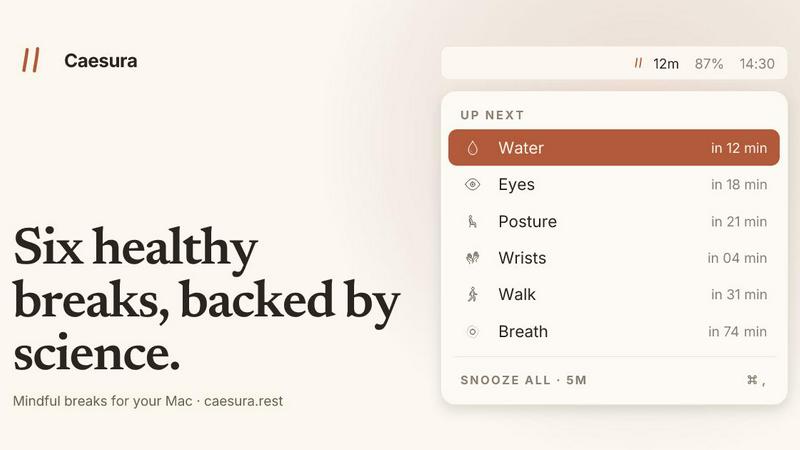
Caesura is a macOS menu-bar app that reminds you to drink water, stretch, rest your eyes, and breathe on science-backed intervals.
VisitPublished on:
June 26, 2026
Pricing:
About Caesura
Caesura is a calm macOS menu-bar break manager designed for people who spend long days at a desk. It is a focused, no-nonsense tool that reminds you to do six essential things your body needs: drink water, walk, stretch your wrists, rest your eyes, check your posture, and breathe. Each reminder operates on its own independent schedule, and those schedules are based on actual scientific research, not round numbers or arbitrary intervals. The core value proposition is simple: Caesura helps you stay healthy without breaking your focus. It achieves this through a thoughtful design that coalesces reminders that fall close together into one gentle break, so you are never interrupted twice in a row. The product respects your workflow by automatically pausing during video calls, screen sharing, fullscreen apps, and Focus modes, then picking up exactly where it left off. There are no accounts to create, no clutter, and no telemetry. It is a one-time purchase for $15, with a free 14-day trial available. Caesura is for anyone who works at a computer all day and wants simple, evidence-based nudges to maintain their physical well-being without the overhead of a complicated app.
Features of Caesura
Six Evidence-Based Breaks
Caesura tracks six distinct habits: water, walking, wrists, eyes, posture, and breath. Each break uses an interval derived from a specific scientific study, not a round number. For example, the water break fires every 45 minutes based on hydration research, while the eye break follows the 20-20-20 rule from vision science. You can turn any break off, retune its interval, or change how it appears on your screen.
Coalescing Breaks
When two reminders fall due within a minute of each other, Caesura automatically coalesces them into a single, unified prompt. This means you will never be interrupted twice in a row. If your water and posture breaks are both due, you get one gentle notification that covers both items. This feature preserves your flow and prevents the annoyance of back-to-back interruptions.
Automatic Pausing
Caesura intelligently watches your computer activity and pauses all timers when you are busy. It detects video calls, screen sharing, fullscreen apps, Do Not Disturb mode, calendar events, games, and FaceTime. The moment you enter any of these states, every timer freezes. When you finish, the timers pick up exactly where they left off. If you had 12 minutes until your water break, you still have 12 minutes after the call ends.
Three Prompt Styles
You can choose how each break appears on your screen. The overlay style takes over your entire screen until you press Return, ideal for breaks you might otherwise ignore. The banner style slides in from under the menu bar and auto-dismisses after 30 seconds. The notification style is a standard macOS notification, the lightest possible touch. You can assign a different style to each break based on your preference.
Use Cases of Caesura
The All-Day Developer
A software developer who spends eight to ten hours coding in a single session can use Caesura to maintain physical health without losing deep focus. The coalescing feature ensures that if a water break and a wrist stretch are due at the same time, only one prompt appears. The automatic pause during screen sharing means meetings never get interrupted. The developer can trust that the app will nudge them at the right moments without breaking their concentration.
The Remote Office Worker
A remote worker who spends their day in video calls, writing documents, and managing email can set Caesura to run silently in the menu bar. The app pauses automatically during Zoom or Teams calls, so there are no awkward interruptions. Between calls, the gentle banner reminders for eye rest and posture checks help prevent the physical strain that comes from sitting in one position for hours. The worker can customize which breaks matter most and which prompt style feels least intrusive.
The Creative Professional
A graphic designer or video editor who works in fullscreen applications like Photoshop or Final Cut Pro can rely on Caesura to pause entirely when those apps are active. When they switch to a browser or email, the timers resume. This prevents break reminders from popping up during intense creative work while still ensuring the user takes care of their body during downtime. The evidence-based intervals help prevent repetitive strain injuries common in creative fields.
The Health-Conscious Student
A university student who spends long hours studying, writing papers, and attending online lectures can use Caesura to build healthy habits early. The app provides simple, science-backed reminders to drink water, move around, and rest their eyes. The breathing break, with its guided inhale and exhale timer, helps manage stress during exam periods. The student can try the app free for 14 days to see if it fits their routine before making a one-time purchase.
Frequently Asked Questions
How does Caesura know when I am on a call?
Caesura watches your camera, screen sharing status, calendar events, and which app owns the screen. It detects common video call apps, screen recording tools, and fullscreen applications. When any of these are active, all timers freeze. The app also respects Do Not Disturb and Focus modes built into macOS. It does not record or transmit any data about your activity.
Can I customize the interval for each break?
Yes, you can turn any break off entirely, change its interval to any duration you prefer, or adjust how it appears on your screen. The default intervals come from scientific studies, but you have full control to tune them to your personal needs. For example, you can set the water reminder to every 30 minutes instead of 45, or change the eye break from a full overlay to a simple notification.
Is Caesura a subscription or a one-time purchase?
Caesura is a one-time purchase for $15. There are no subscriptions, no recurring fees, and no accounts to create. You can try the app free for 14 days before buying. The purchase is tied to your Apple ID and works on your Mac. There is no telemetry, no data collection, and no card required for the trial.
What happens if I miss a break reminder?
If you dismiss a break reminder or let a banner auto-dismiss, the timer for that break simply resets and starts counting down to the next interval. Caesura does not punish you for skipping a break. The goal is gentle, timely nudges that help you build habits over time, not guilt or pressure. You can also choose the overlay style for breaks you tend to ignore, as it requires you to press Return to dismiss it.
Similar to Caesura

Visual financial timelines for couples and young professionals: model cash flow, life events, and shared goals.

The #1 Native Form Builder Plugin for Framer - No Code, No Embeds, No External Platforms.

Practical, independent guides to home repairs, maintenance, costs, troubleshooting, and everyday fixes.

Adopt a virtual baby who grows, learns, and remembers you.


Highlight faster. Study in flow with custom shortcuts and a workflow built around you. Print smarter, or turn any page into a tiled poster.

