
Inkfox AI
Generate unlimited AI images for free with no sign-up, turning simple prompts into ads, product shots, and social visuals.
Visit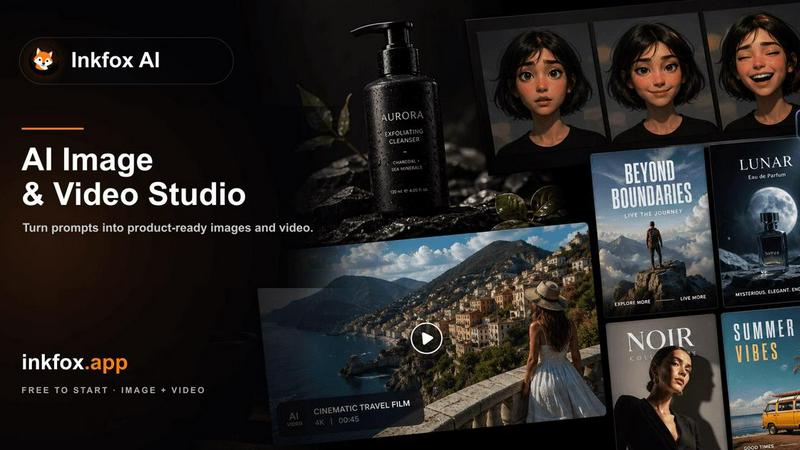
About Inkfox AI
Inkfox AI is a free, unlimited AI image and video generator that removes all the usual barriers to entry. There is no requirement to create an account, sign up, or provide any personal information. You can start generating visuals immediately from a simple text description. The platform is designed for anyone who needs quick, accessible, and instant visual content without the friction of a login process. This includes marketers, small business owners, social media managers, content creators, and hobbyists. The core value proposition is straightforward: think it, and ink it. You describe the image you want, and Inkfox AI generates it for free, as many times as you need. The platform supports a variety of advanced AI models, including Nano Banana 2.0, GPT Image 2.0, Flux, and Seedream, allowing users to choose the best engine for their specific task. Beyond basic text-to-image generation, Inkfox AI provides a complete workspace for creating ad creatives, product shots, social visuals, and more. It also supports image-to-image editing, background removal, image upscaling, and video generation from text or images. The goal is to provide a fundamental, no-cost tool that empowers users to turn their ideas into visual assets for any channel, from ecommerce listings to social media posts.
Features of Inkfox AI
Free Unlimited Generations with No Login
The most fundamental feature of Inkfox AI is that it is completely free and requires no sign-up or login. Users can generate an unlimited number of images and videos without ever creating an account. This removes the primary barrier to entry for AI image generation, making the tool instantly accessible to anyone with a browser. The platform operates on a simple model: you provide a prompt, and it generates the result. This approach is ideal for quick brainstorming, rapid prototyping of visual ideas, or for users who are hesitant to commit to a new platform. Guest results are stored locally in the browser, and users can choose to sign in later to save their work and remove watermarks.
Multi-Model Support for Diverse Outputs
Inkfox AI is not limited to a single AI model. The platform provides access to multiple advanced models, including Nano Banana 2.0, GPT Image 2.0, Flux, and Seedream. Each model has its own strengths, from photorealistic rendering to creative artistic styles. This allows users to experiment and choose the best engine for their specific use case. For example, one model might be better for generating product photos, while another excels at creating cinematic concept art. This flexibility ensures that users are not locked into a single output style and can achieve higher quality results by selecting the right tool for the job.
Comprehensive Image and Video Generation
Beyond basic text-to-image creation, Inkfox AI offers a full suite of visual generation tools. Users can generate videos from text prompts or from existing images. The platform also supports image-to-image editing, allowing users to upload a reference image and describe changes to the scene, background, or angle. Additional features include background removal and image upscaling. This makes Inkfox AI a one-stop workspace for creating and refining visual assets. Instead of using separate tools for each task, users can start with a text prompt, generate a draft, edit it with a reference image, and upscale the final result, all within the same free platform.
Structured Prompting and Visual Presets
To help users get better results, Inkfox AI provides a structured approach to prompting. The platform encourages users to think about the subject, use case, style, and control elements like aspect ratio, lighting, and composition. This back-to-basics framework helps turn vague ideas into strong, specific prompts. The platform also includes a library of use case presets, such as product photo, cinematic, 3D render, and logo directions. These presets automatically apply the best settings for a given visual goal, making it easy for beginners to produce professional-looking results without deep technical knowledge.
Use Cases of Inkfox AI
Creating Ad Creatives and Social Media Visuals
Marketers and social media managers can use Inkfox AI to rapidly generate a variety of ad creatives and social posts. By starting with a simple prompt and using the platform's presets for Meta ads, banners, or social posts, users can produce multiple campaign-ready visual angles in seconds. The ability to generate unlimited drafts for free allows for extensive A/B testing of different visuals without any budget constraints. This use case is perfect for quickly iterating on visual concepts for product launches, seasonal promotions, or daily social media content.
Generating Ecommerce Product Photos
Small business owners and ecommerce sellers can use Inkfox AI to create professional product photos for listings on Shopify, Amazon, or other online marketplaces. The image-to-image feature is particularly useful here. Users can upload a simple photo of their product and then describe the desired scene, background, and lighting. For example, a user could upload a picture of a sneaker and generate a version set on a sports field or a clean white background. This eliminates the need for expensive photoshoots and allows for the creation of consistent, high-quality product imagery for an entire catalog.
Developing Concept Art and Moodboards
Artists, designers, and creative professionals can use Inkfox AI as a rapid ideation tool for concept art and moodboards. The platform's text-to-image capability allows users to quickly visualize abstract ideas, explore different artistic styles, and generate a wide range of visual references. By using different AI models like Seedream or Flux, users can experiment with various aesthetics, from photorealistic environments to anime-inspired characters. This accelerates the initial creative phase, providing a wealth of visual inspiration that can be refined and developed further in other tools.
Producing Educational and Informational Graphics
Educators, bloggers, and content creators can use Inkfox AI to generate custom visuals for articles, presentations, and infographics. The platform can create diagrams, illustrations, and thematic images that explain complex topics. For example, a user could generate a "Hanfu structure infographic" or a "car tuning blueprint" to accompany a written guide. The ability to generate images without a login makes it an excellent tool for teachers and students who need quick, royalty-free visuals for classroom projects or online learning materials.
Frequently Asked Questions
Is Inkfox AI really free and unlimited?
Yes, Inkfox AI is completely free to use with no limits on the number of images or videos you can generate. There are no hidden costs, credit systems, or subscription fees. The core functionality, including the base AI model, is available to everyone without any payment. You can generate as many visuals as you need for your projects.
Do I need to create an account or sign up to use it?
No, you do not need to create an account or sign up to use Inkfox AI. You can start generating images immediately by visiting the website and typing a prompt. The platform is designed to be instantly accessible without any personal information. You can optionally sign in later to save your generated images and remove watermarks, but this is not required to use the generator.
What AI models does Inkfox AI support?
Inkfox AI supports several advanced AI models for image and video generation. These include Nano Banana 2.0, GPT Image 2.0, Flux, and Seedream. The platform also offers models for video generation like Seedance 2.0. You can choose the model that best fits your desired output style, whether it is photorealistic, artistic, or something in between.
How can I improve the quality of my generated images?
To get better results, use the structured prompting approach recommended by Inkfox AI. Clearly define the subject of your image, its intended use case (like an ad or product photo), the desired style (photoreal, cinematic, anime), and any controls like aspect ratio and lighting. Using a reference image with the image-to-image feature can also significantly improve the relevance and quality of the output.
Pricing of Inkfox AI
There is no pricing information available for Inkfox AI. The platform is described as a free, unlimited AI image generator with no sign-up required. No paid plans, tiers, or costs are mentioned in the provided context.
Similar to Inkfox AI

Explore open-source creative software by workflow, platform and development stage, with comparisons and official project links.

Create and edit AI images through conversation, using text or reference images and refining results in chat.

Clone any webpage pixel-perfect, export HTML/CSS/ZIP or React/Vue components.

Generate iOS and Android app icons from any image and export all platform sizes for free.

Free, open-source 2D CAD in Rust for precise drafting, layers, dimensions, plotting, and AI-agent automation.

Paste a URL and AI designs on-brand Open Graph images from your page's colours, fonts and logo. Free, no sign-up.

Free Online Screen Test Tool - Instantly diagnose dead pixels, lines, color issues, and flickering. Multiple test modes, no download needed.

Create and edit AI images, videos, music, and designs in one workspace, with multiple models, reusable characters, and API access.