
xyOps
xyOps is a workflow automation system that lets you schedule, monitor, and respond to events across your entire infrastructure from one place.
Visit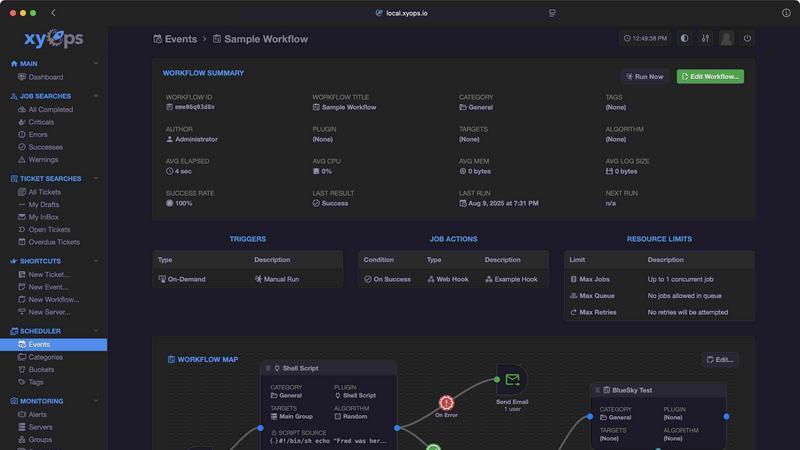
About xyOps
xyOps is a next-generation system that combines job scheduling, workflow automation, server monitoring, alerting, and incident response into a single platform. It is designed for developers and operations teams who want full control over their automation stack without sacrificing data privacy, operational freedom, or visibility into their systems. Unlike many modern tools, xyOps does not hide features behind paywalls or push telemetry data back to external servers. It is open, extensible, and built to run anywhere you need it.
At its core, xyOps helps you orchestrate your entire infrastructure. You can schedule jobs across a fleet of servers, track performance in real time, set up smart alerts, and manage incidents with a built-in ticketing system. The platform supports visual workflow building, flexible job scheduling with cron-like capabilities, and active job tracking with progress updates and resource limits. You can monitor CPU, memory, network, disk, and logs at the server or group level, and define custom monitors and alerts that trigger actions like email notifications, webhooks, or automated job launches.
xyOps is built for scale. Whether you manage five servers or five thousand, the platform adapts to your needs with hot backups, failover support, and easy agent installation on macOS, Linux, and Windows. The system is 100% free and open source under the BSD 3-Clause license, which means it will always remain free and unrestricted. Professional and enterprise support plans are available separately, but all current and future app features remain open source forever. This fundamental approach gives you complete ownership of your automation stack without vendor lock-in or hidden costs.
Features of xyOps
Visual Workflow Builder
The graphical workflow editor lets you connect events, triggers, actions, and monitors into meaningful pipelines. You can chain multiple jobs with conditional logic, pass data and files between workflow steps, and assign actions like notifications or webhooks to specific events. The builder also supports limiters such as timeouts, memory caps, and log size caps. You can run jobs in parallel or create custom queues to control execution order and resource usage across your entire infrastructure.
Flexible Job Scheduler
xyOps brings superpowers to job scheduling, going far beyond traditional cron. You can target individual servers or groups, set multiple schedules per event, and define blackout ranges for holidays or planned downtime. The scheduler supports crontab import for easy migration from existing systems, one-time jobs for single-shot tasks, and plugin-based scheduler extensions for custom scheduling logic. This flexibility ensures you can automate any recurring or ad-hoc task with precision and control.
Active Job Tracking
Run any number of jobs in parallel with optional max parallel limits that queue up remaining tasks. The system provides real-time progress updates along with estimated time remaining for each job. You can enforce resource limits such as CPU and memory usage per job, and your jobs can emit their own progress and stats for granular visibility. Custom actions can be triggered based on job results, allowing you to automate responses to success, failure, or partial completion.
Smart Alerts
Rich alerting capabilities include trigger expressions with flexible rules for complex conditions. Notifications can be sent via email, webhook, or custom notification channels. Every alert includes a snapshot of the server at the time of the event, giving you immediate context. Alerts can automatically create tickets or launch jobs for remediation. Active alerts can also prevent new jobs from launching, providing a safety net that stops cascading failures before they spread.
Use Cases of xyOps
Automated Incident Response
When a server monitor detects high CPU usage or a critical log entry, xyOps can automatically create a ticket in the built-in ticketing system and launch a remediation job. The system captures a server snapshot at the moment of the alert, giving your team immediate context. This automated response reduces mean time to resolution and ensures no incident goes unnoticed, even outside of business hours.
Scheduled Data Backups Across a Fleet
Use the flexible job scheduler to run nightly backups across hundreds of servers. Target groups of servers by hostname or custom labels, set multiple schedules for different backup types, and use blackout ranges to exclude holidays or maintenance windows. The active job tracking feature shows real-time progress and enforces resource limits so backup jobs do not overload your production systems.
CI/CD Pipeline Orchestration
Connect your version control system, build servers, and deployment targets using the visual workflow builder. Chain jobs with conditional logic so that successful builds automatically trigger deployment jobs, while failed builds create tickets and send notifications. Pass artifacts and configuration files between workflow steps. The integrated ticketing system can track deployment history and link to specific commits or build artifacts.
Multi-Server Performance Monitoring
Define custom monitors for CPU, memory, network, disk, and log tracking across all servers in your fleet. Group servers manually or automatically based on hostname patterns. Historical performance graphs from hourly to yearly views help you identify trends and capacity needs. Alerts can be configured to notify your team when metrics exceed thresholds, with the ability to create tickets or launch automated scaling jobs.
Frequently Asked Questions
What is the licensing model for xyOps?
xyOps is 100% free and open source under the BSD 3-Clause license, and it always will be. The license will never be modified, split, or amended with additional restrictive terms. No new code or contributions will ever be accepted under a non-OSI-approved license. All current and future app features remain open source forever. Professional and enterprise support plans are available separately for organizations that need dedicated assistance.
How does xyOps handle scalability and redundancy?
xyOps supports running multiple hot backups that can take over immediately on power loss without interrupting any running jobs. The system scales to thousands of worker servers in your cluster. Servers can be grouped manually or automatically based on hostname patterns. Agents can be easily installed on macOS, Linux, and Windows operating systems, making it simple to add new servers to your fleet as your infrastructure grows.
Can I write custom plugins for xyOps?
Yes, xyOps uses a simple JSON over STDIO Plugin API that requires no SDK and supports all programming languages. You can define custom parameters with UI form fields for easy configuration. The plugin system supports multiple types including Event, Action, Monitor, and Trigger plugins. You can also easily add MCP servers as plugins and publish your own plugins to the Plugin Marketplace for others to use.
What monitoring capabilities does xyOps provide?
xyOps offers server and group-level dashboards with built-in tracking for CPU, memory, network, disk, and logs per job. You can add your own custom monitors and alerts, and run custom commands to grab custom metrics. Historical performance graphs are available from hourly to yearly views. Alerts include a snapshot of the server at the time of the event and can automatically create tickets or run jobs for automated remediation.
Pricing of xyOps
xyOps is 100% free and open source under the BSD 3-Clause license. All current and future app features are open source forever with no paywalls or hidden costs. Professional and enterprise support plans are available separately for organizations that require dedicated assistance, but the core platform and all its features remain completely free.
Similar to xyOps

Plan and review LinkedIn prospecting, outreach flows, post previews, and campaign progress in one workspace.


An independent directory of 146 AI tools. Every listing was paid for, set up and used on real work. Nobody can buy a place or a score.

A curated directory of SaaS growth tools. Every listing is screened and scored before it goes live — no pay-to-rank, no filler.

ools Network is a curated directory of the best AI tools across 25+ categories. Compare ratings, pricing, and features to find the right one, fast.


Done-for-You SaaS Visibility for Search & AI | UseWok

Schedule and publish social content across 10 platforms with one dashboard, API, and MCP built for teams and AI agents.