
URL to Any
URL to Any is a free toolkit that converts any webpage into formats like PDF, Markdown, and images.
Visit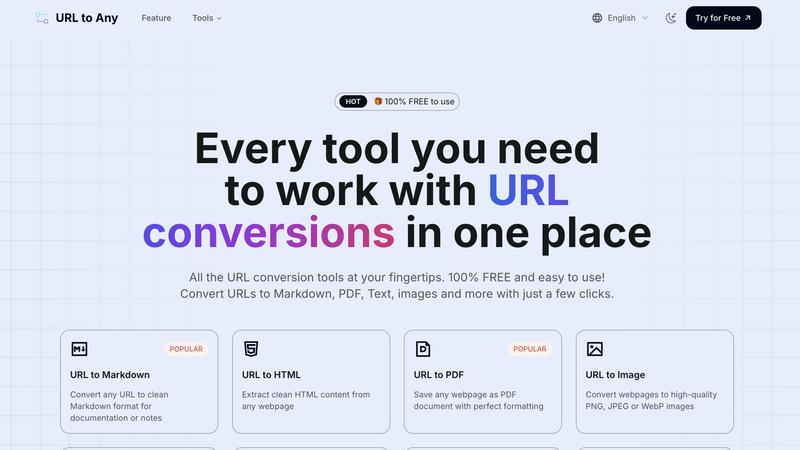
About URL to Any
URL to Any is a comprehensive, web-based toolkit designed to solve a fundamental digital task: converting the content of any webpage into a different, more usable format. At its core, it transforms a simple web address (URL) into a wide array of outputs like Markdown documents, PDF files, images, plain text, and structured data formats such as JSON and XML. This process is built for simplicity and speed, requiring no software installation, account registration, or technical expertise. Users simply paste a URL, select their desired format, and receive a converted result within seconds.
This tool is built for a wide audience. Students can save online articles as clean PDFs for offline study. Content creators and bloggers can convert web research into Markdown for easy integration into their own work. Developers can extract structured data (JSON/XML) from websites for projects. Professionals can generate QR codes for presentations or capture webpage screenshots for reports. The primary value proposition is consolidation and accessibility. Instead of searching for and learning multiple specialized tools, URL to Any provides a single, free platform that handles numerous conversion needs with a consistent, straightforward interface. It emphasizes utility, privacy by not storing processed data, and efficiency, making it an essential asset for anyone who regularly works with or archives information from the web.
Features of URL to Any
Multi-Format Conversion Engine
The platform's central feature is its ability to convert a single URL into over ten different formats. This includes practical document types like PDF and Markdown, visual outputs like PNG or WebP images, machine-readable formats like JSON and XML, and even audio via MP3 conversion. This versatility ensures that regardless of your project requirements—whether for archiving, content creation, development, or sharing—there is a suitable output format available directly within the same tool.
Intuitive, No-Login Interface
URL to Any is designed with a fundamental commitment to ease of use. The interface is clean and task-oriented, guiding users through a simple three-step process: paste, select, convert. Crucially, it requires no user registration or login, removing a significant barrier to entry. This design philosophy ensures that anyone can start using the tool immediately without committing personal information or remembering passwords, focusing purely on the utility of the conversion task.
Secure Cloud Processing
All conversion processes are handled securely in the cloud. This means users do not need to download or install any software, and the tool is accessible from any device with a web browser. The service emphasizes privacy by stating that your data and the content of converted URLs are not stored on their servers after processing. This cloud-based approach also enables the "lightning fast" conversions, as the processing leverages optimized server-side engines.
Advanced Extraction Tools
Beyond basic format conversion, URL to Any includes specialized tools for web development and SEO analysis. Features like the Meta Tags Extractor and Heading Extractor allow users to analyze a website's SEO structure, Open Graph, and Twitter Card data. The URL Extractor tool can crawl a site and provide a complete list of all URLs in TXT or CSV format. These utilities provide deeper insights and data gathering capabilities from webpages, extending the tool's usefulness beyond simple format translation.
Use Cases of URL to Any
Academic Research and Study
Students and researchers can use URL to Any to efficiently save online journals, articles, and reference materials. Converting a lengthy article to a well-formatted PDF or extracting just the pure text allows for offline reading, highlighting, and annotation without the distractions of website ads or layouts. This creates a clean, portable library of research materials directly from web sources.
Content Creation and Blogging
Writers, bloggers, and digital marketers can streamline their workflow by converting source material from the web into Markdown format. This is ideal for drafting posts, as Markdown cleanly captures headings, lists, and links from the original page, making it easy to quote, reference, or repurpose content while maintaining proper formatting within their own content management systems.
Web Development and Data Projects
Developers can utilize the tool to extract structured data from websites. Converting a webpage to JSON or XML format provides a machine-readable data snapshot that can be used for prototyping, testing APIs, or analyzing site structure. The URL Extractor is also valuable for tasks like building sitemaps or auditing all links on a given domain.
Professional Reporting and Presentations
Professionals needing to reference web content in reports or meetings can quickly generate high-quality screenshots (images) of webpages or save dynamic content as static PDF documents to ensure consistent formatting. Furthermore, generating a QR code for a relevant URL with the built-in tool makes it easy to share links directly within presentation slides or printed materials.
Frequently Asked Questions
Is URL to Any really free to use?
Yes, URL to Any is 100% free to use. The platform states clearly that every conversion tool is available without any cost, registration, or hidden fees. You can convert URLs to Markdown, PDF, images, and all other listed formats as many times as you need without encountering paywalls or subscription plans.
What happens to the data from the URLs I convert?
According to the provided information, your data is processed securely and is never stored on their servers. The conversion happens in real-time through their cloud processing engine. Once the conversion is complete and you have downloaded or copied your result, the data from your session is not retained, prioritizing user privacy.
What formats can I convert a URL into?
URL to Any supports a wide range of output formats. The most popular include Markdown, PDF, HTML, and high-quality images (PNG, JPEG, WebP). It also supports text extraction, JSON, XML, MP3 audio, and QR code generation. Additionally, it offers utility tools for encoding/decoding text and extracting meta tags or headings from URLs.
Do I need to install any software or browser extension?
No software installation is required to use the main website tools; everything runs in your web browser. However, the service does offer an optional browser extension for even quicker access. Using the core conversion features is completely web-based and does not depend on having the extension installed.
Similar to URL to Any

Apps and files on an infinite canvas where people and AI agents work together.

Signage and kiosk infrastructure for AI agents. Your agent publishes images, video, streams, web pages and apps to screens via one plugin.screenRIG is

Free YouTube transcripts on the web, a Chrome extension, and an API + MCP server so AI assistants can read YouTube.

Soul Cinema is a cinematic AI image generator that turns a written shot into a film-grade still, with cinematographer lighting, Soul ID character cons

High-performance custom PHP websites, ecommerce stores, and AI discovery infrastructure that make your site readable by AI.


Turn any image into editable layers with AI
