
ReserveGauge
ReserveGauge is a native macOS app that forecasts your Claude Code and Codex usage from real history so you know if you will make it to reset.
Visit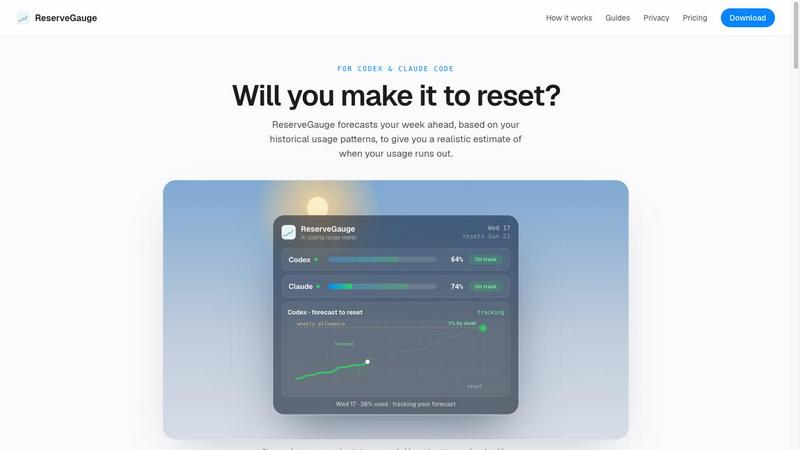
About ReserveGauge
ReserveGauge is a native macOS menu bar application designed specifically for developers who use AI coding tools like Claude Code and Codex. At its core, this tool answers a simple but critical question: at your current pace of usage, will you make it to the next reset before running out of your allowance? It reads live usage data directly from your Mac, showing you exactly where you stand with both your 5-hour and weekly limits. The application tracks your historical usage patterns, displays reset countdowns, and shows recent activity history alongside live activity states for your AI agents. What makes ReserveGauge fundamentally different from other monitoring tools is its commitment to privacy and local data storage. Your usage history stays entirely on your Mac, with no account required and no usage telemetry sent anywhere. The free tier gives you live gauges, current usage percentages, reset timing, and daily history. The Pro tier, available for a one-time payment, adds sophisticated forecasting capabilities that project whether your current pace will exhaust your allowance before the reset. This tool is built for developers who want to plan their coding sessions intelligently, avoid the frustration of hitting limits mid-task, and make informed decisions about when to start a new session.
Features of ReserveGauge
Live Usage Gauges
ReserveGauge provides real-time visual gauges for both Claude Code and Codex directly in your macOS menu bar. You can see your current usage percentage for both 5-hour and weekly limits at a single glance. The gauges update live as you work, showing you exactly how much of your allowance remains. This feature eliminates the need to check provider dashboards or guess where you stand, giving you immediate awareness of your consumption throughout the day.
Forecast Engine
The Pro tier includes a sophisticated forecasting engine that analyzes your historical usage patterns to project your consumption through the rest of the current period. It accounts for your daily rhythm, hours when you are typically inactive, and recent spikes in activity. This means the projection adapts to how you actually work rather than assuming a flat rate of consumption. The forecast shows whether your current pace will land you on target, under, or over your limit before the reset.
What-If Scenarios
Pro users can explore what-if scenarios to plan their coding sessions more effectively. You can adjust variables like effort level, model selection, and Fast Mode usage to see how different approaches would affect your remaining allowance. This feature transforms the tool from a passive monitor into an active planning assistant, helping you decide whether to start a heavy coding session or wait until after the reset.
Live Activity Monitoring
ReserveGauge shows a live menu bar dot that indicates when Claude Code and Codex are actively running on your machine. It displays how many instances are currently active and changes color to green when they finish. This gives you immediate visibility into what your AI agents are doing without leaving your current workflow. The feature helps you understand your usage patterns in real time and correlates activity with consumption.
Use Cases of ReserveGauge
Planning a Heavy Coding Session
Before diving into a complex coding task that requires extensive AI assistance, a developer can check ReserveGauge to see if they have enough allowance remaining. The forecast tool shows whether the current pace will exhaust the limit before reset, allowing the developer to decide if they should proceed now or schedule the work for after the reset. This prevents the frustration of being interrupted mid-task when a limit is hit.
Monitoring Multiple AI Tools
Developers who use both Claude Code and Codex can track both allowances simultaneously in one place. ReserveGauge shows live gauges for both providers, along with reset countdowns and usage history. This eliminates the need to switch between different provider dashboards or remember separate limits, streamlining the workflow for developers who leverage multiple AI coding assistants.
Budgeting Overage Costs
For developers on plans that charge for overage usage, ReserveGauge helps track actual spend beyond the included allowance. The Pro tier includes overage budget tracking and smart notifications that alert users when they are approaching their spending threshold. This allows developers to stay within budget constraints while still getting maximum value from their AI coding tools.
Understanding Usage Patterns
By reviewing the daily usage history and week-over-week trends displayed in ReserveGauge, developers can gain insights into their own work patterns. They can see which days they use the most AI assistance, how their consumption correlates with project phases, and whether their usage is trending up or down over time. This self-awareness helps developers optimize their workflow and plan more effectively.
Frequently Asked Questions
Does ReserveGauge require an account or send my data anywhere?
No. ReserveGauge is designed with privacy as a fundamental principle. It reads usage limits directly from the provider APIs using the login already on your Mac. All usage history is computed and stored locally on your machine. ReserveGauge does not require an account, does not receive any usage data, and sends no usage telemetry. Provider credentials go only to that provider.
Which AI coding tools does ReserveGauge currently support?
ReserveGauge currently supports Claude Code, Codex, Grok, and GitHub Copilot with live monitoring. Support for Cursor is coming soon. The application tracks usage for the CLI and IDE coding agents, not the web chat apps like claude.ai or ChatGPT. For Claude Code, it works with Team and Enterprise plans by tracking your personal Code allocation.
What is the difference between the Free and Pro versions?
The Free version provides live gauges showing current usage percentages, reset countdowns, daily usage history, and overage spend. The Pro version, available for a one-time payment of 12.99 pounds, adds the forecasting engine that projects whether you will run out before reset, what-if scenarios, run-out time estimates, headroom analysis, week-over-week trends, and overage budget tracking. Pro includes a 14-day free trial.
What are the system requirements for ReserveGauge?
ReserveGauge requires macOS 14 or later and runs on Apple Silicon Macs. The application is approximately 3MB in size and is notarized by Apple. It is designed as a native macOS menu bar app that launches at startup and runs quietly in the background, reading usage data from your local machine without interfering with your work.
Pricing of ReserveGauge
ReserveGauge offers two pricing tiers. The Free version is available at no cost and includes live Codex and Claude gauges showing 5-hour and weekly usage, usage percentages, reset countdowns and status, Codex banked resets with expiration dates, daily usage history with real overage spend, menu bar integration, launch at login, and demo mode. The Pro version is available for a one-time payment of 12.99 pounds (approximately 16 dollars) and includes the complete forecasting engine with 14-day free trial, run-out time estimates with history-calibrated projection, what-if scenarios for effort, model, and Fast Mode, headroom and week-over-week trends, overage budget tracking with smart notifications, spike-aware forecasting that adapts to recent usage, and free updates for every new provider added. The Pro license covers use on two Macs, such as a laptop and desktop. A 14-day refund is available if the product is not suitable. Payment is billed in your local currency.
Explore more in this category:
Similar to ReserveGauge

AI Email Filter sorts incoming mail into folders using plain-language prompts you write. Works with any IMAP mailbox; bring your own LLM if you want.

No-code 2D game editor: visual node logic, drag-and-drop scenes, live preview. Exports to Windows, macOS, Linux, Android, iOS, Web.

A free launch checklist for SaaS, apps, AI tools and more. Every step says why it matters and when you can skip it.

Free collection of online developer utilities, code formatters, and digital converters designed to streamline your daily workflow.

Visual financial timelines for couples and young professionals: model cash flow, life events, and shared goals.

SnitchFeed is an agentic social listening tool that surfaces high-intent conversations on LinkedIn, X, Hackernews, and more for GTM and product teams.


The #1 Native Form Builder Plugin for Framer - No Code, No Embeds, No External Platforms.