
ProspectBuddy
ProspectBuddy is a manual LinkedIn tool that safely captures and exports leads directly to your CRM in one click.
Visit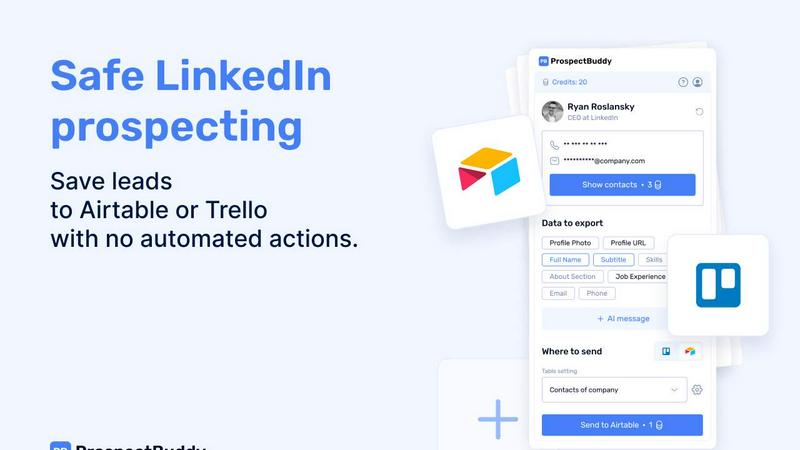
About ProspectBuddy
ProspectBuddy is a fundamental tool designed to bring order and efficiency to the essential task of LinkedIn prospecting. At its core, it is a simple browser extension that allows you to save LinkedIn profile information directly into your Airtable base or Trello board with a single click. This process eliminates the foundational but highly inefficient and error-prone method of manual copy-pasting, which often leads to inconsistent and messy data. The product is built for sales professionals, recruiters, founders, and operators who rely on manual, relationship-based outreach and need a safe, compliant way to manage their pipeline. Its primary value proposition is control: unlike automation tools that act on your behalf, ProspectBuddy puts you in the driver's seat. You visit profiles, you choose the data, and you decide when to save it, ensuring your LinkedIn activity remains within platform guidelines. By transforming unstructured profile data into clean, structured records in the tools you already use, ProspectBuddy turns prospecting from a chaotic chore into a streamlined, organized workflow, saving significant time and improving data quality from the very first interaction.
Features of ProspectBuddy
One-Click Save to Airtable or Trello
This is the foundational feature of ProspectBuddy. With the extension installed, you can parse any LinkedIn profile and send selected data directly to your connected Airtable base or Trello board in one action. This bypasses the entire manual process of switching tabs, copying text field by field, and pasting it into your database, which is slow and prone to mistakes. It ensures that every lead or candidate is captured instantly as a consistent, structured record, forming a reliable foundation for your outreach or hiring pipeline.
Manual, Compliance-First Prospecting
ProspectBuddy is intentionally designed without automation bots or bulk scraping functions. It operates on a principle of manual control, where you, the user, initiate every action. This approach is fundamental for maintaining safety and compliance with LinkedIn's Terms of Service. You manually visit profiles and manually click to save data, which significantly reduces the risk of account restrictions compared to tools that automate profile visits or connection requests, making it a sustainable choice for long-term professional networking.
Verified Contact Enrichment
Beyond basic profile data, ProspectBuddy helps you find verified business email addresses and direct phone numbers associated with a LinkedIn profile. This feature saves the extensive time typically spent on external searches or guesswork. For B2B users who provide a business email, phone number discovery is also available. This enrichment is performed on-demand, giving you the crucial contact details needed for personalized outreach without leaving your prospecting workflow.
AI-Personalized Message Generation
Leveraging the profile data you capture, ProspectBuddy can generate tailored outreach messages in seconds. This feature uses AI to create a personalized draft based on the individual's job experience, skills, or "About" section. It provides a strong, relevant starting point for your communication, helping to increase engagement rates while still requiring your personal review and final edit, keeping the human touch fundamental to effective prospecting.
Use Cases of ProspectBuddy
Sales Teams Building Lead Lists
Sales development representatives and account executives can use ProspectBuddy to efficiently build targeted lead lists from LinkedIn. As they research prospects in their ideal customer profile, they can instantly save full profiles—including enriched email and phone data—into a shared Airtable base. This creates a clean, unified source of truth for the entire team to use for outreach campaigns, ensuring everyone works from accurate and complete information.
Recruiters Managing Candidate Pipelines
Recruiters sourcing candidates on LinkedIn can streamline their process by saving promising profiles directly to a Trello board configured as a hiring pipeline. Each candidate becomes a structured card with their profile details, moving seamlessly through stages like "Contacted," "Interviewed," and "Offered." This eliminates administrative clutter and keeps all candidate information organized and accessible in one central, visual platform.
Founders and Solopreneurs Networking
Founders, consultants, and solo entrepreneurs who wear multiple hats can use ProspectBuddy to manage their networking and partnership outreach without complex software. They can save potential partners, clients, or investors to a simple Airtable base or Trello board, keeping track of conversations and follow-ups. The one-click save function respects their limited time while helping them build and maintain a professional network systematically.
Operators Ensuring Data Consistency
Operations managers or sales ops professionals tasked with maintaining clean CRM data can implement ProspectBuddy to enforce data entry standards. By providing the team with a tool that captures specific, mapped fields every time, they eliminate inconsistent manual entry. This results in higher quality data for reporting, analytics, and automated email campaigns, which is foundational for making informed business decisions.
Frequently Asked Questions
How do I connect ProspectBuddy to Airtable?
Connecting to Airtable is a straightforward process. Within the ProspectBuddy extension, navigate to the Connect screen or your Profile page and select the Airtable option. You will be prompted to select the specific bases or workspaces you wish to grant access to. After clicking "Grant access," the connection is established. You can verify the status on your Profile page and disconnect at any time. This simple setup requires no technical expertise.
Is ProspectBuddy safe to use with LinkedIn?
Yes, ProspectBuddy is built with safety and compliance as a core principle. It does not automate any actions on LinkedIn, such as viewing profiles or sending connection requests. You remain in full control, manually navigating to profiles and manually triggering the save function. This manual, user-driven approach aligns with LinkedIn's guidelines and presents a much lower risk compared to bulk scraping tools or automation bots that can lead to account restrictions.
What can I use credits for in ProspectBuddy?
Credits are the internal currency for premium actions within the extension. Primarily, credits are spent on searching for verified business email addresses (10 credits per search). If no email is found for a profile, the credits are not consumed. The system is designed to be efficient, ensuring you only use credits when you successfully obtain valuable contact information to aid your outreach efforts.
Why are some of my Airtable fields not showing up?
ProspectBuddy supports specific Airtable field types to ensure data integrity. Compatible fields include: Attachment (for photos), URL, Text (for name, subtitle, about, etc.), Email, and Phone. If you have a field in your Airtable table that uses an unsupported type (like a checkbox, multiple select, or formula field), it will not appear in the dropdown menu during the field mapping setup in your Settings.
Pricing of ProspectBuddy
ProspectBuddy offers simple, transparent pricing based on a credit system. The Starter plan is $10 per month and includes 500 credits, suitable for solo professionals and small teams beginning their prospecting journey. It includes email finding, phone number reveal (for B2B users), AI message generation, and CRM sync. The Growth plan is $20 per month for 1000 credits, designed for active teams needing higher volume. For high-volume teams requiring custom workflows, white-label options, or dedicated support, a Custom plan with tailored pricing and features is available. You can start using core saving features with a free account.
Similar to ProspectBuddy

CleanSmart removes duplicates, fixes formatting, fills gaps, and flags anomalies in one automated pass. No code. No data engineers.

LaunchBert saves you hours launching to directories - with a curated roadmap, one-click badge integration, and a form auto-fill Chrome extension.

Search 20,000+ open-source and SaaS tools by the job you need done or the app you want to replace.

Social media content engine that drives revenue. Publish to every platform, track clicks in real time, and let AI agents run it.

App Store screenshots, designed as one panorama. Lay out all your slides on one continuous canvas in your browser. Free to start, Pro is $9 once.

A free launch checklist for SaaS, apps, AI tools and more. Every step says why it matters and when you can skip it.


The #1 Native Form Builder Plugin for Framer - No Code, No Embeds, No External Platforms.