
poseup
PoseUp uses AI to enhance your photos by improving posture and composition for effortlessly professional results.
Visit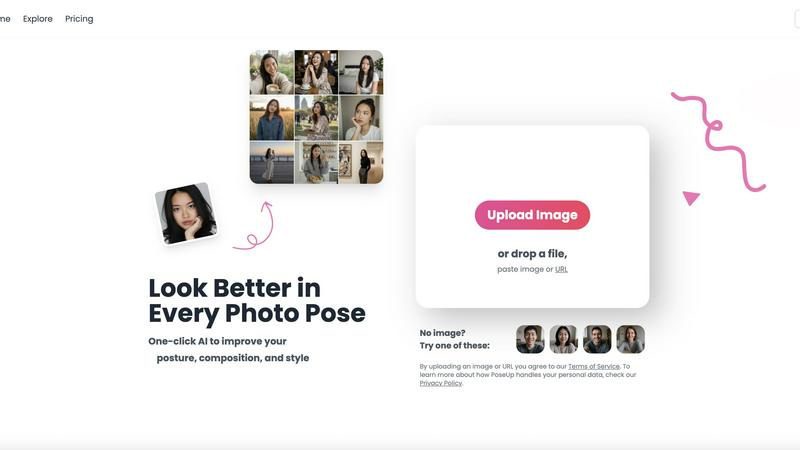
About poseup
PoseUp is an innovative AI-powered photo enhancement tool that revolutionizes the way users improve their photo poses, posture, and overall composition. With just a single click, this tool allows anyone to elevate the quality of their photographs, making it an ideal solution for both casual users and professional photographers. Whether you are taking selfies for social media, capturing precious family moments, or crafting a stunning portfolio, PoseUp leverages advanced artificial intelligence technology to analyze images and recommend optimal changes in positioning and composition. This ensures that users can achieve visually appealing results effortlessly, regardless of their prior photography experience. By utilizing PoseUp, you can easily rectify poor poses, correct posture issues, and enhance the aesthetic value of your images, making it an invaluable resource for social media enthusiasts, photographers, and anyone looking to enhance their photography skills without extensive training.
Features of poseup
One-Click Pose Enhancement
PoseUp's one-click pose enhancement feature is designed to simplify the photo editing process. Users can upload their images, and within seconds, the AI analyzes the composition and suggests improvements, ensuring that results are professional and visually striking.
AI Posture Correction
The AI posture correction functionality is a standout feature that intelligently assesses the user's posture in photographs. It provides recommendations for better positioning, which can significantly enhance the overall appeal and professionalism of the photo, making it suitable for various contexts.
Versatile Use Cases
PoseUp is versatile in its application, catering to different types of photography such as casual selfies, family portraits, professional headshots, and even fitness photos. This flexibility makes it a go-to solution for anyone looking to elevate their photography across multiple scenarios.
User-Friendly Interface
The user-friendly interface of PoseUp allows for seamless navigation, making it accessible for users of all skill levels. Whether you are a beginner or a seasoned photographer, the intuitive design ensures that you can easily upload images and access the enhancement features without any technical hurdles.
Use Cases of poseup
Social Media Content Creation
For social media enthusiasts, PoseUp can transform ordinary selfies into eye-catching images. By applying AI enhancements, users can ensure their photos stand out, attracting more engagement and likes on platforms like Instagram and Facebook.
Family Photo Sessions
When it comes to family gatherings and special occasions, PoseUp can help create beautiful memories by enhancing group photos. The tool's ability to correct poses and improve composition ensures that family portraits are both flattering and memorable.
Professional Portfolios
Photographers looking to enhance their portfolios can benefit from PoseUp's advanced features. By improving poses and compositions in their images, they can present a more polished and professional body of work to potential clients.
Fitness and Wellness Photography
For fitness enthusiasts and trainers, capturing the perfect pose is crucial. PoseUp can optimize fitness photos by correcting posture and enhancing visual appeal, making them more motivating and inspiring for clients and followers.
Frequently Asked Questions
How does PoseUp work?
PoseUp utilizes advanced artificial intelligence algorithms to analyze uploaded photos. It assesses factors such as pose and composition, then suggests improvements that users can apply with a single click.
What types of images can I upload?
PoseUp supports various image formats including JPG, PNG, WEBP, and HEIC, with a file size limit of up to 5MB per image. This allows users to upload a wide range of photographs for enhancement.
Is there a learning curve to using PoseUp?
No, PoseUp is designed to be user-friendly and intuitive. Users do not require any prior photography experience or editing skills to effectively utilize the tool and achieve professional-looking results.
Can I use PoseUp for commercial purposes?
Yes, PoseUp can be used for both personal and commercial photography projects. Whether you are a hobbyist or a professional, the enhancements provided can help improve the quality of your images across various use cases.
Explore more in this category:
Similar to poseup

Turn any image into editable layers with AI

One AI enhancer for photos, images, videos, and creative effects.

Turn videos, images, and files into secure direct links for sharing, embedding, and automated workflows.

Free AI image editor that edits, retouches, and transforms photos with natural-language text prompts.

StopScroll is an AI thumbnail maker that generates YouTube thumbnail concepts from a URL, title, or prompt.


Free online AI image and deepfake checker. Upload a photo for AI-generated and deepfake scores, a clear verdict, and optional generator hints.

Best Face Swap lets you replace faces in photos and videos using simple AI workflows for any media type or intent.