
Opal
Opal is a visual workspace that organizes all your projects and notes so you can find anything instantly.
Visit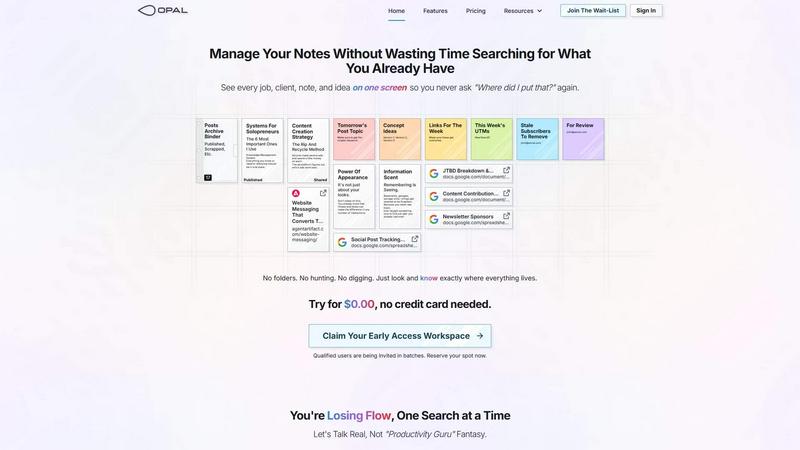
About Opal
Opal is a visual knowledge and project management workspace built on a simple, foundational principle: remembering is seeing. It is designed for people who think spatially, particularly solopreneurs, consultants, agency owners, and writers whose work depends on managing countless conversations, details, and promises. Traditional tools force information into nested folders, complex dashboards, and buried tabs, causing you to forget not just what you know, but where you put it. Opal solves this by providing an infinite digital canvas. Instead of filing, you place information. You can drag and drop notes, documents, files, and links anywhere on this canvas, organizing them visually just as you would arrange papers on a physical desk. This spatial memory approach leverages your brain's innate ability to remember locations. When you can see your entire world of active projects, client details, and creative ideas laid out before you, retrieval becomes instant. The core value proposition is clear: stop the frustrating cycle of searching and digging through digital clutter. Opal keeps your work in sight and top-of-mind, allowing you to maintain flow, reduce cognitive load, and focus on executing your best work without constant interruption.
Features of Opal
The Infinite Visual Canvas
Opal provides a boundless digital workspace where you are free to arrange your work spatially. Unlike restrictive folder hierarchies or linear lists, this canvas allows you to place notes, documents, and links anywhere you choose. You can group related items, create zones for different projects, and build a visual map of your entire operational landscape. This freedom mimics the intuitive organization of a physical desk, making it effortless to see the big picture and the fine details simultaneously.
Spatial Memory & Visual Retrieval
The platform is engineered to leverage spatial memory, the brain's powerful ability to recall where things are located. By placing information in a specific spot on your canvas, you create a mental anchor. When you need to find something, you remember its position rather than just its name or a keyword. This transforms retrieval from a conscious search into a subconscious glance, dramatically reducing the time and mental energy wasted on hunting for information you already have.
Drag-and-Drop Everything
Opal simplifies organization with intuitive drag-and-drop functionality for all content types. You can effortlessly move notes, embed links, position images, and stack reference documents directly onto your canvas. This tactile method of organization is immediate and requires no complex setup or tagging systems. It empowers you to structure and restructure your workspace on the fly, adapting to your evolving workflow with simple, direct manipulation.
Side-by-Side Context Viewing
Opal allows you to open multiple notes, documents, or links side-by-side, limited only by your screen's real estate. This is crucial for work that requires synthesis and context, such as referencing client details while writing a proposal or comparing project notes. You avoid the disruptive tab-switching of traditional apps, keeping all relevant information in your field of view to support deep, focused work without breaking your concentration.
Use Cases of Opal
Client and Project Management for Solopreneurs
For solo business owners managing multiple clients and projects, Opal acts as a central command center. You can create a dedicated zone for each client, visually placing all related notes, call summaries, contract links, project briefs, and to-do lists together. This spatial grouping ensures that every detail for a specific job is instantly accessible, preventing missed promises and keeping all client context visible and organized without complex project management software.
Content Planning and Creation
Writers, creators, and marketers can use Opal to visually map their entire content strategy. The canvas can hold topic ideas, drafts, editorial calendars, keyword lists, published article links, and performance tracking sheets—all in one view. Seeing the entire pipeline from ideation to publication helps maintain consistency, repurpose content effectively, and ensures no brilliant idea gets lost in a forgotten folder or note-taking app.
Creative Ideation and Brainstorming
Opal is ideal for the non-linear process of brainstorming. Instead of confining ideas to a list, you can scatter thoughts, inspiration images, and research links across the canvas. You can then freely move, connect, and group these elements to discover patterns and build out concepts. This visual, spatial method of thinking mirrors how creativity often works, making it easier to develop and refine ideas before formalizing them into structured documents.
Personal Knowledge Management (PKM)
For individuals building a second brain or personal knowledge system, Opal offers a visually intuitive alternative to traditional PKM tools. You can curate notes, saved articles, reference materials, and personal insights on your canvas, organizing them by theme, project, or area of interest. The spatial layout helps you see connections between disparate pieces of information, fostering deeper understanding and making your accumulated knowledge truly usable and retrievable.
Frequently Asked Questions
How is Opal different from note-taking apps like Notion or Evernote?
Opal differs fundamentally in its organizational philosophy. Apps like Notion or Evernote are based on hierarchical filing—you put notes into pages, which go into databases or notebooks. Opal is based on spatial placement. You put notes where they make sense on an infinite canvas, leveraging your brain's spatial memory. This reduces the cognitive tax of categorizing and searching, turning retrieval into a visual, glanceable process rather than a deliberate hunt through nested structures.
Is there a learning curve to using a spatial canvas?
The learning curve is intentionally minimal. The interface is designed around the natural, intuitive action of dragging and dropping items onto a blank space, much like arranging items on a physical desk. There are no complex databases, properties, or syntax to learn. You start by placing a note where you want it. The system works the way your brain already wants to organize visual and spatial information, so most users find it immediately familiar and productive.
Can I collaborate with team members in Opal?
Based on the provided context, Opal appears primarily focused on the individual user or solopreneur managing their own world of information. The current features and messaging emphasize a personal visual workspace to stop losing your own notes and ideas. For collaborative team project management with real-time editing and complex permissions, dedicated collaborative platforms may currently be more suitable.
What happens if my canvas gets too cluttered?
The infinite canvas is designed to scale with your work. The power of spatial memory means that even a large canvas remains usable because you remember where you placed things. However, Opal supports natural organization techniques like grouping related items together, stacking notes, and creating distinct zones or areas for different life or work domains (e.g., "Client Projects" area vs. "Personal Ideas" area). You can always zoom out for a high-level view or zoom in to focus on a specific cluster, maintaining clarity at any scale.
Pricing of Opal
The provided context indicates that Opal is currently offering early access. Users can try the product for $0.00 with no credit card required to register and claim an early access workspace URL. Specific long-term pricing plans, tiers, or subscription costs are not detailed in the available information.
Similar to Opal

Apps and files on an infinite canvas where people and AI agents work together.

Jev turns text or JSON into Choice, Score and Noul answers with probabilities. Build decision flows, process batches and call the API from one Console

Panzoe is an all-in-one AI platform for personal productivity, business automation, AI assistants, content creation, and custom AI solutions.

Free online Markdown to text converter. Strip formatting, copy readable plain text instantly, and keep every conversion private in your browser.

AI Email Filter sorts incoming mail into folders using plain-language prompts you write. Works with any IMAP mailbox; bring your own LLM if you want.

No-code 2D game editor: visual node logic, drag-and-drop scenes, live preview. Exports to Windows, macOS, Linux, Android, iOS, Web.

A free launch checklist for SaaS, apps, AI tools and more. Every step says why it matters and when you can skip it.

Free collection of online developer utilities, code formatters, and digital converters designed to streamline your daily workflow.