
Meme Picture
Meme Picture uses AI to turn your selfies and pet photos into classic memes in seconds with no login required.
Visit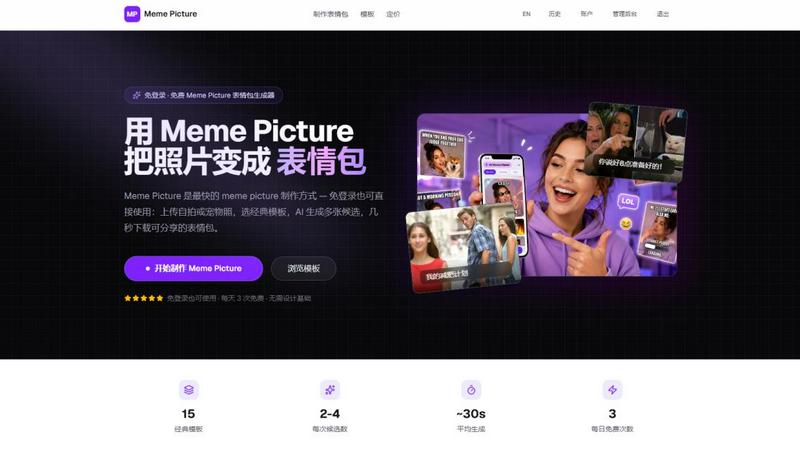
About Meme Picture
Meme Picture is a free, browser-based AI meme generator designed for anyone who wants to create funny, share-ready memes in seconds. At its core, this tool solves a simple problem: you have a photo, and you want to turn it into a recognizable meme format without needing any design skills or software. The process is straightforward. You upload a selfie, a pet photo, or any snapshot. Then, you choose from 15 classic meme templates like Distracted Boyfriend, Surprised Pikachu, Doge, and many more. The AI then places your subject into the chosen layout, applying stylization options to make the image cohesive. Each generation run returns between two and four candidates, letting you pick the funniest result. The entire workflow happens on one page, with no login required to start. This makes Meme Picture ideal for casual users in group chats, social media enthusiasts, and anyone who needs a quick laugh. The tool is built for speed, privacy, and accessibility. It works on both phones and desktops, and original uploads are deleted immediately after generation to protect your privacy. For users who want more, the platform offers a free tier with three daily generations and watermarked output, plus a Pro subscription for higher limits, no watermark, HD export, and GIF support. One-time generation packs are also available for those who prefer a pay-as-you-go model. Meme Picture is not a complex editing suite. It is a focused, no-nonsense tool that does one thing well: turning your photos into memes that your friends will actually use.
Features of Meme Picture
15 Classic Meme Templates
Meme Picture provides a curated library of 15 hand-picked, recognizable meme formats. These include reaction memes like Surprised Pikachu and Woman Yelling at Cat, comparison formats like Distracted Boyfriend and Drake Hotline Bling, animal favorites like Doge and Grumpy Cat, and classics like Success Kid and Change My Mind. Each template keeps the iconic layout your audience already knows. You simply add your photo, and the AI handles the placement. This eliminates the guesswork of finding the right template or manually cropping your image. The collection covers the most popular and enduring meme formats used across Discord, Reddit, WhatsApp, and iMessage. Whether you need a reaction for a group chat or a comparison for a social post, the template selection has you covered. The interface lets you browse by category, including Reaction, Comparison, Animals, and Classic, making it easy to find the perfect format for your joke.
AI-Powered Stylization and Placement
The core technology behind Meme Picture is its AI, which automatically places your subject into the chosen meme template. You do not need to cut out your photo, adjust layers, or match colors. The AI analyzes your uploaded image, identifies the subject, and integrates it into the template layout. Beyond simple placement, the tool offers four visual style options: Cartoon, Pixel Art, Hand-drawn, and Realistic. This lets you match the aesthetic of your photo to the vibe of the meme. For example, a realistic pet photo can be stylized into a cartoon version for a lighthearted Doge meme, or a hand-drawn effect can make a selfie look like a sketch for a Change My Mind format. This feature removes the common friction point where a realistic photo looks out of place in a cartoon meme. The AI handles the heavy lifting, so you get a cohesive, shareable result without opening any editing software.
Multiple Candidates Per Run
Each time you generate a meme, Meme Picture returns between two and four different candidates. This is a crucial feature because humor is subjective. A single meme image might not land the joke perfectly, but having multiple options increases your chances of finding a winner. The AI introduces slight variations in placement, stylization, and composition across the candidates. You can quickly scan the results and select the one that looks the funniest or fits your caption best. This approach saves time compared to manually tweaking settings and regenerating. It also makes the tool feel more creative and less rigid. You are not locked into a single output. Instead, you get a small gallery of possibilities from one action. For free users, this means you get more value from your three daily generations, as each run produces multiple shareable images.
Privacy-First Uploads
Meme Picture is built with a clear privacy policy. Your original photo is deleted immediately after the AI finishes generating your memes. The company states that it does not train on your photos or sell them to third parties. Signed-in users only keep the final meme images in their history, not the original uploads. This is a significant differentiator in an era where many free image tools use uploaded content for model training or data collection. For users who are cautious about sharing personal photos, especially selfies or pictures of their pets, this policy provides peace of mind. You can upload a photo, generate your meme, download the result, and know that your original image is gone. This feature makes Meme Picture suitable for casual, spontaneous use without worrying about long-term data retention. The entire process is designed to be ephemeral for the source material, focusing only on the final, shareable output.
Use Cases of Meme Picture
Reacting in Group Chats
Group chats on WhatsApp, iMessage, Discord, and Telegram thrive on quick, funny reactions. When a friend sends a message that deserves a specific response, a generic reaction image might not capture the moment. With Meme Picture, you can upload a selfie or a pet photo and turn it into a reaction meme like Surprised Pikachu or Woman Yelling at Cat. The process takes about 30 seconds. You get a personalized meme that fits the context perfectly. Instead of searching for a pre-made image online, you create a unique one that your friends will find more relatable and humorous. This use case is the most direct application of the tool. It turns a personal photo into a shared joke, strengthening the social connection within the group. The PNG output is optimized for instant sharing, so you can download and paste it directly into the chat without any extra steps.
Creating Pet Memes for Social Media
Pet photos are a staple of internet humor. Doge, Grumpy Cat, and other animal templates are perfect for showcasing your pet's personality. Meme Picture lets you take a snapshot of your dog or cat and insert it into these classic formats. You can add a caption that reflects your pet's mood or a funny situation. The AI stylization options, like Cartoon or Hand-drawn, can make your pet look even more expressive. The result is a shareable image for Instagram, Facebook, or Twitter. This use case is popular among pet owners who want to participate in meme culture without needing advanced photo editing skills. The tool handles the template layout, so you just need to pick the photo and the caption. The multiple candidates per run mean you can choose the version where your pet's expression aligns best with the meme's joke.
Responding on Reddit and Forums
Online forums like Reddit rely heavily on reaction images and memes to convey tone and humor. A well-placed meme can earn upvotes and engagement. However, finding the exact meme for a specific comment can be time-consuming. Meme Picture allows you to create a custom meme on the fly. You can upload a relevant screenshot or a selfie and pick a template like Change My Mind or One Does Not Simply. The AI places your image into the format, and you add a caption that directly responds to the thread. Because the tool is free and requires no login, you can use it quickly while browsing. The output is a PNG file that you can upload directly to Reddit or other forums. This use case is about speed and relevance. You are not limited to existing meme libraries. You can create a unique image that perfectly matches your reply, making your comment stand out.
Making Inside Jokes with Friends
Inside jokes are the foundation of close friendships. They often reference specific photos, events, or expressions. Meme Picture is a powerful tool for turning these personal moments into shareable memes. You can take a funny snapshot from a recent trip or a goofy selfie and insert it into a template like Distracted Boyfriend or Two Buttons. The caption can reference the inside joke directly. The result is a meme that only your friends will fully understand, which makes it more valuable and funnier within that circle. This use case leverages the template's familiarity to package a private joke. The AI handles the technical work of face placement, so the focus remains on the humor. The privacy feature, where original uploads are deleted, is also reassuring when sharing personal photos within a small group. You can generate the meme, share it in your private chat, and not worry about the original image being stored.
Frequently Asked Questions
Do I need to create an account to use Meme Picture?
No, you do not need to sign in or create an account to use the basic meme generator. You can upload a photo, pick a template, and generate memes immediately. The tool is designed for instant access. There is a free tier that gives you three generations per day without any login. If you want to save your history, access higher generation limits, or remove watermarks, you can sign in and upgrade to a Pro plan. But for casual, one-off use, the tool works completely without an account.
What happens to my uploaded photos after I generate a meme?
Your original uploaded photo is deleted immediately after the AI finishes generating your meme images. Meme Picture does not keep your source file. The company states that it does not train its AI models on your photos or sell them to third parties. If you are signed in, only the final meme images are saved to your history. This privacy-first approach is designed to give you peace of mind when uploading personal selfies or pet pictures.
What file formats and sizes are supported for uploads?
You can upload JPEG, PNG, or WebP files. The maximum file size is 4MB. If your photo is larger than that, the tool automatically compresses it before processing. For best results, the developers recommend using a clear, well-lit selfie or pet photo. You can also try sample photos provided on the website if you do not have an image ready. The output of the generation is always a PNG file, which is optimized for sharing on social media and messaging apps.
How many meme candidates do I get per generation run?
Each generation run returns between two and four candidate images. This means you do not get just one result. You get a small set of variations with different placements or stylization adjustments. You can then look through these candidates and select the one you find funniest or most visually appealing. This feature increases your chances of getting a great meme from a single generation, saving you from having to tweak settings and run the tool multiple times.
Pricing of Meme Picture
Meme Picture offers a free tier and a Pro subscription. The free tier provides 3 generations per day. Each free generation produces watermarked output. To remove watermarks and get higher limits, you can upgrade to the Pro plan. Pro users also get HD export and the ability to create GIF memes. For users who do not want a recurring subscription, one-time permanent generation packs are available for purchase. These packs give you a set number of generations that never expire. Pricing details for the Pro plan and the one-time packs are listed on the Meme Picture website. The free tier requires no credit card and is available to all users immediately.
Explore more in this category:
Similar to Meme Picture

AI image cleanup for SaaS and e-commerce teams: remove backgrounds, erase objects, swap backgrounds - pay per image.

Create and edit AI images online with multiple models, text-to-image, image-to-image, background removal, and upscaling.

Turn two photos into a Raindance AI pier video with the soundtrack included.

Edit a video clip with reference images while keeping the original motion.

Make the Alors on Danse AI meme video from two photos, soundtrack included.

Make the viral Rumpelstiltskin tiptoe dance meme video from two photos.

Turn a prompt into a 1080p motion-graphics MP4 planned and coded by Claude Opus 5.5.

Edit existing videos with AI: swap characters, outfits, objects or scenes while using the source clip to guide motion and camera framing.