
MCPize
MCPize is a marketplace where developers discover and install premium MCP servers for AI agents, with publishers earning 80% revenue.
Visit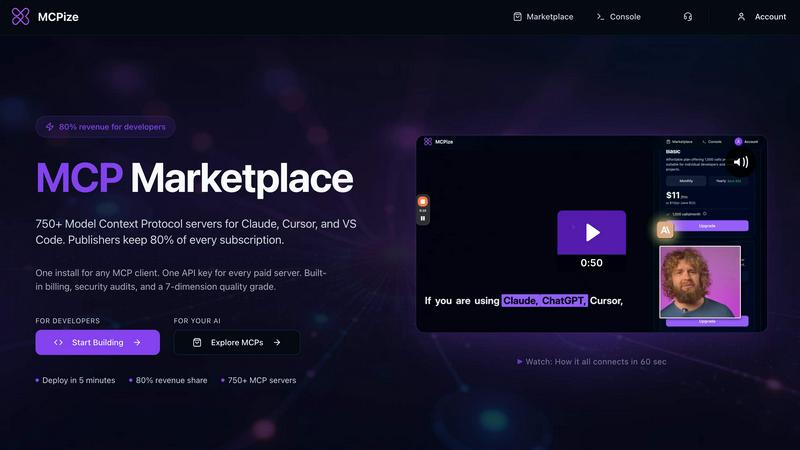
About MCPize
MCPize is a complete platform for Model Context Protocol (MCP) servers. It is designed to bridge the gap between AI agents and the tools they need to be truly useful. Think of it as the App Store for AI, but purpose-built for the new world of agentic workflows. At its core, MCPize is a vibrant marketplace featuring over 1,000 vetted MCP servers that integrate seamlessly with popular AI tools like Claude, Cursor, VS Code, Windsurf, and ChatGPT. Every single server on the platform undergoes a rigorous 7-dimension quality audit that checks for protocol compliance, OAuth security, reliability, and safety. This means you never have to worry about plugging in a shady or broken tool. For developers, MCPize is a launchpad. You can publish and deploy a new MCP server in about 30 seconds using GitHub auto-deploy, and you get to keep 80 percent of every subscription dollar you earn. For users, it is a dream of simplicity. Instead of juggling a dozen different API keys and billing accounts, you get one unified API key, one consolidated bill, and one dashboard to track usage, costs, and set alerts. There is even a generous free tier that gives you 25,000 requests per month with no credit card required. Whether you are a solo developer building a niche tool or a large team looking to supercharge your AI workflows, MCPize provides the infrastructure, the audience, and the trust layer to make it all work.
Features of MCPize
Vetted MCP Marketplace with Quality Audits
MCPize hosts over 1,000 Model Context Protocol servers that have been thoroughly tested and verified. Each server passes a 7-dimension quality audit that checks for protocol compliance, OAuth security, reliability, and safety. This ensures that every tool you install is trustworthy and functions correctly with your AI agents. You can browse by category and see verified quality grades before you install anything.
Unified API Key and Consolidated Billing
Instead of managing a dozen different API keys and billing accounts for separate services, MCPize gives you one single API key that works for every paid server on the platform. You receive one consolidated bill each month, and you can monitor all your usage and costs from a single dashboard. This eliminates vendor management headaches and simplifies your workflow significantly.
Fast Deployment for Developers with 80% Revenue Share
Developers can publish and deploy a new MCP server in about 30 seconds using GitHub auto-deploy. The platform handles the infrastructure, hosting, and billing for you. As a publisher, you keep 80 percent of every subscription dollar you earn. This makes MCPize an attractive launchpad for both solo developers and teams who want to build and monetize AI tools.
Usage Tracking and Cost Alerts
The MCPize dashboard provides detailed monitoring of your request usage and spending across all servers. You can set custom alerts to notify you when you approach certain usage thresholds or cost limits. This gives you full control over your AI tooling expenses and helps you avoid unexpected bills. The free tier offers 25,000 requests per month with no credit card required.
Use Cases of MCPize
Supercharging Your AI Development Workflow
Developers can use MCPize to connect their AI coding assistants like Cursor, VS Code, and Windsurf to specialized MCP servers. For example, you can install the AI Senior Developer Assistant server which helps architect complex systems, debug code, refactor code, and generate CI/CD pipelines. This turns your AI assistant into a more capable partner that can automate entire parts of your development lifecycle.
Integrating Local Payment Gateways for Fintech Apps
Businesses building e-commerce or fintech applications for specific markets can use MCPize to find and install specialized payment servers. For instance, the Bangladesh Payment Orchestrator server handles payment operations via bKash and Nagad mobile financial services. It provides programmatic access to initiate transactions, check statuses, and manage payouts, all through a single MCP server integration.
Creating Professional Architecture Diagrams
Software architects and DevOps engineers can use the Diagram Designer MCP server to convert Mermaid code into professional PNG architecture diagrams. You can select from five visual styles like cloud, isometric, or blueprint, and choose aspect ratios for presentations, documentation, or social media. The server generates diagrams in about 50 to 110 seconds and provides a secure download link.
Automating Digital Marketing Campaigns
Marketing teams and agencies can use the Behemoth Digital Marketing server to streamline their entire workflow. This server offers over 100 professional tools for content creation, paid advertising, SEO optimization, social media management, and brand development. It transforms marketing tasks from hours to minutes by generating SEO content, high-converting ads, email campaigns, and social media posts using AI-powered precision.
Frequently Asked Questions
What is a Model Context Protocol server?
A Model Context Protocol (MCP) server is a standardized way for AI agents to connect with external tools, data sources, and services. Think of it like an API specifically designed for AI agents. Instead of each AI tool having its own unique way of connecting to services, MCP provides a common language. MCPize hosts a marketplace of these servers so you can easily find and install the tools your AI needs.
How does the 7-dimension quality audit work?
Every MCP server listed on MCPize is checked against seven specific criteria. These include protocol compliance to ensure the server follows the MCP standard correctly, OAuth security to protect user authentication, reliability to confirm the server stays online and responsive, and safety to prevent malicious behavior. Each server receives a quality grade based on these checks, so you can trust what you install.
Do I need a credit card to start using MCPize?
No, you do not need a credit card to get started. MCPize offers a generous free tier that gives you 25,000 requests per month at no cost. This allows you to explore the marketplace, install servers, and test integrations before committing to any paid subscriptions. You only need to provide payment information if you want to use paid servers beyond the free tier limits.
How do developers publish and earn money on MCPize?
Developers can publish a new MCP server in about 30 seconds using the GitHub auto-deploy feature. MCPize handles the hosting, infrastructure, and billing for the server. When users subscribe to your server, you keep 80 percent of every subscription dollar earned. The platform takes care of the remaining 20 percent for payment processing and platform maintenance.
Similar to MCPize

Manifolds deanonymizes and researches your users at signup, so you can know who your users actually are.

Clone any webpage pixel-perfect, export HTML/CSS/ZIP or React/Vue components.

Free, open-source 2D CAD in Rust for precise drafting, layers, dimensions, plotting, and AI-agent automation.

Mainspring turns the settings macOS hides into 90+ one-click, fully reversible power-ups for Finder, Dock, screenshots and more. $29 once.

A Mac menu bar app for a full disk. See what is using your space, read whether it comes back on its own, and remove only what you tick.

Paste a URL and AI designs on-brand Open Graph images from your page's colours, fonts and logo. Free, no sign-up.

Free Online Screen Test Tool - Instantly diagnose dead pixels, lines, color issues, and flickering. Multiple test modes, no download needed.

One API key and one credit balance for Reddit and X data. REST endpoints and a hosted MCP server, so your code and your agents call the same tools.