
HypeShare
HypeShare is a secure file transfer platform that lets you send large files up to 10GB for free with end-to-end encryption and no signup required.
Visit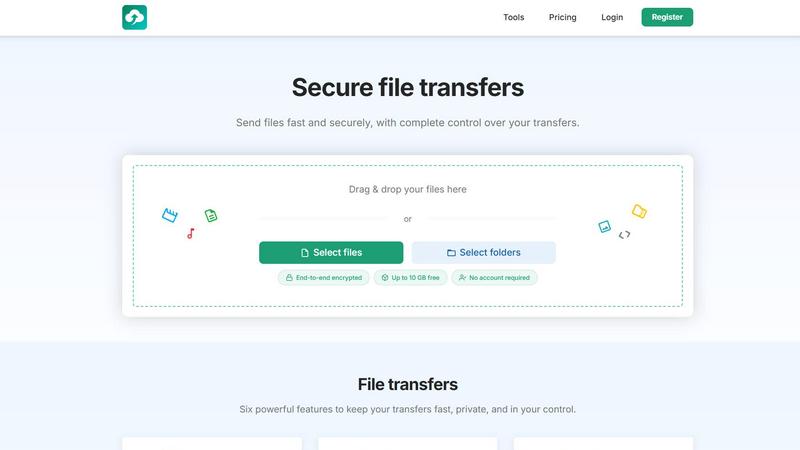
About HypeShare
HypeShare is a secure file transfer platform designed with a single goal in mind: to let you send files quickly and privately without the bloat and complexity of traditional tools. At its core, HypeShare is a straightforward service that prioritizes speed and user control. You can send files up to 10GB in size without ever creating an account, making it ideal for one-off transfers or for users who value anonymity. For those who need more, signing up for a free account unlocks 20GB of storage, encrypted transfers, custom expiry links, and file request pages. The file request feature is particularly powerful, allowing you to create a dedicated upload page. You share the link, and anyone can upload files directly to you without needing to log in themselves. This makes HypeShare a practical tool for freelancers, agencies, and teams who are tired of slow, feature-heavy file-sharing services. The platform focuses on the essentials: end-to-end encryption, password protection, download limits, and automatic expiration dates. These features give you complete control over who accesses your files and for how long. HypeShare is built for anyone who needs a fast, no-friction alternative to bloated file-sharing tools like WeTransfer, Dropbox, or Google Drive. It strips away unnecessary complexity and delivers a clean, efficient experience for sending and receiving files.
Features of HypeShare
Link and Email Sharing
Create and share transfer links instantly. You can generate a unique link for your files and distribute it through any channel you prefer. For a more direct approach, you can send your transfer links securely via email directly from the HypeShare platform. This dual method gives you flexibility in how you deliver your files to recipients, whether you need a quick copy-paste link or a more formal email delivery.
End-to-End Encryption and Password Protection
All transfers on HypeShare are protected with end-to-end encryption, meaning your files are scrambled from the moment they leave your device until they are opened by the intended recipient. This ensures that no one, not even HypeShare, can access your data during transit. For an extra layer of security, you can add a password to any transfer. This prevents unauthorized access and ensures that only people with the correct password can view and download your files.
Expiration and Download Limits
You have complete control over the lifespan of your transfers. Set an automatic expiration date for your links, so they become inactive after a specific time. This is useful for time-sensitive projects or for ensuring that files do not remain accessible indefinitely. Additionally, you can define exactly how many times a transfer can be downloaded. Once that limit is reached, the link automatically deactivates, giving you precise control over file distribution.
File Requests
The File Requests feature allows you to receive files from anyone without them needing an account. You create a custom request link, such as "hypeshare.io/request/yourname," and share it with clients, colleagues, or anyone else. They can then upload files directly to your HypeShare dashboard. You can set an expiry date for each request and receive email notifications every time a new file is uploaded. This is a powerful tool for collecting assets, feedback, or submissions in a secure and organized manner.
Use Cases of HypeShare
Freelancers Sending Final Deliverables
A graphic designer can send a large, high-resolution logo file to a client using HypeShare. The designer sets a download limit of one and an expiration date of seven days. The client receives a secure link and password, downloads the file, and the link automatically deactivates. This ensures the final deliverable is delivered securely and does not remain accessible online indefinitely, protecting both the designer and the client.
Agencies Collecting Client Assets
A marketing agency needs to collect raw video footage, photos, and brand guidelines from a new client. Instead of relying on email attachments or confusing shared folders, the agency creates a File Request page with a custom link. They share the link with the client, who can upload all the necessary files directly to the agency's dashboard without creating an account. The agency gets email notifications for each upload, keeping the workflow smooth and organized.
Teams Sharing Time-Sensitive Documents
A project team needs to share a confidential project plan with external contractors. Using HypeShare, a team member uploads the document, sets a password, and configures the link to expire in 48 hours. The link is shared via email. This ensures that the document is only accessible for the required period and only by those with the password, reducing the risk of sensitive information being left exposed.
Individuals Transferring Large Personal Files
An individual needs to send a collection of family videos totaling 8GB to a relative across the country. They can use HypeShare as a guest, without creating an account, by simply dragging and dropping the files. They generate a link and share it via text message. The relative can download the files immediately without any sign-up process. This is a fast, no-fuss solution for personal file sharing that does not require any long-term commitment or storage.
Frequently Asked Questions
Do I need an account to send files on HypeShare?
No, you do not need an account to send files. The Guest option allows you to send up to 5 transfers per month, with each transfer supporting up to 10GB in file size. You simply drag and drop your files, generate a link, and share it. This is perfect for one-time or infrequent file sharing needs.
How does the File Request feature work?
The File Request feature lets you create a custom upload page. You generate a unique link (like "hypeshare.io/request/yourname") and share it with anyone. When they open the link, they can upload files directly to your HypeShare dashboard. Importantly, the person uploading does not need to have a HypeShare account. You can set an expiration date for the request and receive email notifications for each new upload.
What security measures protect my files during transfer?
All files transferred on HypeShare are protected with end-to-end encryption. This means your files are encrypted on your device before they are uploaded and can only be decrypted by the intended recipient. Additionally, you can add a password to any transfer for an extra layer of security. The platform also allows you to set download limits and expiration dates, giving you complete control over who can access your files and for how long.
What is the difference between the Free plan and the Pro plan?
The Free plan offers 10 transfers per month, 20GB of storage, 10GB per transfer, and a 30-day data retention period. The Pro plan, priced at $8.99 per month, removes these limits entirely. It offers unlimited transfers, unlimited files, 1000GB of storage, 200GB per transfer, unlimited downloads per transfer, and unlimited data retention. The Pro plan also includes priority support and branded downloads.
Pricing of HypeShare
HypeShare offers a straightforward pricing structure with three main tiers. You can start without an account using the Guest option, which allows 5 transfers per month with a maximum file size of 10GB per transfer and 100 downloads per transfer. The Free plan requires registration and provides 10 transfers per month, 20GB of storage, and 10GB per transfer, with a 30-day data retention period. The most popular option is the Pro plan, which costs $8.99 per month when billed monthly or $8.99 per month when billed yearly. This plan unlocks unlimited transfers, unlimited files, 1000GB of storage, 200GB per transfer, unlimited downloads, and unlimited data retention. All plans include end-to-end encryption, file encryption, and the ability to set passwords and expiration dates.
Similar to HypeShare

Whop Trends enables you to discover and track trending products daily, maximizing your income with actionable market.

Blueberry is a Mac app that seamlessly integrates your editor, terminal, and browser for efficient web app development.

Effortlessly batch compress images and videos on Mac, optimizing your assets and saving valuable time and space.

Skene transforms your code into a self-sustaining growth engine, empowering your product to thrive on its own.

Yellow Systems builds custom software and AI solutions for your long term growth.

Effortlessly collect and showcase customer feedback to boost trust and drive sales with actionable insights.

MVPable gives you a clear plan and the right tools to build your product idea without wasting time or money.

Agenta centralizes prompt management and evaluation, enabling reliable LLM development through structured collaboration.