
Haporium
Haporium organizes content from over twelve social networks into customizable, shareable boards for you.
VisitPublished on:
December 24, 2025
Pricing:
About Haporium
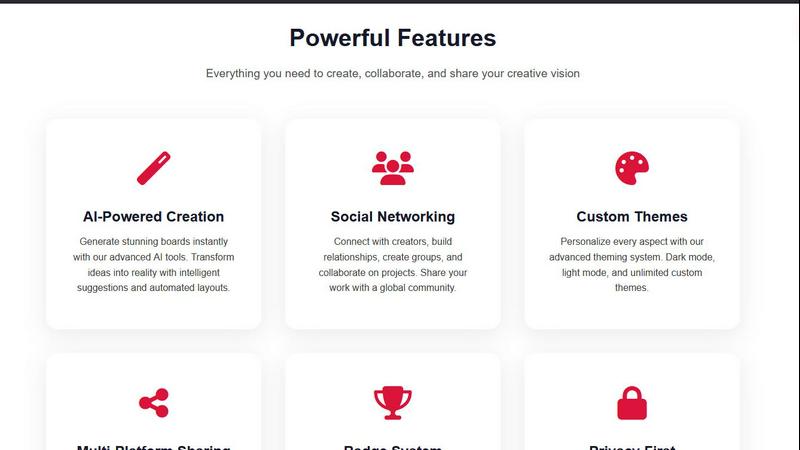
Haporium is a content curation and social discovery platform designed to solve a fundamental problem in the modern digital experience: fragmentation. In today's online world, our favorite videos, music, games, and inspiration are scattered across dozens of separate platforms like YouTube, Spotify, Steam, and Pinterest. This makes it difficult to organize, access, and share our digital interests cohesively. Haporium addresses this by providing a single, unified space where users can bring all this disparate content together. The core of the platform is the "Board," a personalized collection where users can gather links, images, text, and social media posts from across the web. By connecting various accounts, Haporium automatically syncs your content, keeping your boards current without manual effort. This tool is built for anyone who consumes digital content, from casual users wanting to organize their hobbies to professionals curating resources or communities building shared knowledge bases. Its main value proposition is simplicity and unification, turning a scattered digital life into an organized, visually engaging, and easily shareable collection.
Features of Haporium
Multi-Platform Account Integration
Haporium allows you to connect your accounts from over a dozen popular platforms with a single click. This includes YouTube, Spotify, Steam, Pinterest, TikTok, and GitHub. Once connected, the platform can pull in your existing playlists, video libraries, game collections, and pinned items. This foundational feature eliminates the need to manually copy and paste links, creating a seamless bridge between your various digital services and your Haporium boards.
Automated Content Synchronization
After you connect your accounts, Haporium handles the ongoing work. Your boards are not static; they automatically update as you add new favorites, games, or videos to your linked accounts. This ensures that your curated collections are always current and reflect your latest interests without requiring you to constantly revisit and manually update each board, saving significant time and effort.
Customizable and Shareable Boards
The board is the central organizing unit of Haporium. You can create boards for any topic, theme, or project, and mix content types from different platforms into one cohesive collection. Each board can be set to public for everyone to see, kept completely private, or protected with a password for selective sharing. This flexibility gives you full control over your curation, whether for personal use, collaboration, or public discovery.
Social Discovery and Collaboration
Haporium is not just a personal tool; it's a community platform. You can browse public boards created by other users to discover new content and perspectives on topics you love. Furthermore, you can invite friends or colleagues to collaborate on boards, allowing multiple people to contribute to and edit a single collection. This makes it a powerful tool for team projects, group planning, or building community knowledge bases.
Use Cases of Haporium
Personal Digital Library Creation
Individuals can use Haporium to build a comprehensive library of all their digital interests. For example, you can create a "My 2024 Favorites" board that automatically aggregates your top YouTube videos, Spotify playlists, Steam games, and Pinterest inspiration from the year. This creates a single, nostalgic, and easily browsable archive of your personal digital journey, replacing countless browser bookmarks and app libraries.
Educational Resource Curation
Teachers, students, and lifelong learners can leverage Haporium to gather learning materials. An educator might create a board for a history unit, pulling in relevant documentary playlists from YouTube, period-specific music from Spotify, articles, and image galleries. This board can then be shared with students as a dynamic, multi-media syllabus or study guide, providing a rich and organized learning hub.
Project Planning and Team Collaboration
Teams working on projects can use Haporium as a collaborative visual workspace. A marketing team, for instance, could create a board for a new campaign, adding inspiration from Pinterest, competitor analysis videos from YouTube, mood-setting music tracks, and links to shared documents. Team members can all contribute, making it a living, centralized repository of ideas and assets that stays in sync.
Community and Fan Hub Building
Enthusiasts and community managers can build public boards that serve as hubs for specific interests. A fan of a particular video game series could create a board featuring official trailers, soundtrack links, fan art, and wiki pages. This public board becomes a curated starting point for new fans and a gathering place for the community to explore and share related content.
Frequently Asked Questions
What platforms can I connect to Haporium?
You can connect a wide range of platforms to Haporium, including YouTube, Spotify, Steam, Pinterest, TikTok, and GitHub, with more than a dozen supported in total. The connection process is designed to be simple, usually requiring just a few clicks to authorize Haporium to access your public data from these services, such as your playlists or libraries.
Is there a cost to use Haporium?
Based on the provided information, Haporium offers a "Get Started Free" option. The platform encourages users to try creating a demo board with full features without even needing to sign up for an account initially. This suggests a free tier or free trial is available, though specific details on premium plans or paid features are not outlined in the given context.
Can I use Haporium without creating an account?
Yes, you can start using Haporium immediately without an account. The platform provides a "Try Demo Board" feature that allows you to create your first board, add content, and experience the core functionality. You can then choose to transfer that demo board to a permanent account later if you wish to save your work long-term.
How do I share my boards with others?
Sharing boards in Haporium is flexible. You can set a board to "Public," making it discoverable by anyone browsing the platform. For private sharing, you can set a board to "Password-Protected" and share the password only with specific people. You can also invite collaborators directly to edit a board with you, enabling teamwork on a single collection.
Similar to Haporium

Free collection of online developer utilities, code formatters, and digital converters designed to streamline your daily workflow.

Visual financial timelines for couples and young professionals: model cash flow, life events, and shared goals.

The #1 Native Form Builder Plugin for Framer - No Code, No Embeds, No External Platforms.

Plan and review LinkedIn prospecting, outreach flows, post previews, and campaign progress in one workspace.

Practical, independent guides to home repairs, maintenance, costs, troubleshooting, and everyday fixes.

Adopt a virtual baby who grows, learns, and remembers you.

Highlight faster. Study in flow with custom shortcuts and a workflow built around you. Print smarter, or turn any page into a tiled poster.
