
Easy Watermark Remover
Easily remove Gemini AI watermarks from images online with Quick Crop or AI Smart Removal, no signup or extensions needed.
Visit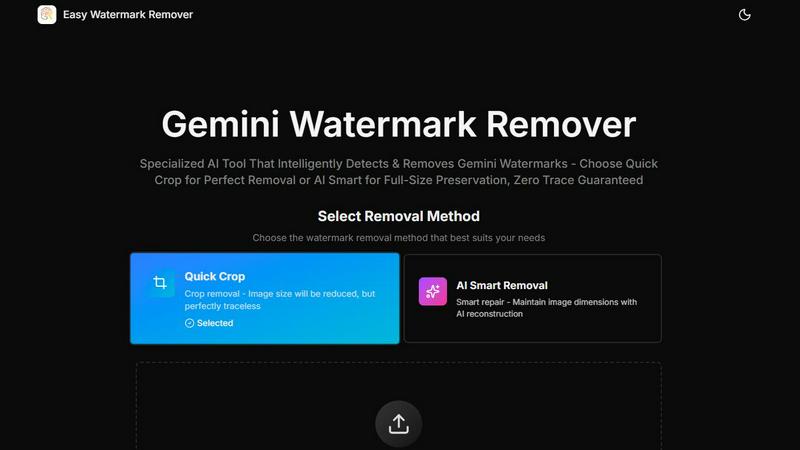
About Easy Watermark Remover
Easy Watermark Remover is a powerful, free browser-based tool designed specifically for those who need to erase unwanted watermarks, particularly Gemini AI logos and SynthID marks, from their images. This tool caters to a wide range of users, including content creators, marketers, and photographers, who often find themselves needing to remove visible watermarks to enhance the visual appeal of their work. The main value proposition of Easy Watermark Remover lies in its ability to maintain the integrity of the original image while offering two distinct methods for watermark removal: Quick Crop and AI Smart Removal. Both methods are designed to ensure that the original dimensions and quality of the image are preserved, making it an essential tool for anyone looking to create professional-grade visuals without the intrusive branding of watermarks.
Features of Easy Watermark Remover
AI Smart Removal
AI Smart Removal offers a sophisticated approach to watermark elimination by employing advanced algorithms that intelligently reconstruct the pixels surrounding the watermark. This feature is particularly useful when the watermark overlaps with important details in the image, as it allows users to maintain the original dimensions while ensuring a seamless and natural-looking finish.
Quick Crop
Quick Crop provides a fast and efficient way to remove watermarks by simply cropping the affected area. This method is ideal for images where the watermark is placed in an unimportant region, such as a plain background or corner. While this option reduces the image size, it offers a perfect traceless cleanup, making it a suitable choice for quick edits.
Batch Processing
Easy Watermark Remover supports batch processing, allowing users to upload multiple images at once for watermark removal. This feature is particularly beneficial for users who have a high volume of images to edit, streamlining the workflow and saving valuable time.
Local Processing for Privacy
All processing with Easy Watermark Remover takes place locally on the user's device, ensuring privacy and data security. Users can confidently remove watermarks without worrying about their images being uploaded to a server, making it a trusted tool for sensitive projects.
Use Cases of Easy Watermark Remover
Content Creation
Content creators can utilize Easy Watermark Remover to enhance their visuals by removing distracting watermarks from images used in blogs, social media posts, and marketing materials. This helps to maintain a professional appearance and improves audience engagement.
Marketing and Advertising
Marketers can leverage this tool to create clean product images for advertisements, presentations, and promotional content. By removing watermarks, they can ensure that their visuals focus solely on the product, enhancing the message they wish to convey.
Photography Editing
Photographers often encounter watermarks on images they wish to use for portfolios or client presentations. Easy Watermark Remover allows them to quickly eliminate these marks while preserving the quality and composition of their photographs, making it an invaluable part of their editing toolkit.
Academic and Research Use
In academic and research settings, researchers may need to utilize images from various sources. Easy Watermark Remover enables them to remove watermarks from these images, ensuring that their presentations and publications feature clean visuals, which is crucial for clarity and professionalism.
Frequently Asked Questions
How does Easy Watermark Remover work?
Easy Watermark Remover uses two main methods to remove watermarks: AI Smart Removal, which intelligently reconstructs the image around the watermark, and Quick Crop, which simply removes the watermark by cropping it out.
Is there a limit to the size of images I can upload?
Yes, Easy Watermark Remover supports image files in PNG, JPG, and WebP formats, with a maximum size of 16MB per image. This allows for high-quality images to be processed efficiently.
Do I need to install any software to use Easy Watermark Remover?
No, Easy Watermark Remover is a browser-based tool, meaning you can access it from any device without the need for installation. This convenience allows users to work from anywhere with internet access.
Can I preview the image before downloading it?
Yes, Easy Watermark Remover provides a preview feature that allows users to inspect the cleaned image before downloading it. This is crucial for ensuring that the removal process has not compromised the image quality or details.
Explore more in this category:
Similar to Easy Watermark Remover

A fast, simple image studio powered by Nano Banana 2.1. Create and edit high-quality images with accurate details, readable text, consistent character

AI image generation and editing with precise typography, native 2K output, and localized edits.

AIPetGen turns a photo of your dog, cat, or other pet, or a written description, into a new picture or a short animation.

Remove unwanted people, objects, text and watermarks from photos with AI


Make images look low quality online for free. Compress, downscale, and pixelate photos right in your browser with no sign-up required.

Free AI attractiveness test and face analysis with private, on-device photo processing.

Generate and edit production-ready images with GPT Image 2 using prompts, reference images, clear text rendering, and a developer-friendly API.