
CustomTattoo AI
CustomTattoo AI turns your tattoo idea into a design you can preview on your own skin before booking with an artist.
Visit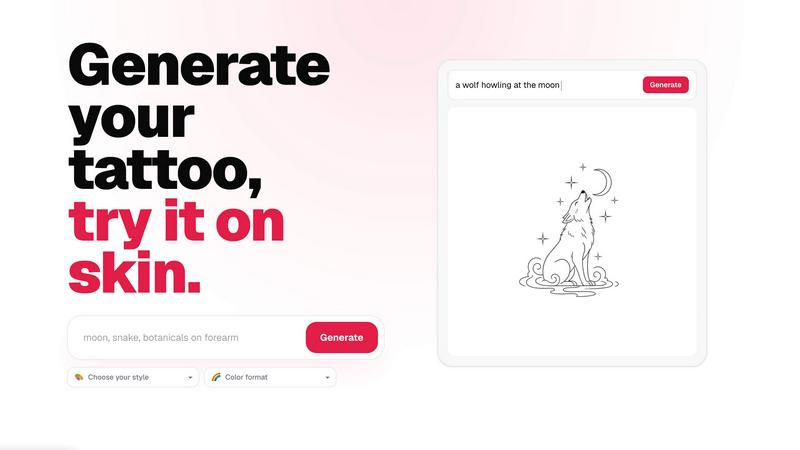
About CustomTattoo AI
CustomTattoo AI is a practical, AI-powered platform designed for anyone planning their next tattoo. It helps you move from a vague idea to a clear, previewed design that you can take to your artist. The core purpose of this tool is to remove guesswork and hesitation from the tattoo decision process. Instead of relying on imagination or generic images found online, you can generate unique concepts that match your specific description. You describe your idea, choose a style and color format, and the AI creates a custom tattoo design for you. The platform goes further by letting you preview that design on your own skin using a try-on feature. This allows you to see how the tattoo will look in a specific placement before you commit. The main value is confidence. You get to compare different styles, test various placements, and refine your visual direction. This makes your consultation with a tattoo artist much more productive. The product is built for first-time clients who feel uncertain, tattoo enthusiasts looking for fresh ideas, and anyone who wants a reliable reference for their next session. CustomTattoo AI operates on a simple credit system, starting with three free credits at signup, so you can test the generator without any upfront payment. There are no hidden subscriptions, and you keep full control of your ideas and the final decision.
Features of CustomTattoo AI
AI Tattoo Generator
This is the core feature that turns your words into visual concepts. You start by writing a brief description of your tattoo idea. You can include the subject, the placement on your body, and the overall mood or feeling. The AI then interprets your text and generates a unique design. You have control over the direction by selecting a specific tattoo style, such as Gothic blackwork, traditional, or watercolor. You also choose the color format, like black and grey or full color. This feature allows you to explore many different visual directions from a single idea, helping you find the concept that feels right before you ever step into a studio.
On-Skin Preview
This feature lets you see your generated tattoo design on your own body before you book an appointment. After you generate a concept, you can use the preview tool to place the design on a photo of your skin. This is not a generic mockup. It allows you to test placement, size, and orientation in a realistic way. You can see how a design wraps around your arm, sits on your chest, or fits on your leg. This visual feedback is crucial for making informed decisions. It helps you understand the scale of the design and how it interacts with your body's natural contours, giving you confidence in your choice before it becomes permanent.
Personal Design Library
As you generate and refine your tattoo ideas, you can save your favorite designs to a personal library. This feature acts as your digital mood board. You can store multiple concepts, compare different styles side-by-side, and track your evolving preferences. The library keeps your ideas organized and accessible. When you are ready to visit a tattoo artist, you can pull up your top designs from this library. Having a collection of your preferred concepts makes it easy to communicate your vision clearly. It provides a visual reference that bridges the gap between your imagination and the artist's understanding.
Artist-Ready Direction
This feature ensures that your generated design is more than just a creative exercise. It is a practical tool for your next tattoo appointment. The designs you create and refine within the platform are intended to serve as a clear reference for your tattoo artist. By using the generator and the on-skin preview, you arrive at the studio with a well-defined direction. You know the style, the placement, the size, and the color format you want. This saves time during the consultation and helps the artist understand exactly what you are looking for. It turns a vague idea into a concrete plan, making the entire process smoother and more collaborative.
Use Cases of CustomTattoo AI
First-Time Tattoo Clients
For someone getting their first tattoo, the biggest hurdle is often uncertainty. You might have a general idea but no way to visualize it on your body. CustomTattoo AI solves this by allowing you to generate multiple concepts and preview them on your own skin. You can experiment with different styles and placements without any pressure. This process builds confidence. You can see exactly what a design will look like before you make a permanent commitment. It helps you avoid the regret of a design that looked good in your head but felt wrong on your body.
Tattoo Enthusiasts Seeking New Ideas
If you already have tattoos and are planning your next piece, this tool helps you break out of creative ruts. You can input a theme or subject and explore styles you may not have considered, like geometric, dotwork, or neo-traditional. The AI generator provides fresh visual interpretations of your ideas. You can use the library to compare these new concepts against your existing tattoos to see if they fit your overall collection. It is a way to discover new directions and expand your artistic vision without needing to schedule multiple artist consultations.
Refining a Vague Concept
Many people have a feeling or a theme they want to capture but lack the visual language to describe it. You might know you want something related to "growth" or "family," but you are not sure what that looks like. CustomTattoo AI helps you translate that abstract idea into concrete visuals. You can generate designs based on keywords and moods. By seeing what the AI produces, you can start to refine your direction. You can say "more like this, but darker" or "make the lines thinner." This iterative process helps you discover the specific design you want.
Preparing for an Artist Consultation
Walking into a tattoo studio with a clear reference saves time and improves results. This use case is about using the platform as a preparation tool. You generate several designs, preview them on your chosen placement, and save the best ones. When you meet with your artist, you can show them these images. You can point to exactly what you like about the style, the composition, or the placement. This reduces back-and-forth communication and ensures the artist understands your vision from the start. It leads to a more productive session and a final design you are happy with.
Frequently Asked Questions
Is CustomTattoo AI free to try?
Yes, you can try CustomTattoo AI for free. When you sign up for an account, you are given 3 free credits. These credits allow you to generate tattoo designs and use the on-skin preview feature without paying anything. There is no credit card required to claim these free credits. This lets you test the generator and see how the platform works before you decide to purchase more credits. It is a risk-free way to explore your tattoo ideas.
How does the on-skin preview work?
The on-skin preview uses a simple process to place your generated tattoo design onto a photo of your body. After you generate a design, you can use the preview tool to upload a photo of the body part where you want the tattoo. The AI then overlays the design onto your image. You can adjust the size, rotation, and position to see how it looks in different spots. This gives you a realistic visualization of the final result on your own unique body shape and skin tone.
Will there be hidden subscriptions?
No, there are no hidden subscriptions with CustomTattoo AI. The platform operates on a straightforward credit system. You start with free credits at signup. When you need more, you can purchase additional credit packs. There are no monthly recurring fees or automatic renewals. You only pay for the credits you use when you need them. This gives you full control over your spending and ensures you are not locked into any ongoing commitment.
Can I take the design to my tattoo artist?
Yes, you can absolutely take the designs you create to your tattoo artist. The platform is designed to help you develop a clear visual direction that you can use as a reference. The generated concepts are meant to communicate your idea, style, and placement preferences. While the final design will always be created by your tattoo artist, your generated images provide a strong foundation for discussion. They help you and your artist agree on the core elements of the tattoo before any work begins.
Similar to CustomTattoo AI

Generate and edit production-ready images with GPT Image 2 using prompts, reference images, clear text rendering, and a developer-friendly API.

Create text-perfect logos, posters, ads, packaging, and ecommerce visuals with Ideogram 4 workflows, references, and API tools.

AI-native presentation and visual content platform that turns prompts, documents, images, videos, and data into polished, shareable decks.

Free Pokémon tools: random team generator, shiny odds calculator, Nuzlocke mode, name generator, mega & shiny generators.

Create a custom text logo, wordmark logo, or typography logo with editable fonts, colors, icons, shapes, and flexible export formats.


The Growth Toolkit for App Store & Google Play. Create the store assets that make your app feel ready to ship.
