
Browser Notes
Browser Notes saves your notes, boards, and mind maps directly in your browser with no signup or cloud required.
Visit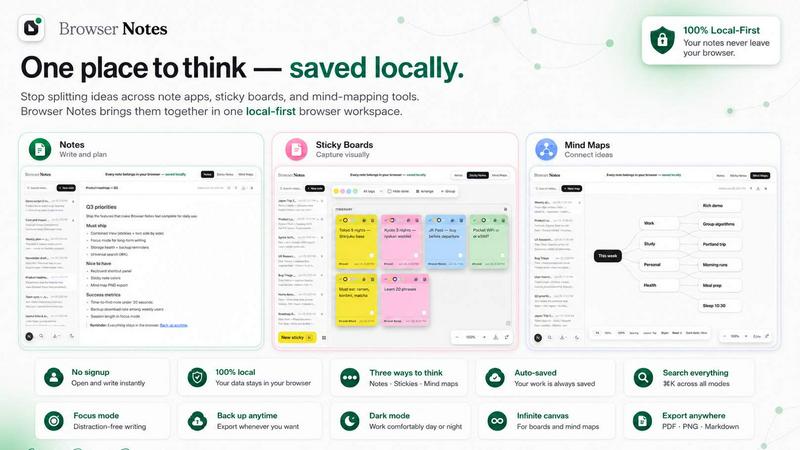
About Browser Notes
Browser Notes is a local-first workspace that lives inside your Chrome browser. It brings together three essential thinking tools: standard notes, sticky notes, and mind maps. The core idea is simple: your thoughts and ideas should stay on your device, not in someone else's cloud. Many people use separate apps for writing, brainstorming, and mapping ideas. This scatters your work and often forces you to create accounts, accept tracking, and trust third-party servers with private information. Browser Notes solves this by giving you one unified space where everything is stored locally in your browser. There is no account to create, no tracking scripts running in the background, and no forced synchronization to external servers. You can work completely offline, which means your ideas remain accessible even without an internet connection. The product is designed for students who want to keep study notes private, professionals who brainstorm project ideas, writers who draft content, and anyone who values control over their own data. You can back up your data manually at any time, giving you full ownership and portability. Browser Notes strips away the complexity of modern note-taking apps and returns to a foundational principle: your notes belong to you, stored where you work. It is a return to basics, putting the user in complete control without any hidden costs or data collection.
Features of Browser Notes
Notes with Markdown Formatting
Write and format your notes using Markdown, a simple and readable syntax that converts plain text into structured content. You can add headings, bold and italic text, bullet lists, numbered lists, links, and code blocks without needing a complex toolbar. Markdown is a foundational skill for writers and developers, and Browser Notes makes it easy to learn and use. Everything you write stays local, so your formatting choices are saved directly in your browser. This feature is perfect for creating clean, organized documentation, meeting notes, or personal journals. The simplicity of Markdown means you focus on your words, not the interface.
Sticky Notes on a Free Canvas
Brainstorming often requires visual freedom. Browser Notes provides a free canvas where you can place sticky notes anywhere, resize them, and move them around. This mimics the physical experience of using a whiteboard or corkboard, but without the clutter of physical supplies. You can use different colors to categorize ideas, group related thoughts, and rearrange your board as your thinking evolves. The canvas is infinite, so you never run out of space. This feature is ideal for visual thinkers who need to see the big picture and make connections between scattered ideas. It is a back-to-basics approach to brainstorming that puts creativity first.
Mind Maps for Branching Ideas
When you need to explore a central concept in depth, mind maps help you branch out ideas logically. Browser Notes lets you create a central node and add connected branches for subtopics, details, and related thoughts. You can expand each branch further, creating a tree of interconnected ideas. This is a fundamental technique for planning essays, projects, presentations, or any complex topic. The mind map feature is visual, interactive, and entirely local. You can start from a blank map or use a template to get started quickly. It helps you see relationships between ideas that might be missed in linear notes.
Local Storage with Manual Backup
Every note, sticky note, and mind map you create is stored directly in your browser's local storage. This means your data never leaves your computer unless you choose to back it up. You can export your entire workspace as a backup file at any time and store it on your own hard drive, USB stick, or private cloud. If you need to restore your data, you can import a backup file with a single click. This feature gives you complete control over your information. There is no automatic sync to servers you do not control, no data mining, and no risk of a company losing your notes. It is a foundational principle of data ownership.
Use Cases of Browser Notes
Organizing Study Notes for Exams
Students can use Browser Notes to compile all their study materials in one place. Write detailed notes with Markdown for each subject, use sticky notes on a canvas to memorize key facts, and create mind maps to understand how different topics connect. Everything is stored locally, so there is no risk of losing notes due to a cloud service shutdown. You can study offline in a library or on a train without needing internet access. Backing up your notes to a USB drive ensures you never lose your semester's work. This is a reliable, private way to manage academic information.
Brainstorming Project Plans
Professionals and teams can use the sticky note canvas to brainstorm project ideas, tasks, and timelines. Start with a central goal, then add sticky notes for each milestone, task, and resource needed. You can color-code sticky notes by priority or department. Once the brainstorming is done, transfer structured tasks into a Markdown note for a clear action plan. Because everything is local, sensitive project details remain confidential. This use case brings the physical whiteboard experience into your browser, with the added benefit of permanence and searchability.
Drafting and Structuring Written Content
Writers, bloggers, and content creators can use the mind map feature to outline articles, blog posts, or book chapters. Start with the main topic in the center, then branch out into subtopics, arguments, and supporting points. Once the structure is clear, write the full content in a Markdown note, using headings and lists to maintain organization. Sticky notes can hold research snippets or quotes. This workflow keeps all your writing resources in one local workspace, free from distractions and data tracking.
Managing Personal Knowledge and Ideas
For anyone who wants to keep a private journal, idea log, or personal wiki, Browser Notes provides a secure environment. You can create daily notes with Markdown, use sticky notes for quick reminders, and build mind maps for long-term goals or life planning. Because no account is required, there is no digital footprint tied to your identity. You can access your notes anytime, even without the internet. Manual backups let you archive old ideas and start fresh without losing anything. This is a fundamental tool for personal information management.
Frequently Asked Questions
Do I need to create an account to use Browser Notes?
No, you do not need an account. Browser Notes is designed to be completely private and local. There is no sign-up, no email verification, and no profile to create. You install the Chrome extension and start using it immediately. This eliminates the need to remember passwords or trust a third party with your personal information.
Is my data safe if I clear my browser history or cache?
Your notes are stored in your browser's local storage, which is separate from your browsing history and cache. However, local storage can be cleared if you use browser tools to delete site data. To be safe, you should regularly create a manual backup of your workspace using the backup feature. This backup file can be stored on your computer or an external drive and imported back into Browser Notes at any time.
Can I use Browser Notes without an internet connection?
Yes, Browser Notes works fully offline. Because everything is stored in your browser's local storage, you do not need an active internet connection to create, edit, or view your notes, sticky notes, or mind maps. This makes it ideal for use in areas with unreliable internet, on airplanes, or in any situation where you want to work without distractions.
How do I back up my data and restore it later?
To back up your data, use the backup option within the extension. This will create a single file containing all your notes, sticky notes, and mind maps. Save this file to a safe location on your computer or an external drive. To restore, use the import backup feature and select the backup file. Your workspace will be restored exactly as it was when you created the backup. You can do this as many times as you like.
Explore more in this category:
Similar to Browser Notes

Panzoe is an all-in-one AI platform for personal productivity, business automation, AI assistants, content creation, and custom AI solutions.

Free online Markdown to text converter. Strip formatting, copy readable plain text instantly, and keep every conversion private in your browser.

AI Email Filter sorts incoming mail into folders using plain-language prompts you write. Works with any IMAP mailbox; bring your own LLM if you want.

No-code 2D game editor: visual node logic, drag-and-drop scenes, live preview. Exports to Windows, macOS, Linux, Android, iOS, Web.

A free launch checklist for SaaS, apps, AI tools and more. Every step says why it matters and when you can skip it.

Free collection of online developer utilities, code formatters, and digital converters designed to streamline your daily workflow.

Visual financial timelines for couples and young professionals: model cash flow, life events, and shared goals.

The #1 Native Form Builder Plugin for Framer - No Code, No Embeds, No External Platforms.