
Bg Eraser
Bg Eraser removes backgrounds from your photos in batches, giving you clean transparent images without signups or storing your files.
Visit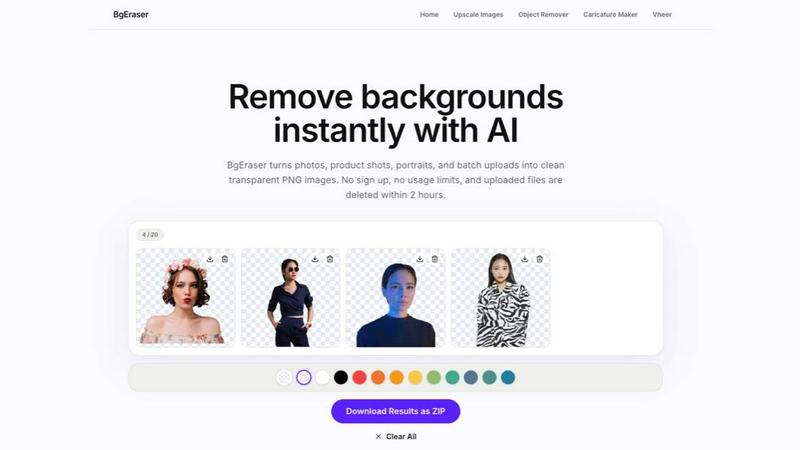
About Bg Eraser
Bg Eraser is a straightforward, web-based tool that uses artificial intelligence to remove the background from any image. Its primary function is to take a photo, identify the main subject, and separate it from its background, delivering a clean transparent PNG file. This process, which once required manual effort in complex software like Photoshop, is now automated and accessible to anyone with a web browser. The tool is designed for a wide audience, including e-commerce sellers who need to prepare product photos for online marketplaces, graphic designers who require cut-out images for their projects, photographers who want to quickly isolate subjects, and content creators who need visuals for social media or presentations. The core value proposition of Bg Eraser is its simplicity and efficiency. It removes the need for software installation or account registration. Users can simply drag and drop their images onto the website and download the result within seconds. A key feature is its ability to process up to twenty images at once, which is a significant time-saver for batch work. The tool prioritizes user privacy by automatically deleting all uploaded and processed files from its servers within two hours. This ensures that your images, especially those of products or people, do not remain stored online. Bg Eraser supports common image formats like JPG, PNG, and WebP, making it a versatile and practical solution for everyday image editing needs. It returns to the fundamental task of background removal, making it fast, private, and free from the complexity of traditional editing software.
Features of Bg Eraser
AI Background Eraser
This is the core feature of the tool. It utilizes advanced artificial intelligence to analyze your image, detect the primary subject, and separate it from the background. The AI is trained to handle a variety of subjects, including people, products, pets, and logos. It works by identifying the edges of the subject and preserving them with clean, sharp lines. This eliminates the need for manual selection or tracing. The result is a high-quality cut-out that maintains the detail of the original subject, such as hair, fur, or the intricate shape of a product. This feature is the fundamental engine that powers the entire tool, turning a complex task into a one-click operation.
Batch Background Removal
This feature allows you to upload and process up to twenty images simultaneously. Instead of removing backgrounds one image at a time, you can select a folder of product photos, portraits, or any other images and let the AI work through the entire batch in the same workspace. This is a significant efficiency gain for users who need to prepare multiple images for a catalog, an online store listing, or a series of social media posts. The batch processing streamlines the workflow, reducing the time spent on repetitive tasks and allowing you to focus on other aspects of your project. All processed images can then be downloaded together as transparent PNGs.
Transparent PNG Output
After the background is removed, Bg Eraser delivers the final image as a transparent PNG file. A transparent PNG means the area where the background used to be is now see-through. This is the standard format for images that need to be placed on different backgrounds, such as on a website, a product listing on a marketplace, or a design mockup. The transparency allows the subject to seamlessly integrate into any new environment without a white or colored box around it. This output format is essential for professional-looking graphics and is a direct result of the AI's precision in cutting out the subject.
Privacy-First Auto Deletion
This feature is built around user security and data privacy. When you upload an image to Bg Eraser, the file is sent to the server for processing. The tool’s policy is to automatically and permanently delete the original uploaded file and the resulting transparent PNG from its servers within two hours of upload. This means there is no long-term storage of your images on the platform. You do not need to create an account or sign up, so no personal data is linked to your images. This feature provides peace of mind, especially for users processing sensitive or proprietary product photos, personal portraits, or any image they do not want to remain online.
Use Cases of Bg Eraser
E-commerce Product Photography
For online sellers on platforms like Amazon, eBay, or Etsy, product images with a clean white or transparent background are often a requirement. Bg Eraser allows sellers to take photos of their products in any setting and instantly remove the distracting background. The resulting transparent PNG can then be placed on a pure white background for a professional listing. The batch processing feature is particularly useful here, as a seller can upload all twenty product photos from a new inventory at once and have them ready for listing in minutes, instead of editing each one manually.
Creating Profile Pictures and Avatars
Users often need a clean, professional-looking profile picture for social media, professional networks like LinkedIn, or business websites. Bg Eraser can take a casual portrait photo and remove the background, leaving just the person. This isolated image can then be placed on a solid color background or kept transparent for use on different platforms. It provides a simple way to create a consistent and polished personal brand image without needing a professional photography studio or advanced editing skills.
Preparing Graphics for Presentations and Documents
When creating a slideshow, report, or marketing document, you may want to use an image of a product, a person, or a logo without the box or background it originally had. Bg Eraser allows you to extract these elements cleanly. You can then place the transparent subject directly onto a slide background or within a paragraph of text. This creates a more integrated and professional look for your document, as the image appears to be part of the page layout rather than a pasted-in picture.
Design Mockups and Social Media Content
Graphic designers and content creators frequently need cut-out images to build their compositions. For example, creating a mockup of a t-shirt design requires a transparent image of the shirt. Bg Eraser can process a photo of a plain t-shirt to produce this. Similarly, creating a collage for an Instagram post or a YouTube thumbnail often involves combining several images. The tool provides the clean, isolated subjects needed to build these visuals from scratch, allowing for more creative freedom in assembling the final graphic.
Frequently Asked Questions
What is Bg Eraser?
Bg Eraser is a free, online tool that uses artificial intelligence to automatically remove the background from images. It is designed to be simple and fast, requiring no account registration or software download. You upload an image, the AI processes it, and you can download the result as a transparent PNG file. The tool prioritizes privacy by automatically deleting all uploaded and processed files from its servers within two hours.
Can I remove backgrounds from multiple images at once?
Yes, Bg Eraser supports batch processing. You can upload up to twenty images at the same time. The AI will process all of them in the same workspace, removing the background from each image. This allows you to prepare multiple product photos, portraits, or other images for your projects much faster than editing them one by one.
What image formats does Bg Eraser support?
Bg Eraser supports the most common image file formats: JPG, PNG, and WebP. You can upload images in any of these formats. Once the background is removed, the final output is always provided as a transparent PNG file. This is the standard format for images that need to be placed on different backgrounds.
How does Bg Eraser protect my privacy?
Bg Eraser is designed with privacy as a key feature. You do not need to create an account or sign in to use the tool. All images you upload and the resulting processed files are automatically and permanently deleted from the tool's servers within two hours of your upload. This ensures that your images are not stored long-term, protecting your privacy and the security of your content.
Explore more in this category:
Similar to Bg Eraser

Plan content, get client approvals, publish to nine social platforms, manage your inbox and report from one workspace.

See every app and what it's using in plain English, and end or slow down the one that's hogging your Mac.

Clip pages, take full-page screenshots and batch-capture list data to Notion, Feishu, Obsidian, Markdown, CSV or JSON.

Search tabs, Chrome bookmarks and history, run browser commands, and save webpages and social posts locally—no account.

Chrome extension for Todoist that nests sub-tasks under their parents in Today, Upcoming, Filter and Label views, where Todoist shows them flat.

Every key you press lights up on an on-screen keyboard, and each shortcut is named. For screen recordings, demos and learning shortcuts.

Little characters peek out of your Mac's notch to remind you to drink water, eat, sit up and get to bed. Quiet during calls. $4.99 once.

Free fullscreen light screen tool online. Turn any display into a flashlight, ambient light, or solid-color screen. No download or sign-up.