
About Avif2Png
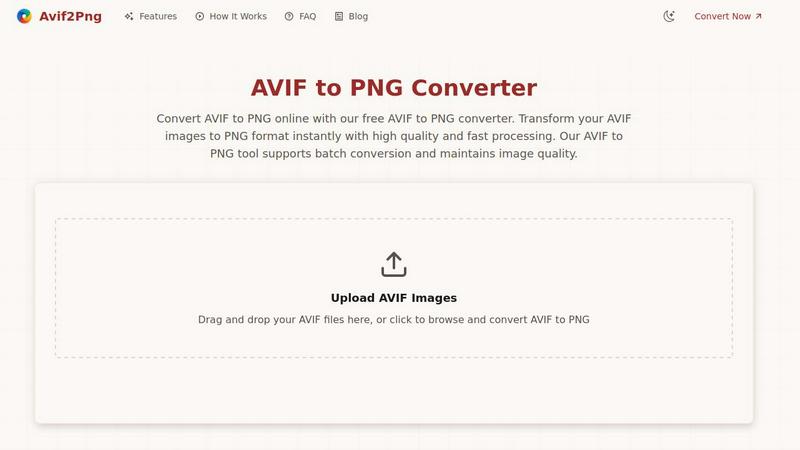
Avif2Png is a fundamental online utility designed to solve a specific and growing need in digital image management: converting modern AVIF image files into the widely compatible PNG format. At its core, this tool addresses a basic compatibility gap. The AVIF (AV1 Image File Format) is a newer image standard known for its excellent compression, which means smaller file sizes with high quality. However, its adoption is not yet universal across all software, operating systems, and web browsers. PNG (Portable Network Graphics), on the other hand, is a foundational format with near-universal support. Avif2Png provides the essential bridge between these two formats. It is built for anyone who has an AVIF file but needs to use it in an environment where PNG is required. This includes web developers ensuring their site images display for all visitors, graphic designers preparing assets for clients using various software, and general users who need to share or print an image without compatibility issues. The main value proposition of Avif2Png lies in its straightforward, secure, and efficient conversion process that maintains visual quality, supports multiple files at once, and requires no technical expertise or software installation.
Features of Avif2Png
Free Online Conversion
Avif2Png operates entirely online and is completely free to use. There is no requirement to register for an account, subscribe to a service, or download any software. This removes the foundational barrier to entry, allowing anyone with an internet connection and a file to convert to access the tool instantly. The free model ensures that the essential task of format conversion is accessible to students, hobbyists, and professionals alike without any cost considerations.
Batch File Processing
A key feature that enhances productivity is the ability to process multiple AVIF images simultaneously. Instead of converting files one by one, which is time-consuming, users can upload several AVIF files at once. The tool will then convert the entire batch to PNG format in a single operation. This batch conversion capability is a fundamental efficiency booster for users dealing with collections of images, such as from a photo shoot or a set of web graphics.
Quality-Preserving Conversion
The conversion process from AVIF to PNG is designed to be lossless concerning the visual data. This means that the tool decodes the AVIF file and re-encodes it into the PNG format without applying compression that degrades the image's sharpness, color accuracy, or detail. The resulting PNG file maintains the visual integrity of the original AVIF image, which is crucial for professional work where quality cannot be compromised.
Secure and Private Processing
Security is treated as a basic requirement. Uploaded AVIF files and the resulting PNG conversions are handled securely on the server. Crucially, the files are not stored indefinitely. They are automatically deleted from the servers shortly after the conversion process is complete. This approach ensures user privacy and data security, providing peace of mind that personal or professional images are not retained or misused.
Use Cases of Avif2Png
Ensuring Universal Web Compatibility
Web developers and content creators use Avif2Png to guarantee that images display correctly across all web browsers and devices. While modern browsers support AVIF, many older browsers and some content management systems (CMS) or email clients do not. Converting AVIF assets to PNG ensures that every site visitor, regardless of their browser version, sees the images as intended, which is a foundational principle of accessible web design.
Preparing Graphics for Design and Editing
Graphic designers and digital artists often receive or create assets in AVIF for its size benefits. However, when they need to edit these images in popular software like Adobe Photoshop, GIMP, or Canva, or when the project requires features like transparency (alpha channels), PNG is the required and reliable format. Avif2Png provides the essential first step to make these modern files editable in standard design ecosystems.
Facilitating Print and Publication Workflows
Print services, publishing platforms, and document creation software frequently have strict format requirements, with PNG being a universally accepted standard for high-quality raster graphics. Converting AVIF images to PNG ensures they are compatible with these professional workflows, preventing last-minute format errors and ensuring the final printed or published material reflects the intended image quality.
Simplifying Cross-Platform Sharing
For general users, sharing an image via email, messaging apps, or social media can be problematic if the recipient's device or app cannot open the AVIF format. This leads to confusion and failed communication. Using Avif2Png to convert to PNG before sharing is a basic and effective solution, as PNG is readable on virtually every computer, smartphone, and tablet, ensuring the image can be viewed by anyone.
Frequently Asked Questions
What is the difference between AVIF and PNG formats?
AVIF is a modern image format that uses advanced compression (based on the AV1 video codec) to create very small file sizes while maintaining high image quality. PNG is an older, well-established format that uses lossless compression, meaning it preserves all image data perfectly but often results in larger files than AVIF. The core difference is that AVIF prioritizes efficiency, while PNG prioritizes universal compatibility and perfect quality preservation.
Is there a limit to the number or size of files I can convert?
Based on the provided information, Avif2Png is a free tool that supports batch conversion, implying you can convert multiple files at once. However, most online tools have practical limits on individual file size or the total size of a batch upload to ensure server stability and fast processing for all users. For specific limits, it is best to check the tool's website interface at the time of use.
Are my uploaded images kept private and secure?
Yes. A fundamental principle of Avif2Png is user privacy and security. The service is designed to automatically delete your uploaded AVIF files and the converted PNG files from its servers shortly after the conversion process is complete. This means your images are not stored long-term, shared, or used for any other purpose, ensuring your data remains confidential.
Do I need to install any software to use Avif2Png?
No. Avif2Png is a web-based application that runs entirely in your internet browser. There is no need to download, install, or update any software on your computer, phone, or tablet. This makes it a fundamentally accessible tool that works across different operating systems (Windows, macOS, Linux, etc.) as long as you have a modern web browser.
Similar to Avif2Png

Free AI attractiveness test and face analysis with private, on-device photo processing.

Generate and edit production-ready images with GPT Image 2 using prompts, reference images, clear text rendering, and a developer-friendly API.

Explore Flux LoRA workflows in a browser-based AI Studio, with a roadmap for models, generation, and guided training.

Turn any image into editable layers with AI

One AI enhancer for photos, images, videos, and creative effects.

Turn videos, images, and files into secure direct links for sharing, embedding, and automated workflows.

Free AI image editor that edits, retouches, and transforms photos with natural-language text prompts.

StopScroll is an AI thumbnail maker that generates YouTube thumbnail concepts from a URL, title, or prompt.