Perkoon vs SupaSidebar
Side-by-side comparison to help you choose the right product.

Perkoon enables free unlimited peer-to-peer file transfers without signup, ensuring your files stay private and secure.
Last updated: March 4, 2026

SupaSidebar
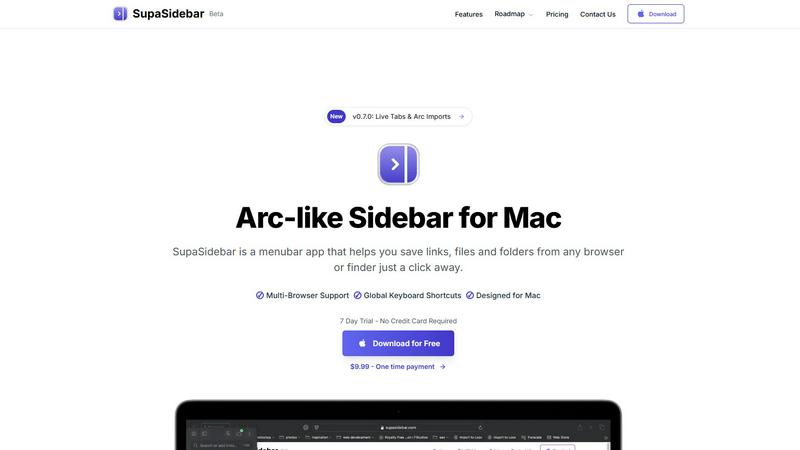
SupaSidebar gives you instant keyboard access to your links, files, and folders on Mac.
Last updated: February 28, 2026
Visual Comparison
Perkoon

SupaSidebar
Feature Comparison
Perkoon
Peer-to-Peer (P2P) File Transfer
Perkoon's flagship feature allows users to send files directly between browsers without any size limitations or sign-ups. This P2P technology ensures that files are transmitted securely and privately, as they do not pass through any central servers. This direct connection makes file sharing efficient and stress-free.
Encrypted Cloud Storage
For instances when recipients are offline, Perkoon provides an encrypted cloud storage solution. This paid feature securely holds files until the recipient is available to download them. The encryption ensures that users' data remains private and protected during transit and storage.
Built-in Automation Tools
Perkoon is designed with the modern user in mind, incorporating built-in tools that allow for automation and integration with AI agents. These features streamline the file transfer process, enabling users to interact with the service directly without the need for cumbersome screen-scraping methods.
Referral and Rewards Program
Perkoon offers a unique referral program that rewards users for sharing the service with others. By sending a referral link, users can earn extra storage space when their friends sign up and transfer files. This incentivizes community growth while benefiting all participants.
SupaSidebar
Universal Capture with Keyboard Shortcuts
SupaSidebar empowers you to save content without interrupting your flow. Using intuitive global keyboard shortcuts, you can instantly capture the current website link (CMD+CTRL+S) or copy it to your clipboard (CMD+CTRL+C) directly from any browser. This eliminates the tedious process of manually copying, switching apps, and pasting, making saving references, articles, or tools a seamless part of your browsing experience.
Recents History for Instant Recall
Never lose track of your digital trail. SupaSidebar automatically tracks every website you visit across all supported browsers for the past 48 hours, logging them in the "Recents" section. This feature acts as a short-term memory for your Mac, allowing you to instantly find and re-open that webpage you were viewing just a short while ago without digging through your browser history or countless open tabs.
Fast Universal Search
Access anything on your Mac with a single keystroke. By pressing CMD+CTRL+K, you activate a powerful search bar that scans across all your saved items—websites, files, folders, and applications. This centralized search function means you can launch apps, open documents, or navigate to saved links without ever taking your hands off the keyboard, dramatically speeding up task switching.
Organized Spaces and Pinned Favorites
Keep your most critical resources immediately accessible. You can pin important links, files, or folders to the top of your sidebar for one-click access. Furthermore, SupaSidebar organizes items into separate "Spaces," allowing you to categorize resources by project, topic, or context. This structure helps maintain order and ensures you can quickly find what you need for your current task.
Use Cases
Perkoon
Personal File Sharing
Individuals can use Perkoon to share large files with friends and family without worrying about size limits or fees. Whether sending vacation photos or important documents, Perkoon makes personal file sharing simple and hassle-free.
Team Collaboration
For teams working remotely, Perkoon serves as an essential tool for sharing project files and documents. The ability to send large files without restrictions streamlines collaboration, ensuring that team members can access the resources they need promptly.
Secure Business Transactions
Businesses can rely on Perkoon for secure file transfers, especially when dealing with sensitive information. The P2P feature ensures that confidential documents remain private, and the encrypted cloud storage provides an additional layer of security.
AI Integration
Developers and tech enthusiasts can leverage Perkoon’s capabilities by integrating it with AI agents. This allows for automated file transfers and interactions, enhancing productivity and efficiency in various applications.
SupaSidebar
Academic Research and Study
For students and academics, SupaSidebar streamlines the research process. You can quickly save journal articles, reference websites, and PDF documents into dedicated project spaces while studying. The "Recents" history helps you backtrack through sources, and the universal search lets you instantly pull up any saved material when writing papers or preparing for exams, keeping all research materials consolidated and accessible.
Project Management and Development
Developers and project managers can use SupaSidebar to centralize all project-related assets. Create a space for each project to hold links to documentation, design mockups, task boards, repository pages, and local project folders. This eliminates the need to bookmark in multiple browsers or navigate deep into file systems, providing a single, persistent hub for all project resources right from the desktop.
Streamlined Content Creation
Writers, designers, and content creators can benefit greatly. Save inspiration links, stock photo folders, branding guidelines, and writing templates directly into the sidebar. When working, quickly jump between research tabs, asset folders, and writing apps using keyboard shortcuts, maintaining a focused creative workflow without the clutter of dozens of open windows and tabs.
Daily Personal Productivity
For everyday Mac users, SupaSidebar reduces digital friction. Keep your daily checklists, often-used finance websites, favorite news links, and personal document folders pinned and ready. It replaces the need for scattered bookmarks and desktop clutter, offering a clean, fast, and organized way to access the digital tools you use every day, saving time and mental energy.
Overview
About Perkoon
Perkoon is an innovative file transfer service designed to simplify the way individuals and teams share files. In a digital landscape cluttered with limitations and unnecessary complexity, Perkoon redefines file sharing by offering a straightforward solution that prioritizes user experience and privacy. It caters to anyone frustrated with traditional file transfer methods that impose artificial limits, require mandatory sign-ups, or treat user data as a commodity. Perkoon's core offering includes two efficient ways to send files: a free peer-to-peer (P2P) service that allows users to transfer files directly between browsers when both parties are online, and a secure cloud storage option for offline transfers, available through a paid plan. With its commitment to free usage, privacy, and user-friendly automation tools built for the age of AI, Perkoon stands out as a trusted and robust solution for file transfer needs.
About SupaSidebar
SupaSidebar is a dedicated menubar application for Mac, designed to fundamentally improve how you access and organize your digital work. Inspired by the efficient sidebar concept of the Arc browser, it provides a universal, always-accessible panel for your most important resources. At its core, SupaSidebar solves a simple but widespread problem: the time and effort wasted switching between apps, hunting for files, and managing countless browser tabs. It allows you to instantly save and retrieve links from any major web browser—including Safari, Chrome, Firefox, Brave, and Arc—as well as files and folders directly from your Finder. All data is stored locally on your Mac, ensuring privacy and speed. The application is built for anyone seeking a more organized and focused workflow, from students and researchers managing sources to professionals juggling multiple projects. Its main value proposition is delivering a clutter-free, keyboard-centric command center that keeps your essential tools at your fingertips, reducing distraction and significantly boosting daily productivity on macOS.
Frequently Asked Questions
Perkoon FAQ
Is Perkoon really free?
Yes, Perkoon offers a free P2P file transfer service that does not impose size limits or require user accounts. This service is free because it operates on a decentralized model that costs Perkoon nothing to run.
How does cloud storage work with Perkoon?
When files need to be stored for offline recipients, Perkoon offers encrypted cloud storage as a paid feature. This ensures that files are held securely until the recipient can access them.
Can I use Perkoon on any browser?
Perkoon is compatible with Chrome, Edge, and Brave browsers without any limits. However, users of Firefox and Safari may encounter certain restrictions due to browser-specific limitations.
How can I earn rewards through the referral program?
By sharing your unique referral link, you can invite others to use Perkoon. When they sign up and transfer files, both you and your friend can earn additional storage space, creating a mutually beneficial system.
SupaSidebar FAQ
Is SupaSidebar a browser extension?
No, SupaSidebar is not a browser extension. It is a standalone menubar application installed directly on your macOS system. It works alongside your existing browsers by using system-level accessibility features to communicate with them, allowing it to capture links and history from Safari, Chrome, Firefox, Brave, Arc, and others without requiring individual extensions for each one.
Which browsers does SupaSidebar work with?
SupaSidebar is compatible with all major browsers on Mac. This includes Safari, Google Chrome, Mozilla Firefox, Brave, and the Arc browser. The application is designed to integrate seamlessly with these browsers to capture your current tab's link and track your browsing history directly from its sidebar interface.
What macOS version do I need?
SupaSidebar requires macOS 13 (Ventura) or a later version to function properly. This ensures compatibility with the necessary system frameworks and security features that allow the app to operate reliably across your applications and provide its full set of features, including global keyboard shortcuts and browser integration.
Where is my data stored?
All your data within SupaSidebar--including saved links, files, folders, and your browsing history--is stored locally on your Mac. Nothing is sent to or stored on external servers. This local-first approach prioritizes your privacy and security, ensures fast access to your information, and means your data remains entirely under your control.
Alternatives
Perkoon Alternatives
Perkoon is a unique file transfer service that falls under the category of productivity and management tools. It offers users the ability to send files for free using peer-to-peer technology, which eliminates the need for sign-ups and size restrictions. This straightforward approach appeals to individuals seeking a hassle-free experience when transferring data, especially in an age where many services impose limitations or treat user data as a commodity. Users often look for alternatives to Perkoon for various reasons such as pricing, feature sets, or specific platform compatibility. When searching for a suitable alternative, it's essential to consider factors like the ease of use, privacy policies, file size limits, and any additional functionalities that may enhance your file transfer experience. A good alternative should prioritize user needs without compromising on security or convenience.
SupaSidebar Alternatives
SupaSidebar is a Mac productivity application designed to streamline your digital workspace. It acts as a central hub, providing instant access to your most-used links, files, and folders directly from your desktop sidebar. This tool helps users reduce clutter and maintain focus by keeping essential resources organized and just a click away. Users often explore alternatives for various practical reasons. Some may seek different pricing models, such as a free tier or a one-time purchase. Others might need specific features not offered, require compatibility with Windows, or simply prefer a different user interface and workflow. It's a normal part of finding the right tool for your individual needs. When evaluating an alternative, consider your core requirements. Key factors include the depth of browser integration, the efficiency of the search and command functions, and how well it organizes links and recent history. The goal is to find a solution that genuinely simplifies your daily computer use without adding complexity.