Image3D AI vs Proofapp
Side-by-side comparison to help you choose the right product.

Image3D AI
Image3D AI transforms any 2D image into high-quality 3D models for printing and game design without any 3D skills.
Last updated: March 1, 2026

Proofapp
Proofapp lets you leave visual comments directly on websites to replace endless email feedback.
Last updated: March 4, 2026
Visual Comparison
Image3D AI
Proofapp

Feature Comparison
Image3D AI
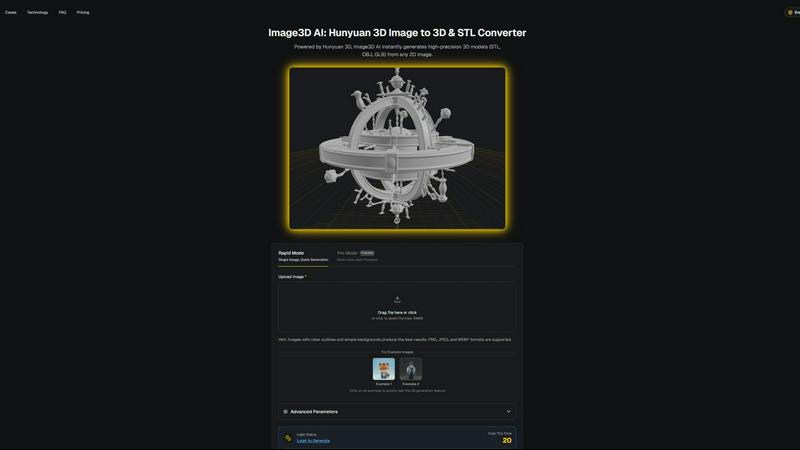
Rapid Mode
Rapid Mode allows users to convert a single image into a 3D model quickly, making it ideal for those needing fast results. This feature emphasizes speed and efficiency, generating 3D assets in just minutes. Users can easily upload their images, and the AI does the heavy lifting of interpreting the image data to create a basic 3D model.
Pro Mode
Pro Mode is designed for professionals requiring higher precision and detail. It enables users to upload multiple views of an object, allowing the AI to create a more accurate and complex 3D model. This mode is perfect for users who need high-quality outputs, such as game developers and product designers, ensuring that the generated models meet rigorous standards.
Multi-Format Export
Image3D AI supports multiple file formats for exporting generated 3D models, including STL, OBJ, and GLB. This versatility allows users to choose the best format for their specific needs, whether for 3D printing, game development, or web applications. Each format is tailored for different uses, ensuring compatibility with various software and platforms.
Best Practices Guide
The Best Practices Guide offers users essential tips to enhance the quality of their image-to-3D conversions. It covers topics such as selecting the right images, understanding generation modes, and leveraging multi-view capabilities. By following these guidelines, users can improve their results significantly, maximizing the potential of Image3D AI.
Proofapp
Visual Commenting
This is the foundational feature of Proofapp. Instead of describing issues with words, reviewers can click directly on any part of the captured website screenshot to leave a comment. This action pins the feedback visually to the exact pixel location, eliminating all ambiguity. Team members can then reply within threaded conversations directly on that pin, attach supporting files, and mark comments as resolved once the feedback has been addressed. This creates a clear, actionable, and organized record of all project feedback in one central location.
Multi-Breakpoint Testing
Proofapp understands that modern websites must work across multiple devices. When you provide a URL, the platform automatically captures screenshots at both standard desktop and mobile screen sizes. This allows designers, developers, and clients to review and provide feedback on how the site appears and functions on different screen breakpoints simultaneously. This feature ensures that responsive design issues are caught and communicated visually early in the review process, preventing problems from being discovered only after launch.
Secure Share Links & Guest Access
Collaboration is made effortless with Proofapp's sharing system. Project owners can generate a secure, shareable link to send to clients or external stakeholders. Crucially, reviewers do not need to create a Proofapp account to view the project and leave comments, which drastically reduces friction for client feedback. These links can also be set to expire after a certain period, and the platform offers role-based permissions for enterprise users, providing control over who can view or comment on sensitive projects.
Real-time Collaboration & Notifications
Proofapp turns static feedback into a dynamic conversation. When a team member or client leaves a new comment or replies to an existing thread, all other participants with access to the project are notified in real-time. This live-updating dashboard ensures everyone is on the same page, can respond quickly, and see the progress of feedback resolution as it happens. This feature integrates with tools like Slack to push notifications, keeping the team connected and moving forward without constant manual checking.
Use Cases
Image3D AI
Game Development
Game developers can leverage Image3D AI to rapidly generate high-quality 3D assets from concept art or existing 2D images. The ability to create game-ready models with PBR material support allows for seamless integration into popular game engines like Unity and Unreal Engine, enhancing the overall gaming experience.
E-commerce Product Visualization
For e-commerce professionals, Image3D AI offers the capability to convert product images into interactive 3D models. These models can be used for AR previews or online showcases, providing customers with a more engaging and informative shopping experience that helps drive sales.
3D Printing Projects
Hobbyists and professionals in the 3D printing sphere can utilize Image3D AI to generate high-precision STL files from their images. The tool ensures that these files are print-ready, enabling users to bring their digital designs to life with ease and accuracy.
Architectural Design
Architects and designers can take advantage of Image3D AI to quickly produce architectural models from 2D sketches or photographs. This feature saves significant modeling time and enhances efficiency, allowing professionals to focus on creative aspects rather than technical modeling details.
Proofapp
Freelancer Client Approvals
Freelancers, such as web designers or developers, can use Proofapp to collect clear, organized feedback from their clients. By sharing a simple link, clients can point directly to what they want changed on the design mockup or live site. This professional approach saves hours typically spent deciphering email descriptions, reduces revision rounds, and helps freelancers deliver exactly what the client envisions, leading to higher satisfaction and faster project completion.
In-house Design & Development Team Workflow
Internal teams can streamline their handoff and review processes. A designer can upload a prototype, and developers can pin technical questions or visual bugs directly onto the design. Project managers can track progress as comments are resolved. This centralized, visual system replaces disjointed communication across chat apps, email, and project management tools, creating a single source of truth for the project's feedback and required changes.
Marketing Campaign & Landing Page Reviews
Marketing teams often need to gather input from multiple stakeholders on campaign assets or new landing pages. Proofapp allows the entire team-sales, content, and leadership-to review the live page visually. Comments about copy, imagery, or call-to-action placement are pinned in context, ensuring feedback is specific and actionable. This collaborative review prevents last-minute changes and miscommunication before a high-stakes campaign goes live.
Agency Managing Multiple Client Projects
Digital agencies managing several client projects simultaneously need organized systems. Proofapp allows them to create separate projects for each client. They can then use secure share links to gather feedback, keeping all client communication visually organized within its dedicated project space. This prevents feedback from different clients from getting mixed up, improves accountability, and presents a professional, modern image to their clients.
Overview
About Image3D AI
Image3D AI is a revolutionary professional tool designed to address a fundamental challenge in digital creation: the transformation of flat, two-dimensional images into fully realized three-dimensional models. Utilizing the advanced artificial intelligence capabilities of Tencent's Hunyuan 3D engine, Image3D AI interprets depth, shape, and texture from photographs or drawings. This innovative process, which typically requires extensive time and expertise in complex software like Blender, can now be completed in just minutes, significantly streamlining workflows. The primary value proposition of Image3D AI lies in its accessibility and efficiency, empowering anyone with an image to become a creator without the steep learning curve associated with traditional 3D modeling. Whether users start with a single photo or multiple angles, the AI generates production-ready 3D assets that include detailed geometry and realistic materials. This versatility makes Image3D AI suitable for a diverse audience, including 3D printing enthusiasts, game developers, and e-commerce professionals seeking interactive product displays. By simplifying the conversion process from image to 3D model, Image3D AI acts as a crucial bridge connecting imagination with tangible, usable digital assets.
About Proofapp
Proofapp is a visual feedback and website review platform designed to fundamentally improve how teams collaborate on digital projects. At its core, Proofapp addresses the chronic inefficiencies of traditional feedback methods, such as long email chains, vague text descriptions, and misplaced screenshot attachments. The platform works by allowing users to simply input any website URL. It then automatically generates screenshots of the site at both desktop and mobile breakpoints, creating a visual canvas for precise feedback. Reviewers, including clients and team members, can click directly on any element of these screenshots to pin comments, creating unambiguous, context-rich feedback without the need for complex explanations. This process centralizes all communication, tracks resolution status, and significantly accelerates the review cycle. Proofapp is built for a wide range of users, from freelancers and small design studios to in-house marketing and development teams, who all share the common goal of shipping better work faster by eliminating communication friction and misalignment.
Frequently Asked Questions
Image3D AI FAQ
How does Image3D AI work?
Image3D AI uses advanced artificial intelligence to analyze 2D images and interpret depth, shape, and texture, converting them into 3D models. By utilizing the Hunyuan 3D engine, it performs this complex task in a matter of minutes.
What types of images work best for conversion?
Images with clear outlines, high contrast, and simple backgrounds yield the best results. Avoid using blurry or low-light images, as these can hinder the AI's ability to accurately interpret the object.
What file formats can I export my 3D models in?
Image3D AI supports several file formats for exporting your 3D models, including STL for 3D printing, OBJ for traditional 3D editing, and GLB for modern web and AR applications. This flexibility allows users to choose the format best suited for their needs.
Is there a learning curve to using Image3D AI?
No, Image3D AI is designed to be accessible for users of all skill levels. With no prior 3D modeling experience required, anyone can upload images and generate 3D models quickly and efficiently, democratizing the 3D creation process.
Proofapp FAQ
How do reviewers leave feedback without an account?
Reviewers do not need to sign up for a Proofapp account to participate. The project owner simply generates a secure, shareable link from within their Proofapp dashboard and sends it to the client or stakeholder. When the recipient opens the link, they will see the captured website screenshots and can immediately click anywhere to leave a comment, attach files, and join discussion threads, all as a guest user.
What website technologies does Proofapp support?
Proofapp works by capturing a live screenshot of any publicly accessible website URL you provide. It functions like a browser taking a picture of the page. Therefore, it supports any website technology that renders in a standard web browser, including static HTML sites, dynamic sites built with JavaScript frameworks like React or Vue, and content managed by platforms like WordPress or Webflow.
Can I give different access levels to different reviewers?
Yes, Proofapp offers role-based permissions, especially relevant for team and enterprise use. Project owners can control access by assigning roles such as "Admin," "Commenter," or "Viewer." This ensures that sensitive projects remain secure, and you can control who is allowed to edit project settings, leave comments, or only view the feedback.
How does the free trial work?
Proofapp offers a full-featured free trial that lasts for two months. During this trial period, you have complete access to the platform's features to test it with your real projects and team. No credit card is required to start the trial, allowing you to evaluate the tool's fit for your workflow without any financial commitment or risk.
Alternatives
Image3D AI Alternatives
Image3D AI is a cutting-edge tool designed to transform 2D images into fully realized 3D models, making it a vital resource in the realm of digital creation, particularly for 3D printing and game design. This innovative software leverages advanced artificial intelligence technology to automate a traditionally complex process, enabling users to generate high-quality models quickly and efficiently. Users often seek alternatives to Image3D AI for various reasons, including pricing, specific feature sets, or compatibility with different platforms. When looking for an alternative, it's essential to consider factors such as ease of use, the range of export formats available, the quality of 3D models produced, and the level of support for different applications. Evaluating these aspects will help ensure that the chosen tool meets your individual needs and enhances your creative workflow.
Proofapp Alternatives
Proofapp is a visual feedback and website review platform, falling into the category of design collaboration tools. It allows teams to capture screenshots of websites and pin comments directly on the design, streamlining the process of collecting and managing feedback from clients and colleagues. Users often explore alternatives for various reasons. A tool's pricing structure may not align with a team's budget as it grows, or it might lack a specific integration with other software in their workflow. Some teams may require more advanced features like version history or user testing, while others might need a platform that supports different types of digital assets beyond websites. When evaluating an alternative, consider your core needs. Focus on how the tool handles feedback collection and organization, its ease of use for both your team and external clients, and its cost relative to the value provided. The goal is to find a solution that centralizes communication, reduces revision cycles, and keeps projects moving forward efficiently.