
Image3D AI
Image3D AI transforms any 2D image into high-quality 3D models for printing and game design without any 3D skills.
Visit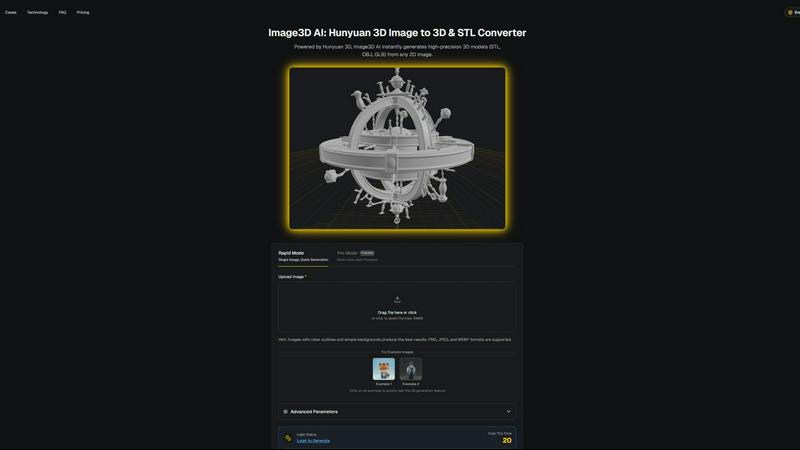
About Image3D AI
Image3D AI is a revolutionary professional tool designed to address a fundamental challenge in digital creation: the transformation of flat, two-dimensional images into fully realized three-dimensional models. Utilizing the advanced artificial intelligence capabilities of Tencent's Hunyuan 3D engine, Image3D AI interprets depth, shape, and texture from photographs or drawings. This innovative process, which typically requires extensive time and expertise in complex software like Blender, can now be completed in just minutes, significantly streamlining workflows. The primary value proposition of Image3D AI lies in its accessibility and efficiency, empowering anyone with an image to become a creator without the steep learning curve associated with traditional 3D modeling. Whether users start with a single photo or multiple angles, the AI generates production-ready 3D assets that include detailed geometry and realistic materials. This versatility makes Image3D AI suitable for a diverse audience, including 3D printing enthusiasts, game developers, and e-commerce professionals seeking interactive product displays. By simplifying the conversion process from image to 3D model, Image3D AI acts as a crucial bridge connecting imagination with tangible, usable digital assets.
Features of Image3D AI
Rapid Mode
Rapid Mode allows users to convert a single image into a 3D model quickly, making it ideal for those needing fast results. This feature emphasizes speed and efficiency, generating 3D assets in just minutes. Users can easily upload their images, and the AI does the heavy lifting of interpreting the image data to create a basic 3D model.
Pro Mode
Pro Mode is designed for professionals requiring higher precision and detail. It enables users to upload multiple views of an object, allowing the AI to create a more accurate and complex 3D model. This mode is perfect for users who need high-quality outputs, such as game developers and product designers, ensuring that the generated models meet rigorous standards.
Multi-Format Export
Image3D AI supports multiple file formats for exporting generated 3D models, including STL, OBJ, and GLB. This versatility allows users to choose the best format for their specific needs, whether for 3D printing, game development, or web applications. Each format is tailored for different uses, ensuring compatibility with various software and platforms.
Best Practices Guide
The Best Practices Guide offers users essential tips to enhance the quality of their image-to-3D conversions. It covers topics such as selecting the right images, understanding generation modes, and leveraging multi-view capabilities. By following these guidelines, users can improve their results significantly, maximizing the potential of Image3D AI.
Use Cases of Image3D AI
Game Development
Game developers can leverage Image3D AI to rapidly generate high-quality 3D assets from concept art or existing 2D images. The ability to create game-ready models with PBR material support allows for seamless integration into popular game engines like Unity and Unreal Engine, enhancing the overall gaming experience.
E-commerce Product Visualization
For e-commerce professionals, Image3D AI offers the capability to convert product images into interactive 3D models. These models can be used for AR previews or online showcases, providing customers with a more engaging and informative shopping experience that helps drive sales.
3D Printing Projects
Hobbyists and professionals in the 3D printing sphere can utilize Image3D AI to generate high-precision STL files from their images. The tool ensures that these files are print-ready, enabling users to bring their digital designs to life with ease and accuracy.
Architectural Design
Architects and designers can take advantage of Image3D AI to quickly produce architectural models from 2D sketches or photographs. This feature saves significant modeling time and enhances efficiency, allowing professionals to focus on creative aspects rather than technical modeling details.
Frequently Asked Questions
How does Image3D AI work?
Image3D AI uses advanced artificial intelligence to analyze 2D images and interpret depth, shape, and texture, converting them into 3D models. By utilizing the Hunyuan 3D engine, it performs this complex task in a matter of minutes.
What types of images work best for conversion?
Images with clear outlines, high contrast, and simple backgrounds yield the best results. Avoid using blurry or low-light images, as these can hinder the AI's ability to accurately interpret the object.
What file formats can I export my 3D models in?
Image3D AI supports several file formats for exporting your 3D models, including STL for 3D printing, OBJ for traditional 3D editing, and GLB for modern web and AR applications. This flexibility allows users to choose the format best suited for their needs.
Is there a learning curve to using Image3D AI?
No, Image3D AI is designed to be accessible for users of all skill levels. With no prior 3D modeling experience required, anyone can upload images and generate 3D models quickly and efficiently, democratizing the 3D creation process.
Similar to Image3D AI

App Store screenshots, designed as one panorama. Lay out all your slides on one continuous canvas in your browser. Free to start, Pro is $9 once.

Generate and edit production-ready images with GPT Image 2 using prompts, reference images, clear text rendering, and a developer-friendly API.

Create text-perfect logos, posters, ads, packaging, and ecommerce visuals with Ideogram 4 workflows, references, and API tools.

AI-native presentation and visual content platform that turns prompts, documents, images, videos, and data into polished, shareable decks.

Free Pokémon tools: random team generator, shiny odds calculator, Nuzlocke mode, name generator, mega & shiny generators.

Create a custom text logo, wordmark logo, or typography logo with editable fonts, colors, icons, shapes, and flexible export formats.


The Growth Toolkit for App Store & Google Play. Create the store assets that make your app feel ready to ship.