
Favicon Generator vs Gomotion
Side-by-side comparison to help you choose the right product.
Favicon Generator
Create and download website favicons in various formats and sizes quickly and easily with no sign-up required.
Last updated: February 28, 2026

Gomotion
Gomotion uses AI to create professional motion graphics for creators and marketers.
Last updated: February 28, 2026
Visual Comparison
Favicon Generator
Gomotion

Feature Comparison
Favicon Generator
User-Friendly Interface
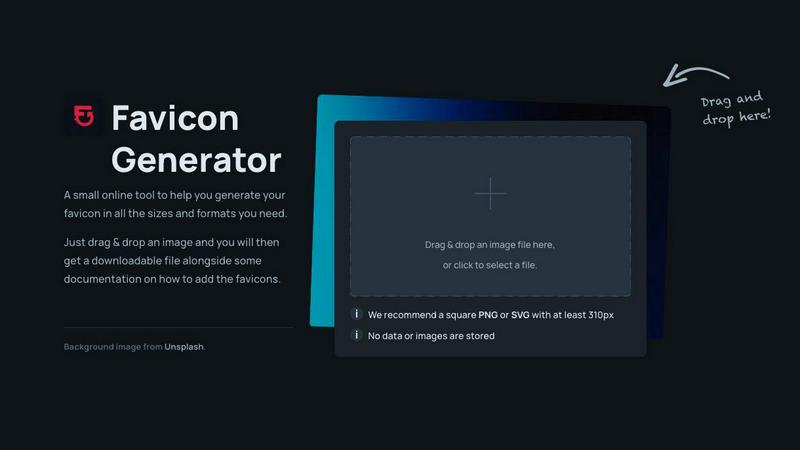
Favicon Generator offers a straightforward drag-and-drop functionality, allowing users to easily upload their images or logos. This intuitive feature simplifies the favicon creation process, making it accessible for everyone, regardless of their technical background.
Multiple Format Support
The tool supports several popular file formats including ICO, PNG, and SVG, ensuring that users can create favicons that meet their specific needs. This versatility allows for seamless integration into various web environments and ensures compatibility across different browsers and devices.
Instant Favicon Generation
One of the standout features of Favicon Generator is its ability to produce favicons in mere seconds. This instant generation capability means users can quickly obtain the necessary files without waiting, making it ideal for time-sensitive projects.
PWA Compatibility
Favicon Generator includes support for Progressive Web App (PWA) requirements, allowing users to create favicons suited for modern web applications. This ensures that your web app looks polished and professional, enhancing user engagement and retention.
Gomotion
Prompt-Based Text Animation
This feature allows you to animate text simply by describing how you want it to move. Instead of manually setting keyframes for position, scale, or rotation, you can type a prompt like "float in gently" or "spin and zoom." Gomotion's AI interprets this description and applies cinematic motion to your titles, captions, or logos instantly. This is perfect for creating engaging intros, lower thirds, or animated quotes without any animation expertise, delivering professional results directly from your imagination.
Narrative Mode for Full Stories
Narrative Mode is designed to create complete, end-to-end animated videos from a script. You input your story, and Gomotion structures it into a full animated sequence, syncing motion graphics with your images and video clips. This transforms the lengthy process of storyboarding and scene-by-scene animation into a task that takes minutes. It is ideal for creating short advertisements, social media content, or explainer videos where a cohesive narrative is more important than individual animated elements.
Brand Kit Import and Consistency
Maintaining a consistent brand identity across all content is crucial. Gomotion simplifies this by allowing you to import your brand assets, like logos, colors, and fonts, with one click. Once imported, the AI uses these elements to generate animations that automatically align with your brand guidelines. This ensures every piece of animated content—from social media teasers to product launch videos—looks professionally crafted and unmistakably part of your brand's visual language.
Complex Data and Chart Animation
Moving beyond basic text and logos, Gomotion can create sophisticated animations for data visualization. You can input chart data, and the tool will generate animated bar graphs, line charts, or pie charts that grow and evolve on screen. This feature is essential for making explainer videos, business presentations, or simulation videos more impactful and easier to understand, turning static statistics into engaging visual stories that capture and hold your audience's attention.
Use Cases
Favicon Generator
Website Development
Web developers can utilize Favicon Generator to quickly create favicons for their projects, ensuring that all sites they build have cohesive branding. This is essential for establishing a professional presence online.
Branding for Small Businesses
Small business owners can enhance their brand identity by creating custom favicons that reflect their logo and style. This helps in building brand recognition among customers, especially in crowded online spaces.
Personal Blog Enhancement
Blogger and content creators can use Favicon Generator to add a personal touch to their blogs. A unique favicon can make their site stand out and create a more memorable experience for their readers.
Quick Design Solutions for Agencies
Design agencies can rely on Favicon Generator to provide quick and efficient favicon solutions for multiple client projects. This streamlines the design process and allows for more time to focus on other creative aspects.
Gomotion
Social Media Content Creation
Content creators and social media managers can use Gomotion to quickly produce eye-catching animations for platforms like Instagram, TikTok, and YouTube. Whether it's an animated quote for a story, a dynamic title for a reel, or a branded teaser for a new product, Gomotion generates optimized, platform-ready content in minutes. This saves significant time and resources compared to outsourcing or learning complex animation software, allowing for consistent and high-quality posting schedules.
Product Demos and Launch Videos
For small businesses and marketers launching a new product or service, Gomotion is an invaluable tool. Using Narrative Mode, you can turn a product script or feature list into a compelling animated demo video. These videos can showcase benefits, highlight key specs with animated text, and maintain brand consistency throughout, creating professional launch assets that engage potential customers and explain value propositions clearly without a large production budget.
Business Presentations and Reports
Professionals who need to present data or ideas in meetings, webinars, or investor pitches can use Gomotion to enhance their slides. Instead of static charts and bullet points, you can incorporate animated graphs and kinetic text that make information more digestible and memorable. This use case transforms standard presentations into dynamic visual experiences, helping to communicate complex ideas more effectively and leave a stronger impression on the audience.
Brand Marketing and Advertising
Marketing teams can leverage Gomotion to produce a high volume of branded animated ads across different channels. From short bumper ads for online platforms to animated billboards for digital displays, the tool's multi-format design ensures content looks perfect on any screen. The ability to quickly iterate on ad concepts based on performance or to create localized versions of campaigns makes agile, data-driven marketing more accessible and cost-effective.
Overview
About Favicon Generator
Favicon Generator is a user-friendly online tool that empowers individuals and businesses to create custom favicons for their websites effortlessly. Favicons are those small yet significant icons that appear in browser tabs, bookmarks, and other user interface elements. They serve as visual identifiers for your brand, enhancing recognition and contributing to an improved user experience. This tool is specifically designed for web developers, designers, and anyone looking to elevate their website's aesthetic appeal without requiring complex software or technical skills. With a simple drag-and-drop interface, users can upload their logos or images and generate favicons in various sizes and formats in a matter of seconds. Supporting multiple file types such as ICO, PNG, and SVG, along with PWA requirements, Favicon Generator ensures that your website maintains a professional look across all devices. Whether for personal projects or professional endeavors, this tool is an invaluable resource for anyone wanting to make a memorable impression online.
About Gomotion
Gomotion is an AI-powered motion designer, built to make professional animation simple and accessible. It serves as a fundamental tool for anyone who needs to create animated content but does not have the time or technical skill to learn complex software like Adobe After Effects. The core idea is straightforward: you describe what you want to see, and Gomotion generates the motion graphics for you. This process bridges the gap between a creative idea and a finished product, removing the traditional barriers of keyframing and manual design. It is built for marketers, content creators, small business owners, and designers who require high-quality, brand-consistent animations for communication. The main value is efficiency and ease. By transforming text prompts or static images into ready-to-publish animations, Gomotion democratizes motion design. It allows users to focus on their message and story, not on the technical complexities of animation software, making professional motion graphics a foundational part of any business's toolkit.
Frequently Asked Questions
Favicon Generator FAQ
What image formats can I upload for favicon creation?
You can upload several image formats, including PNG and SVG, which are recommended for generating high-quality favicons. The tool is designed to handle various file types to meet your needs.
Is there a size requirement for the images I upload?
While the tool can accept various sizes, we recommend using a square PNG or SVG image with a minimum size of 310 pixels. This ensures optimal quality for the generated favicons.
Does Favicon Generator store my uploaded images?
No, Favicon Generator does not store any data or images you upload. Your privacy is important, and all files are processed without retaining any of your information.
Is the Favicon Generator really free to use?
Yes, Favicon Generator is completely free to use, requiring no sign-up or subscription. You can generate your favicons without any hidden fees or charges.
Gomotion FAQ
Who is Gomotion designed for?
Gomotion is designed for a wide range of users who need professional motion graphics but may not have animation expertise. This includes marketers, content creators, small business owners, social media managers, educators, and designers looking to speed up their workflow. It is built for anyone who wants to create engaging animated videos, ads, or presentations without the steep learning curve and time investment required by traditional animation software.
What kind of animations can I create with Gomotion?
You can create a variety of animations, from simple text and logo animations to complex, narrative-driven video stories. Specific outputs include animated titles for videos, full explainer videos using Narrative Mode, animated data charts for presentations, and brand-consistent motion graphics for social media posts and advertisements. The tool is versatile enough for foundational business communication needs across different formats and platforms.
How does the AI understand what animation I want?
Gomotion's AI is trained on principles of motion design and cinematic movement. When you provide a text prompt, it analyzes the descriptive words (like "float," "bounce," or "spin") and applies corresponding animation properties and timing curves. For more complex tasks like Narrative Mode, it structures your script into scenes and applies appropriate transitions and motions to create a cohesive flow, all based on established storytelling and visual design conventions.
Can I use Gomotion for my business's brand?
Absolutely. Gomotion has a dedicated feature for brand consistency. You can upload your brand kit, which includes your logo, color palette, and fonts. Once imported, the AI will use these assets as the foundation for all generated animations. This ensures that every piece of content you create maintains a professional and consistent look that aligns with your company's identity, which is fundamental for building brand recognition and trust with your audience.
Alternatives
Favicon Generator Alternatives
Favicon Generator is an online tool that belongs to the design tools category, specifically focused on creating favicons for websites. Favicons are small icons displayed in browser tabs and bookmarks, serving as a vital aspect of brand identity and user experience. Users often search for alternatives to Favicon Generator for various reasons, including pricing, the need for specific features, or compatibility with different platforms. When choosing an alternative, it is important to consider factors such as ease of use, supported formats, and the speed of favicon generation, ensuring that it meets your unique requirements effectively. --- [{"question": "What is Favicon Generator?", "answer": "Favicon Generator is an online tool that allows users to easily create and download favicons in multiple formats and sizes for their websites."}, {"question": "Who is Favicon Generator for?", "answer": "Favicon Generator is designed for web developers, designers, and anyone looking to enhance their website's appearance without technical expertise."}, {"question": "Is Favicon Generator free?", "answer": "Yes, Favicon Generator is a free tool that does not require any sign-up to use."}, {"question": "What are the main features of Favicon Generator?", "answer": "Main features include a simple drag-and-drop interface, support for multiple image formats, instant favicon generation, and comprehensive documentation."}]
Gomotion Alternatives
Gomotion is an AI-powered design tool that creates motion graphics from text or images. It falls into the category of automated animation software, aiming to make professional motion design accessible without complex software skills. Users often look for alternatives for basic reasons like cost, specific feature needs, or platform compatibility. Some may require more advanced control, while others seek a simpler or more budget-friendly option for their foundational animation tasks. When choosing an alternative, consider your core needs. Key factors include the type of input you use, the quality and style of the output, ease of use, and how well it integrates with your existing workflow. The goal is to find a tool that reliably handles your basic motion graphic creation.