
DocuExtractor vs LuxSign
Side-by-side comparison to help you choose the right product.

DocuExtractor
DocuExtractor automatically turns your receipts and invoices into clean, structured Excel or CSV files.
Last updated: February 28, 2026

LuxSign enables secure electronic signatures for documents, compliant with EU regulations, all hosted in Luxembourg.
Last updated: February 26, 2026
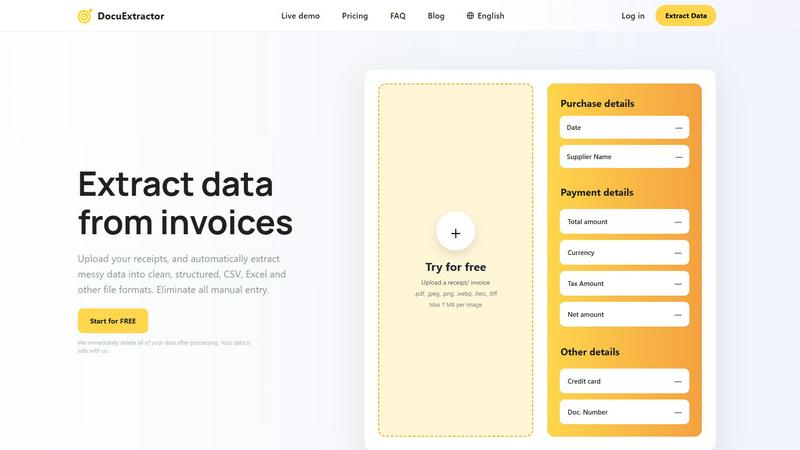
Visual Comparison
DocuExtractor
LuxSign

Feature Comparison
DocuExtractor
Advanced AI-Powered Extraction
At its core, DocuExtractor employs a sophisticated blend of Optical Character Recognition (OCR), Deep Learning (DL), and Large Language Models (LLMs). This multi-layered AI approach allows the software to not just read text, but to understand the context and structure of financial documents. It can intelligently identify and extract key data fields such as dates, supplier names, total amounts, tax details, and document numbers from various layouts and formats with a reported 99.6% accuracy, ensuring the output is both precise and reliable.
Broad Format and Language Support
DocuExtractor is built to handle the diverse reality of business documentation. It supports a wide array of upload formats including PDF, JPG, PNG, WebP, HEIC, and TIFF files, making it compatible with scans, photos, and digital documents. Furthermore, it can process documents in over 45 languages with automatic language detection, which is crucial for businesses operating in global markets or dealing with international suppliers and clients.
Simple Three-Step Workflow
The platform is designed with a back-to-basics, user-friendly approach. The entire process is broken down into three straightforward steps: Upload, Extract, and Download. Users can drag and drop documents, either individually or in batches, select their desired output format (CSV or Excel), and receive their structured data instantly. This simplicity ensures a minimal learning curve, allowing teams to become productive in minutes without extensive training.
Enterprise-Grade Security and Scale
DocuExtractor is engineered for businesses with serious data security and volume needs. It operates on a principle of immediate data deletion post-processing, ensuring your financial information is not stored unnecessarily. The platform is enterprise-ready, capable of handling over 500,000 documents monthly with consistent performance. This combination of robust security, high-volume processing, and reliable uptime makes it a trustworthy solution for both small firms and large corporations.
LuxSign
Multiple Signature Methods
LuxSign provides versatile signing options, allowing users to draw their signature with a mouse, type their name, or upload an image of their signature. This flexibility accommodates various preferences and speeds up the signing process, making it convenient for every user.
Advanced Security
Security is paramount with LuxSign. The platform employs industry-standard encryption to protect documents during upload, storage, and transmission. Additionally, documents are stored on secure servers in Luxembourg, ensuring compliance with EU data protection regulations for peace of mind.
Collaboration Workspaces
LuxSign facilitates teamwork through collaboration workspaces where users can create shared environments for their teams. This feature allows users to organize documents in folders, manage member access, and collaborate seamlessly on signing workflows, enhancing productivity and efficiency.
Complete Audit Trail
Maintaining transparency and security, LuxSign provides a complete audit trail for every action taken on a document. Each log includes timestamps, IP addresses, and signer information, ensuring compliance and providing a reliable record for verification purposes.
Use Cases
DocuExtractor
Automating Accounts Payable Processing
For accounts payable teams, processing a high volume of invoices and receipts is a daily chore. DocuExtractor automates this by extracting key details like vendor name, invoice number, date, and total amount. The resulting CSV or Excel file can be directly imported into accounting software (like QuickBooks or Xero), eliminating manual entry, reducing errors, and accelerating the payment cycle, which can save professionals several hours per week.
Streamlining Expense Reporting and Reconciliation
Employees and managers can use DocuExtractor to quickly process personal or corporate credit card receipts. Instead of manually typing details from a pile of receipts, users upload them in batches. The software extracts the merchant, date, and amount, creating a clean, auditable digital record. This streamlines expense report submission, simplifies reconciliation for accountants, and ensures compliance with company spending policies.
Bank Statement Analysis and Bookkeeping
Bookkeepers and accountants often need to categorize transactions from bank and credit card statements. Manually copying this data is time-consuming. DocuExtractor can convert PDF bank statements into structured Excel files, isolating transaction dates, descriptions, and amounts. This formatted data is much easier to review, categorize, and integrate into general ledgers, making monthly closings faster and more accurate.
Data Migration and Historical Document Digitization
When businesses switch accounting systems or need to analyze historical financial data, they face the daunting task of digitizing paper archives or old PDFs. DocuExtractor provides an efficient solution by batch-processing these historical documents—invoices, receipts, statements—and converting them into structured digital data. This creates a searchable, analyzable database from previously unstructured information, unlocking valuable insights from past records.
LuxSign
Real Estate Transactions
In the real estate sector, LuxSign can be utilized to streamline the signing of contracts and agreements between buyers, sellers, and agents. The platform's secure and compliant nature ensures that all parties can sign documents electronically, expediting the entire process.
Employment Contracts
LuxSign is an excellent tool for HR departments to manage employment contracts. With the ability to send documents for signature and track their status in real-time, HR teams can ensure that all contracts are signed promptly and securely.
Financial Agreements
Financial institutions can leverage LuxSign for signing loan agreements and other financial documents. The platform's compliance with eIDAS standards guarantees that these documents are legally valid across the European Union, thus enhancing trust in the transaction.
Remote Team Collaboration
For companies with remote teams, LuxSign simplifies the document signing process. Employees can sign documents from anywhere, at any time, using their smartphones or tablets. This flexibility is essential for maintaining productivity in a distributed work environment.
Overview
About DocuExtractor
DocuExtractor is a fundamental software solution designed to solve a foundational problem in business operations: manual data entry. It is a cutting-edge document conversion tool that specializes in extracting and structuring data from financial documents. By utilizing advanced Optical Character Recognition (OCR) technology combined with deep learning and large language models (AI), it automatically transforms messy, unstructured information from documents like invoices, receipts, and bank statements into clean, organized data. This data is then output into universally usable formats such as CSV and Excel files. The primary value proposition of DocuExtractor is its ability to eliminate tedious, error-prone manual data input, thereby saving significant time and enhancing data reliability. It is built for accountants, bookkeepers, accounts payable specialists, and businesses of all sizes who seek to streamline their financial workflows. With a focus on accuracy, speed, and ease of use, DocuExtractor allows professionals to redirect their efforts from repetitive administrative tasks to more strategic, value-added activities, making it an essential tool for modern, efficient financial management.
About LuxSign
LuxSign is a secure, cloud-based electronic signature platform designed specifically for businesses that require high compliance standards. Originating from Luxembourg, LuxSign ensures that all documents are encrypted end-to-end and stored exclusively within the country, thereby guaranteeing full compliance with the General Data Protection Regulation (GDPR). The platform supports the European Union's eIDAS Simple Electronic Signature (SES) standards, ensuring that contracts signed through LuxSign hold legal validity across all member states. LuxSign is equipped with essential features such as parallel and sequential signing workflows, drag-and-drop signature field placement, and automated email notifications for signers. Its advanced tiers offer additional functionalities like document templates, comprehensive audit trails, bulk signing capabilities, collaboration workspaces, custom branding options, and a REST API for system integrations. This makes LuxSign an ideal solution for businesses aiming to streamline their document signing processes while ensuring security and compliance.
Frequently Asked Questions
DocuExtractor FAQ
What types of documents can DocuExtractor process?
DocuExtractor is specifically optimized for financial documents. This includes, but is not limited to, invoices, receipts, purchase orders, and bank or credit card statements. You can upload these documents in various formats such as PDF, JPG, PNG, WebP, HEIC, and TIFF. The software uses specialized algorithms for each document type to ensure the highest accuracy during data extraction.
How does DocuExtractor ensure the security of my data?
Data security is a foundational priority. DocuExtractor operates on a strict data privacy policy where all uploaded documents and the extracted data are immediately and permanently deleted from our servers once the processing is complete and you have downloaded your results. We do not store, share, or use your financial data for any other purpose, ensuring your sensitive information remains safe and confidential.
What is the accuracy rate of the data extraction?
DocuExtractor achieves a consistently high accuracy rate of 99.6% for standard, clear financial documents. This high precision is the result of combining advanced OCR technology with deep learning and large language model (AI) systems that are trained to understand the context and layout of financial data. For optimal results, ensure your uploaded documents are legible and of reasonable quality.
Can I process multiple documents at once?
Yes, batch processing is a core feature designed to save you time. DocuExtractor allows you to upload multiple documents simultaneously through a simple drag-and-drop interface. The system will process them in sequence, extracting data from each one. You can then download the consolidated, structured data from all documents in a single CSV or Excel file, ready for import into your accounting or analysis software.
LuxSign FAQ
What types of documents can I sign using LuxSign?
You can sign a variety of document formats using LuxSign, including PDF, DOC, and DOCX files. The platform supports automatic conversion for seamless processing.
Is LuxSign GDPR compliant?
Yes, LuxSign is fully compliant with GDPR and Luxembourg data protection laws. All documents are encrypted and stored securely in Luxembourg, ensuring your data privacy is protected.
How many signers can I add to a document?
LuxSign allows you to add up to four signers per document. You can choose to set up either parallel signing or sequential signing workflows to suit your needs.
What kind of support does LuxSign offer?
LuxSign provides email support for users, with premium plans offering priority support for faster response times. This ensures that users have access to assistance when needed for any signing-related inquiries.
Alternatives
DocuExtractor Alternatives
DocuExtractor is a productivity and management tool designed to automate data extraction from financial documents like invoices and receipts. It uses OCR technology to convert unstructured document data into organized spreadsheets, eliminating manual entry. This category of software is essential for businesses aiming to improve efficiency and data accuracy in their financial workflows. Users often explore alternatives to find a solution that better fits their specific needs. Common reasons include budget constraints, as pricing models vary, or a need for different features like integration with specific accounting software. Some may require a tool that works on a particular operating system or offers a different user experience. When evaluating other options, consider the core functionality: accurate OCR, batch processing capabilities, and output format compatibility. It's also wise to assess the software's ease of use, security measures for handling sensitive documents, and the scalability of its pricing plans to match your business volume.
LuxSign Alternatives
LuxSign is a sophisticated electronic signature platform designed to facilitate secure document signing for businesses. It operates within the productivity and management category, ensuring that all signatures comply with eIDAS SES standards, thus providing legal validity across the European Union. Businesses often seek alternatives to LuxSign for various reasons, including pricing considerations, specific feature requirements, or the need for different platform integrations that better fit their operational workflows. When looking for an alternative to LuxSign, it is important to evaluate the platform's compliance with legal standards, the security measures in place for data protection, and the range of features offered. Users should consider their unique needs, such as the ability to customize workflows, the level of customer support, and integration capabilities with existing systems. Assessing these factors will help ensure that the chosen platform aligns with the business's goals and requirements.