
DocuExtractor
DocuExtractor automatically turns your receipts and invoices into clean, structured Excel or CSV files.
Visit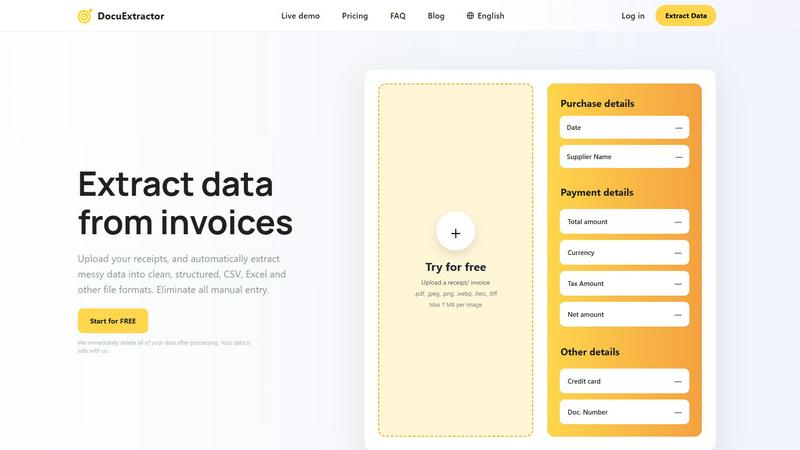
About DocuExtractor
DocuExtractor is a fundamental software solution designed to solve a foundational problem in business operations: manual data entry. It is a cutting-edge document conversion tool that specializes in extracting and structuring data from financial documents. By utilizing advanced Optical Character Recognition (OCR) technology combined with deep learning and large language models (AI), it automatically transforms messy, unstructured information from documents like invoices, receipts, and bank statements into clean, organized data. This data is then output into universally usable formats such as CSV and Excel files. The primary value proposition of DocuExtractor is its ability to eliminate tedious, error-prone manual data input, thereby saving significant time and enhancing data reliability. It is built for accountants, bookkeepers, accounts payable specialists, and businesses of all sizes who seek to streamline their financial workflows. With a focus on accuracy, speed, and ease of use, DocuExtractor allows professionals to redirect their efforts from repetitive administrative tasks to more strategic, value-added activities, making it an essential tool for modern, efficient financial management.
Features of DocuExtractor
Advanced AI-Powered Extraction
At its core, DocuExtractor employs a sophisticated blend of Optical Character Recognition (OCR), Deep Learning (DL), and Large Language Models (LLMs). This multi-layered AI approach allows the software to not just read text, but to understand the context and structure of financial documents. It can intelligently identify and extract key data fields such as dates, supplier names, total amounts, tax details, and document numbers from various layouts and formats with a reported 99.6% accuracy, ensuring the output is both precise and reliable.
Broad Format and Language Support
DocuExtractor is built to handle the diverse reality of business documentation. It supports a wide array of upload formats including PDF, JPG, PNG, WebP, HEIC, and TIFF files, making it compatible with scans, photos, and digital documents. Furthermore, it can process documents in over 45 languages with automatic language detection, which is crucial for businesses operating in global markets or dealing with international suppliers and clients.
Simple Three-Step Workflow
The platform is designed with a back-to-basics, user-friendly approach. The entire process is broken down into three straightforward steps: Upload, Extract, and Download. Users can drag and drop documents, either individually or in batches, select their desired output format (CSV or Excel), and receive their structured data instantly. This simplicity ensures a minimal learning curve, allowing teams to become productive in minutes without extensive training.
Enterprise-Grade Security and Scale
DocuExtractor is engineered for businesses with serious data security and volume needs. It operates on a principle of immediate data deletion post-processing, ensuring your financial information is not stored unnecessarily. The platform is enterprise-ready, capable of handling over 500,000 documents monthly with consistent performance. This combination of robust security, high-volume processing, and reliable uptime makes it a trustworthy solution for both small firms and large corporations.
Use Cases of DocuExtractor
Automating Accounts Payable Processing
For accounts payable teams, processing a high volume of invoices and receipts is a daily chore. DocuExtractor automates this by extracting key details like vendor name, invoice number, date, and total amount. The resulting CSV or Excel file can be directly imported into accounting software (like QuickBooks or Xero), eliminating manual entry, reducing errors, and accelerating the payment cycle, which can save professionals several hours per week.
Streamlining Expense Reporting and Reconciliation
Employees and managers can use DocuExtractor to quickly process personal or corporate credit card receipts. Instead of manually typing details from a pile of receipts, users upload them in batches. The software extracts the merchant, date, and amount, creating a clean, auditable digital record. This streamlines expense report submission, simplifies reconciliation for accountants, and ensures compliance with company spending policies.
Bank Statement Analysis and Bookkeeping
Bookkeepers and accountants often need to categorize transactions from bank and credit card statements. Manually copying this data is time-consuming. DocuExtractor can convert PDF bank statements into structured Excel files, isolating transaction dates, descriptions, and amounts. This formatted data is much easier to review, categorize, and integrate into general ledgers, making monthly closings faster and more accurate.
Data Migration and Historical Document Digitization
When businesses switch accounting systems or need to analyze historical financial data, they face the daunting task of digitizing paper archives or old PDFs. DocuExtractor provides an efficient solution by batch-processing these historical documents—invoices, receipts, statements—and converting them into structured digital data. This creates a searchable, analyzable database from previously unstructured information, unlocking valuable insights from past records.
Frequently Asked Questions
What types of documents can DocuExtractor process?
DocuExtractor is specifically optimized for financial documents. This includes, but is not limited to, invoices, receipts, purchase orders, and bank or credit card statements. You can upload these documents in various formats such as PDF, JPG, PNG, WebP, HEIC, and TIFF. The software uses specialized algorithms for each document type to ensure the highest accuracy during data extraction.
How does DocuExtractor ensure the security of my data?
Data security is a foundational priority. DocuExtractor operates on a strict data privacy policy where all uploaded documents and the extracted data are immediately and permanently deleted from our servers once the processing is complete and you have downloaded your results. We do not store, share, or use your financial data for any other purpose, ensuring your sensitive information remains safe and confidential.
What is the accuracy rate of the data extraction?
DocuExtractor achieves a consistently high accuracy rate of 99.6% for standard, clear financial documents. This high precision is the result of combining advanced OCR technology with deep learning and large language model (AI) systems that are trained to understand the context and layout of financial data. For optimal results, ensure your uploaded documents are legible and of reasonable quality.
Can I process multiple documents at once?
Yes, batch processing is a core feature designed to save you time. DocuExtractor allows you to upload multiple documents simultaneously through a simple drag-and-drop interface. The system will process them in sequence, extracting data from each one. You can then download the consolidated, structured data from all documents in a single CSV or Excel file, ready for import into your accounting or analysis software.
Explore more in this category:
Similar to DocuExtractor

Practical, independent guides to home repairs, maintenance, costs, troubleshooting, and everyday fixes.

Highlight faster. Study in flow with custom shortcuts and a workflow built around you. Print smarter, or turn any page into a tiled poster.


IZIPAY is a virtual and physical crypto card service that lets users top up with digital assets and pay online like with a regular card.

Turn videos, images, and files into secure direct links for sharing, embedding, and automated workflows.

Build Mode is a Mac app that turns focused sessions into visible progress, so you can see the work adding up before the results arrive.

Free, open-source scheduler. Web/mobile/API. Fees.