Caller vs Perkoon
Side-by-side comparison to help you choose the right product.

Call any number worldwide from your browser with simple pay as you go pricing.
Last updated: March 1, 2026

Perkoon enables free unlimited peer-to-peer file transfers without signup, ensuring your files stay private and secure.
Last updated: March 4, 2026
Visual Comparison
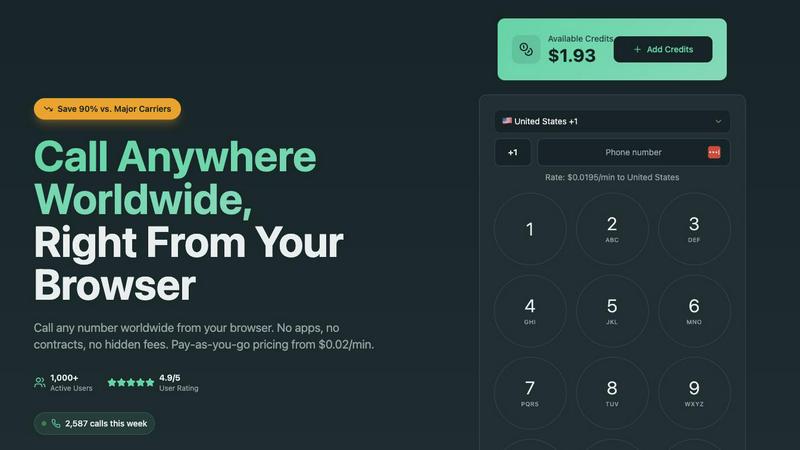
Caller
Perkoon

Feature Comparison
Caller
Browser-Based Calling
Caller operates entirely within your web browser, requiring no software downloads, app installations, or complex setup. This foundational feature means you can start making calls instantly from any device with an internet connection, whether it's a computer, tablet, or smartphone. It removes technical barriers and the need for specific hardware, returning to the basic idea of a phone call: a simple connection between two people.
Pay-As-You-Go Pricing
The platform uses a transparent, pay-as-you-go credit system. You only pay for the minutes you actually use on completed calls, with rates starting as low as $0.02 per minute. There are no monthly fees, no subscription commitments, and no hidden charges. Credits added to your account never expire, giving you full control over your communication budget and aligning cost directly with usage.
Global Coverage and HD Quality
Caller provides calling access to over 200 countries and territories worldwide, covering all major destinations for both landlines and mobile phones. Despite its simple interface, the service is powered by enterprise-grade infrastructure that delivers high-definition (HD) voice quality. This ensures crystal clear audio for your conversations, making it feel as if you are in the same room as the person you are calling.
Secure and Private Communications
Security is built into the foundation of the service. All calls made through Caller are protected with SSL encryption, similar to the security standards used by banks. This ensures that your conversations and payment transactions are kept private and secure. The platform is designed with privacy in mind, offering a reliable and protected channel for all your important communications.
Perkoon
Peer-to-Peer (P2P) File Transfer
Perkoon's flagship feature allows users to send files directly between browsers without any size limitations or sign-ups. This P2P technology ensures that files are transmitted securely and privately, as they do not pass through any central servers. This direct connection makes file sharing efficient and stress-free.
Encrypted Cloud Storage
For instances when recipients are offline, Perkoon provides an encrypted cloud storage solution. This paid feature securely holds files until the recipient is available to download them. The encryption ensures that users' data remains private and protected during transit and storage.
Built-in Automation Tools
Perkoon is designed with the modern user in mind, incorporating built-in tools that allow for automation and integration with AI agents. These features streamline the file transfer process, enabling users to interact with the service directly without the need for cumbersome screen-scraping methods.
Referral and Rewards Program
Perkoon offers a unique referral program that rewards users for sharing the service with others. By sending a referral link, users can earn extra storage space when their friends sign up and transfer files. This incentivizes community growth while benefiting all participants.
Use Cases
Caller
International Personal Calls
Individuals can use Caller to easily and affordably stay in touch with family and friends living in other countries. Whether it's a weekly catch-up with relatives abroad or connecting with friends traveling, the low international rates and browser-based access make it a simple, cost-effective alternative to expensive carrier plans or calling cards.
Business Client Communication
Professionals and small businesses can leverage Caller to contact clients, suppliers, or partners around the world without incurring high telecom expenses. It is ideal for making calls to banks, government offices, or service providers in other countries, providing a professional and clear connection that supports business operations and customer service.
Remote Team Collaboration
Distributed and remote teams can utilize Caller for internal communication and conference calls. The service allows team members in different countries to connect instantly from their browsers, facilitating quick meetings, check-ins, and collaboration without the need for a corporate phone system or complex unified communications setup.
Travel and Temporary Communication
Travelers, digital nomads, or individuals living abroad temporarily can use Caller as their primary calling tool. It eliminates the need to purchase local SIM cards or pay exorbitant roaming fees. As long as there is an internet connection, they can make and receive calls to any number worldwide using their account.
Perkoon
Personal File Sharing
Individuals can use Perkoon to share large files with friends and family without worrying about size limits or fees. Whether sending vacation photos or important documents, Perkoon makes personal file sharing simple and hassle-free.
Team Collaboration
For teams working remotely, Perkoon serves as an essential tool for sharing project files and documents. The ability to send large files without restrictions streamlines collaboration, ensuring that team members can access the resources they need promptly.
Secure Business Transactions
Businesses can rely on Perkoon for secure file transfers, especially when dealing with sensitive information. The P2P feature ensures that confidential documents remain private, and the encrypted cloud storage provides an additional layer of security.
AI Integration
Developers and tech enthusiasts can leverage Perkoon’s capabilities by integrating it with AI agents. This allows for automated file transfers and interactions, enhancing productivity and efficiency in various applications.
Overview
About Caller
Caller is a fundamental reimagining of how we make phone calls. It is a web-based platform that allows you to make phone calls to any number in the world directly from your internet browser. This approach eliminates the traditional complexities and costs associated with telephony. There is no need for a physical phone line, a SIM card from a mobile carrier, or the installation of specialized VoIP software. The core principle is profound simplicity: you visit the website, enter a phone number, and connect. This service is designed for a wide audience, from individuals calling family and friends abroad to professionals and businesses that need to contact clients, banks, or government offices internationally. Its primary value proposition is twofold: significant cost reduction and unmatched ease of use. By operating on a pure pay-as-you-go model without apps, contracts, or monthly subscriptions, Caller can offer rates up to 90% cheaper than standard carriers. It strips away the unnecessary layers, providing a transparent, affordable, and straightforward tool for global communication that works for everyone.
About Perkoon
Perkoon is an innovative file transfer service designed to simplify the way individuals and teams share files. In a digital landscape cluttered with limitations and unnecessary complexity, Perkoon redefines file sharing by offering a straightforward solution that prioritizes user experience and privacy. It caters to anyone frustrated with traditional file transfer methods that impose artificial limits, require mandatory sign-ups, or treat user data as a commodity. Perkoon's core offering includes two efficient ways to send files: a free peer-to-peer (P2P) service that allows users to transfer files directly between browsers when both parties are online, and a secure cloud storage option for offline transfers, available through a paid plan. With its commitment to free usage, privacy, and user-friendly automation tools built for the age of AI, Perkoon stands out as a trusted and robust solution for file transfer needs.
Frequently Asked Questions
Caller FAQ
How do I start using Caller?
Getting started is straightforward. First, you sign up for a free account on the Caller website, which does not require a credit card. Next, you add credits to your account using a secure payment method. Once your account is funded, you simply visit the website, enter the full international phone number you wish to call, and click the call button to connect instantly.
What do I need to make a call?
You only need two things: a device (such as a computer, smartphone, or tablet) with a stable internet connection and a modern web browser (like Chrome, Safari, or Firefox). A microphone and speakers or a headset are also required for audio. There is no need for a traditional phone, SIM card, or any downloaded software.
How does the pricing work?
Caller uses a prepaid credit system. You purchase credits for your account, and your balance is deducted based on the per-minute rate of the destination you are calling. You are only charged for completed call minutes, with rates clearly displayed before you call. There are no monthly subscriptions or minimum fees; you pay solely for what you use.
Can I get my own phone number with Caller?
Yes, Caller offers the option to purchase dedicated phone numbers from various countries, including the United States and the United Kingdom. You can choose local, toll-free, or mobile numbers. These can be used as your caller ID for outgoing calls, enhancing your professional presence, and are available for a low monthly fee starting at $1.99.
Perkoon FAQ
Is Perkoon really free?
Yes, Perkoon offers a free P2P file transfer service that does not impose size limits or require user accounts. This service is free because it operates on a decentralized model that costs Perkoon nothing to run.
How does cloud storage work with Perkoon?
When files need to be stored for offline recipients, Perkoon offers encrypted cloud storage as a paid feature. This ensures that files are held securely until the recipient can access them.
Can I use Perkoon on any browser?
Perkoon is compatible with Chrome, Edge, and Brave browsers without any limits. However, users of Firefox and Safari may encounter certain restrictions due to browser-specific limitations.
How can I earn rewards through the referral program?
By sharing your unique referral link, you can invite others to use Perkoon. When they sign up and transfer files, both you and your friend can earn additional storage space, creating a mutually beneficial system.
Alternatives
Caller Alternatives
Caller is a productivity tool that allows you to make phone calls from your web browser. It simplifies global communication by removing the need for traditional phone lines, apps, or contracts. This category of software helps individuals and businesses connect more efficiently without complex setups. People explore alternatives for various reasons. Some may need specific features like call recording or a dedicated mobile app. Others might be looking for different pricing models, such as monthly subscriptions for high-volume users, or require integration with other business tools they already use. When evaluating different options, consider your core needs. Key factors include the total cost for your calling patterns, the required call quality and reliability, and which devices or platforms you need to use. The best choice aligns with how you actually communicate.
Perkoon Alternatives
Perkoon is a unique file transfer service that falls under the category of productivity and management tools. It offers users the ability to send files for free using peer-to-peer technology, which eliminates the need for sign-ups and size restrictions. This straightforward approach appeals to individuals seeking a hassle-free experience when transferring data, especially in an age where many services impose limitations or treat user data as a commodity. Users often look for alternatives to Perkoon for various reasons such as pricing, feature sets, or specific platform compatibility. When searching for a suitable alternative, it's essential to consider factors like the ease of use, privacy policies, file size limits, and any additional functionalities that may enhance your file transfer experience. A good alternative should prioritize user needs without compromising on security or convenience.