
Caller vs LuxSign
Side-by-side comparison to help you choose the right product.

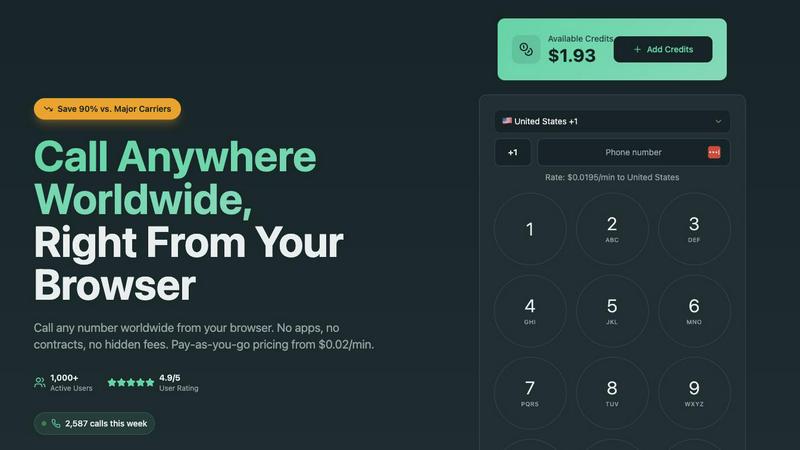
Call any number worldwide from your browser with simple pay as you go pricing.
Last updated: March 1, 2026

LuxSign enables secure electronic signatures for documents, compliant with EU regulations, all hosted in Luxembourg.
Last updated: February 26, 2026
Visual Comparison
Caller
LuxSign

Feature Comparison
Caller
Browser-Based Calling
Caller operates entirely within your web browser, requiring no software downloads, app installations, or complex setup. This foundational feature means you can start making calls instantly from any device with an internet connection, whether it's a computer, tablet, or smartphone. It removes technical barriers and the need for specific hardware, returning to the basic idea of a phone call: a simple connection between two people.
Pay-As-You-Go Pricing
The platform uses a transparent, pay-as-you-go credit system. You only pay for the minutes you actually use on completed calls, with rates starting as low as $0.02 per minute. There are no monthly fees, no subscription commitments, and no hidden charges. Credits added to your account never expire, giving you full control over your communication budget and aligning cost directly with usage.
Global Coverage and HD Quality
Caller provides calling access to over 200 countries and territories worldwide, covering all major destinations for both landlines and mobile phones. Despite its simple interface, the service is powered by enterprise-grade infrastructure that delivers high-definition (HD) voice quality. This ensures crystal clear audio for your conversations, making it feel as if you are in the same room as the person you are calling.
Secure and Private Communications
Security is built into the foundation of the service. All calls made through Caller are protected with SSL encryption, similar to the security standards used by banks. This ensures that your conversations and payment transactions are kept private and secure. The platform is designed with privacy in mind, offering a reliable and protected channel for all your important communications.
LuxSign
Multiple Signature Methods
LuxSign provides versatile signing options, allowing users to draw their signature with a mouse, type their name, or upload an image of their signature. This flexibility accommodates various preferences and speeds up the signing process, making it convenient for every user.
Advanced Security
Security is paramount with LuxSign. The platform employs industry-standard encryption to protect documents during upload, storage, and transmission. Additionally, documents are stored on secure servers in Luxembourg, ensuring compliance with EU data protection regulations for peace of mind.
Collaboration Workspaces
LuxSign facilitates teamwork through collaboration workspaces where users can create shared environments for their teams. This feature allows users to organize documents in folders, manage member access, and collaborate seamlessly on signing workflows, enhancing productivity and efficiency.
Complete Audit Trail
Maintaining transparency and security, LuxSign provides a complete audit trail for every action taken on a document. Each log includes timestamps, IP addresses, and signer information, ensuring compliance and providing a reliable record for verification purposes.
Use Cases
Caller
International Personal Calls
Individuals can use Caller to easily and affordably stay in touch with family and friends living in other countries. Whether it's a weekly catch-up with relatives abroad or connecting with friends traveling, the low international rates and browser-based access make it a simple, cost-effective alternative to expensive carrier plans or calling cards.
Business Client Communication
Professionals and small businesses can leverage Caller to contact clients, suppliers, or partners around the world without incurring high telecom expenses. It is ideal for making calls to banks, government offices, or service providers in other countries, providing a professional and clear connection that supports business operations and customer service.
Remote Team Collaboration
Distributed and remote teams can utilize Caller for internal communication and conference calls. The service allows team members in different countries to connect instantly from their browsers, facilitating quick meetings, check-ins, and collaboration without the need for a corporate phone system or complex unified communications setup.
Travel and Temporary Communication
Travelers, digital nomads, or individuals living abroad temporarily can use Caller as their primary calling tool. It eliminates the need to purchase local SIM cards or pay exorbitant roaming fees. As long as there is an internet connection, they can make and receive calls to any number worldwide using their account.
LuxSign
Real Estate Transactions
In the real estate sector, LuxSign can be utilized to streamline the signing of contracts and agreements between buyers, sellers, and agents. The platform's secure and compliant nature ensures that all parties can sign documents electronically, expediting the entire process.
Employment Contracts
LuxSign is an excellent tool for HR departments to manage employment contracts. With the ability to send documents for signature and track their status in real-time, HR teams can ensure that all contracts are signed promptly and securely.
Financial Agreements
Financial institutions can leverage LuxSign for signing loan agreements and other financial documents. The platform's compliance with eIDAS standards guarantees that these documents are legally valid across the European Union, thus enhancing trust in the transaction.
Remote Team Collaboration
For companies with remote teams, LuxSign simplifies the document signing process. Employees can sign documents from anywhere, at any time, using their smartphones or tablets. This flexibility is essential for maintaining productivity in a distributed work environment.
Overview
About Caller
Caller is a fundamental reimagining of how we make phone calls. It is a web-based platform that allows you to make phone calls to any number in the world directly from your internet browser. This approach eliminates the traditional complexities and costs associated with telephony. There is no need for a physical phone line, a SIM card from a mobile carrier, or the installation of specialized VoIP software. The core principle is profound simplicity: you visit the website, enter a phone number, and connect. This service is designed for a wide audience, from individuals calling family and friends abroad to professionals and businesses that need to contact clients, banks, or government offices internationally. Its primary value proposition is twofold: significant cost reduction and unmatched ease of use. By operating on a pure pay-as-you-go model without apps, contracts, or monthly subscriptions, Caller can offer rates up to 90% cheaper than standard carriers. It strips away the unnecessary layers, providing a transparent, affordable, and straightforward tool for global communication that works for everyone.
About LuxSign
LuxSign is a secure, cloud-based electronic signature platform designed specifically for businesses that require high compliance standards. Originating from Luxembourg, LuxSign ensures that all documents are encrypted end-to-end and stored exclusively within the country, thereby guaranteeing full compliance with the General Data Protection Regulation (GDPR). The platform supports the European Union's eIDAS Simple Electronic Signature (SES) standards, ensuring that contracts signed through LuxSign hold legal validity across all member states. LuxSign is equipped with essential features such as parallel and sequential signing workflows, drag-and-drop signature field placement, and automated email notifications for signers. Its advanced tiers offer additional functionalities like document templates, comprehensive audit trails, bulk signing capabilities, collaboration workspaces, custom branding options, and a REST API for system integrations. This makes LuxSign an ideal solution for businesses aiming to streamline their document signing processes while ensuring security and compliance.
Frequently Asked Questions
Caller FAQ
How do I start using Caller?
Getting started is straightforward. First, you sign up for a free account on the Caller website, which does not require a credit card. Next, you add credits to your account using a secure payment method. Once your account is funded, you simply visit the website, enter the full international phone number you wish to call, and click the call button to connect instantly.
What do I need to make a call?
You only need two things: a device (such as a computer, smartphone, or tablet) with a stable internet connection and a modern web browser (like Chrome, Safari, or Firefox). A microphone and speakers or a headset are also required for audio. There is no need for a traditional phone, SIM card, or any downloaded software.
How does the pricing work?
Caller uses a prepaid credit system. You purchase credits for your account, and your balance is deducted based on the per-minute rate of the destination you are calling. You are only charged for completed call minutes, with rates clearly displayed before you call. There are no monthly subscriptions or minimum fees; you pay solely for what you use.
Can I get my own phone number with Caller?
Yes, Caller offers the option to purchase dedicated phone numbers from various countries, including the United States and the United Kingdom. You can choose local, toll-free, or mobile numbers. These can be used as your caller ID for outgoing calls, enhancing your professional presence, and are available for a low monthly fee starting at $1.99.
LuxSign FAQ
What types of documents can I sign using LuxSign?
You can sign a variety of document formats using LuxSign, including PDF, DOC, and DOCX files. The platform supports automatic conversion for seamless processing.
Is LuxSign GDPR compliant?
Yes, LuxSign is fully compliant with GDPR and Luxembourg data protection laws. All documents are encrypted and stored securely in Luxembourg, ensuring your data privacy is protected.
How many signers can I add to a document?
LuxSign allows you to add up to four signers per document. You can choose to set up either parallel signing or sequential signing workflows to suit your needs.
What kind of support does LuxSign offer?
LuxSign provides email support for users, with premium plans offering priority support for faster response times. This ensures that users have access to assistance when needed for any signing-related inquiries.
Alternatives
Caller Alternatives
Caller is a productivity tool that allows you to make phone calls from your web browser. It simplifies global communication by removing the need for traditional phone lines, apps, or contracts. This category of software helps individuals and businesses connect more efficiently without complex setups. People explore alternatives for various reasons. Some may need specific features like call recording or a dedicated mobile app. Others might be looking for different pricing models, such as monthly subscriptions for high-volume users, or require integration with other business tools they already use. When evaluating different options, consider your core needs. Key factors include the total cost for your calling patterns, the required call quality and reliability, and which devices or platforms you need to use. The best choice aligns with how you actually communicate.
LuxSign Alternatives
LuxSign is a sophisticated electronic signature platform designed to facilitate secure document signing for businesses. It operates within the productivity and management category, ensuring that all signatures comply with eIDAS SES standards, thus providing legal validity across the European Union. Businesses often seek alternatives to LuxSign for various reasons, including pricing considerations, specific feature requirements, or the need for different platform integrations that better fit their operational workflows. When looking for an alternative to LuxSign, it is important to evaluate the platform's compliance with legal standards, the security measures in place for data protection, and the range of features offered. Users should consider their unique needs, such as the ability to customize workflows, the level of customer support, and integration capabilities with existing systems. Assessing these factors will help ensure that the chosen platform aligns with the business's goals and requirements.