
ytskim
ytskim turns any YouTube video into a text summary or full transcript so you can learn and save time.
Visit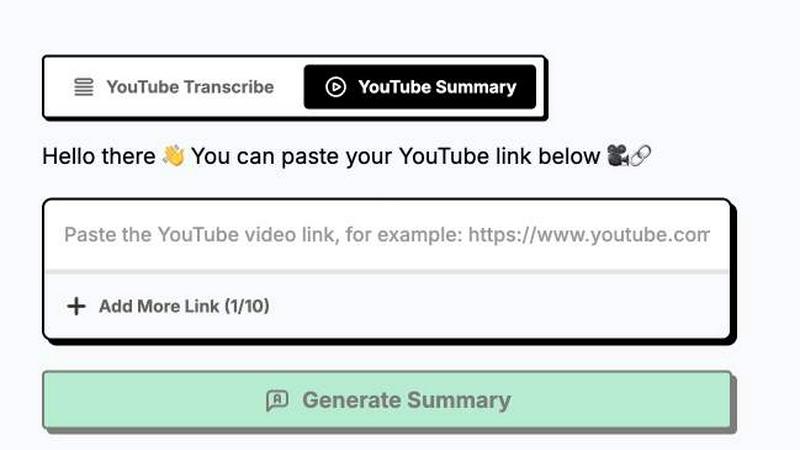
About ytskim
ytskim is a focused, practical tool designed to solve a common problem for anyone who works with YouTube video content: getting accurate transcripts and structured summaries quickly. Instead of watching a long video or manually taking notes, you can use ytskim to extract the spoken text and receive a well-organized summary of the key points in just a few seconds. The core value proposition is straightforward: it saves you time and mental effort by converting video dialogue into a clear, readable, and actionable format. This product is built for a wide range of users, including students who need to review lecture content, researchers who want to analyze interviews, content creators who repurpose video scripts, and professionals who need to digest meeting recordings or training materials. The fundamental idea behind ytskim is to remove the friction from information gathering. You do not need to watch an entire video to understand its core message. You simply provide the video link, and the tool handles the heavy lifting. It uses reliable speech-to-text technology to capture the transcript with high accuracy, and then applies intelligent processing to distill that transcript into a structured summary. This summary is not just a random list of sentences; it is organized to highlight the main topics, arguments, and conclusions. The design philosophy is back-to-basics: you get the raw transcript and the smart summary, nothing more and nothing less. There are no complex workflows or unnecessary features. You get your information, and you move on. This makes ytskim an essential utility for anyone who values their time and needs to extract the essence of video content without distraction.
Features of ytskim
High-Accuracy Transcription
The foundation of ytskim is its ability to generate accurate transcripts from any YouTube video. This feature is not about simple word matching; it uses advanced speech recognition models that are trained to understand various accents, speaking speeds, and audio qualities. The result is a text file that faithfully represents the spoken content of the video, including filler words and natural pauses when necessary. This accuracy is critical because the quality of the summary directly depends on the quality of the transcript. If the transcript is full of errors, the summary will be unreliable. ytskim prioritizes getting the words right so you can trust the output for serious tasks like academic research, content analysis, or legal review. The process is fully automated and takes only seconds, even for longer videos.
Intelligent Structured Summarization
Beyond a simple transcript, ytskim provides a structured summary that organizes the content into logical sections. This feature goes beyond basic keyword extraction. It analyzes the transcript to identify the main topics, sub-topics, and key arguments presented in the video. The output is a clean, hierarchical document that you can scan quickly to understand the video's core message. For example, if a video covers three main points, the summary will have three clear sections, each with a heading and supporting bullet points or concise paragraphs. This structured format is far more useful than a wall of text, as it allows you to find specific information without reading the entire transcript. It is designed for users who need to grasp the big picture and the key details without spending time on the full video.
Fast Processing Speed
The tool is built for speed, delivering both the transcript and the structured summary in a matter of seconds. You do not need to wait for a long processing queue or sit through a progress bar that takes minutes. This speed is a direct result of efficient backend algorithms and optimized server infrastructure. The value here is simple: you can process multiple videos in rapid succession, making it ideal for batch workflows. For instance, a content researcher can quickly analyze a dozen videos in the time it would take to watch just one. This speed transforms the tool from a convenience into a productivity multiplier. It respects your time and allows you to maintain your workflow momentum without frustrating delays.
Simple and Direct User Interface
The user interface is intentionally minimal and focused. There are no complicated menus, settings, or options to configure. You simply paste a YouTube video link, click a button, and receive your transcript and summary. This back-to-basics approach means there is almost no learning curve. Anyone can use ytskim immediately, regardless of their technical skill level. The output is presented in a clean, readable format within the same interface, and you can easily copy the text or download it for later use. This simplicity is a core strength. It eliminates the friction that often comes with more complex tools, ensuring that the focus stays on getting the information you need, not on figuring out how to use the software.
Use Cases of ytskim
Academic Research and Note-Taking
Students and researchers can use ytskim to quickly extract key information from lecture videos, conference talks, or documentary content. Instead of watching a one-hour lecture and taking handwritten notes, you can get a structured summary in seconds. This allows you to focus on understanding the concepts rather than the act of transcription. You can then use the transcript for detailed analysis, citation, or as a study guide. This use case fundamentally changes how you approach video-based learning, turning passive watching into an active, efficient research process. It is a foundational tool for anyone in an educational setting who needs to process large amounts of video content.
Content Repurposing for Creators
Content creators who work with YouTube videos can use ytskim to generate scripts and outlines for other formats. For example, a podcaster can take a long-form interview video and use the summary to create show notes, social media posts, or a blog article. A video editor can use the transcript to identify the best soundbites and key moments for a highlight reel. This use case saves hours of manual transcription and note-taking, allowing creators to produce more content in less time. The structured summary provides a ready-made framework for repurposing, making it easy to adapt video content for different platforms and audiences.
Competitive and Market Analysis
Business professionals and analysts can use ytskim to monitor competitor content, industry trends, and product reviews on YouTube. Instead of watching multiple videos each day, you can process them all through ytskim and quickly scan the summaries for relevant insights. This allows you to stay informed about your market without dedicating hours to video consumption. You can compare the key points from different videos, identify common themes, and gather intelligence efficiently. This use case is about turning a time-consuming monitoring task into a streamlined, data-driven process that supports faster decision-making.
Accessibility and Content Review
Individuals with hearing impairments or those who prefer reading over listening can use ytskim to access video content. The transcript provides a full text version of the audio, making the content accessible. Similarly, professionals who need to review video content for compliance, legal, or training purposes can use the structured summary to quickly identify and locate specific sections. Instead of scrubbing through a video timeline, you can search the transcript for keywords and jump directly to the relevant part. This use case highlights the tool's role in making information more accessible and reviewable for a broader audience.
Frequently Asked Questions
What types of YouTube videos does ytskim support?
ytskim supports virtually any YouTube video that has an audio track and is publicly accessible. This includes standard videos, live streams, interviews, lectures, tutorials, and podcasts. The tool works with videos of varying lengths, from short clips to multi-hour recordings. The primary requirement is that the video has clear, spoken audio. Videos with heavy background noise or music may result in a less accurate transcript, but the tool is designed to handle a wide range of audio quality levels.
How long does it take to get a transcript and summary?
The processing time is typically very fast, often completing in just a few seconds. For longer videos, it may take a bit longer, but it is still significantly faster than the playback time of the video. The exact speed depends on the length of the video and the current server load. The tool is optimized for speed, so you can expect to receive your output much faster than the time it would take to watch the video or transcribe it manually.
Is the transcript and summary accurate?
ytskim uses advanced speech recognition technology to achieve a high level of accuracy. The accuracy depends on the clarity of the audio in the original video. Videos with clear, well-recorded speech, minimal background noise, and standard accents will produce the most accurate results. For videos with heavy accents, overlapping dialogue, or poor audio quality, the accuracy may be slightly lower. The structured summary is generated based on the transcript, so its quality is directly tied to the transcript's accuracy.
Can I download the transcript and summary?
Yes, the output is provided in a clear, readable format directly on the screen. You can easily copy the text to your clipboard for use in other applications. Depending on the specific implementation of the tool, there may also be options to download the transcript and summary as a text file. This allows you to save, organize, and archive your results for future reference and analysis.
Explore more in this category:
Similar to ytskim

Apps and files on an infinite canvas where people and AI agents work together.

Jev turns text or JSON into Choice, Score and Noul answers with probabilities. Build decision flows, process batches and call the API from one Console

Panzoe is an all-in-one AI platform for personal productivity, business automation, AI assistants, content creation, and custom AI solutions.

Free online Markdown to text converter. Strip formatting, copy readable plain text instantly, and keep every conversion private in your browser.

AI Email Filter sorts incoming mail into folders using plain-language prompts you write. Works with any IMAP mailbox; bring your own LLM if you want.

No-code 2D game editor: visual node logic, drag-and-drop scenes, live preview. Exports to Windows, macOS, Linux, Android, iOS, Web.

A free launch checklist for SaaS, apps, AI tools and more. Every step says why it matters and when you can skip it.

Free collection of online developer utilities, code formatters, and digital converters designed to streamline your daily workflow.