
Tailride
Tailride automatically extracts invoices from your email and web portals using AI, saving hundreds of hours on accounting work.
Visit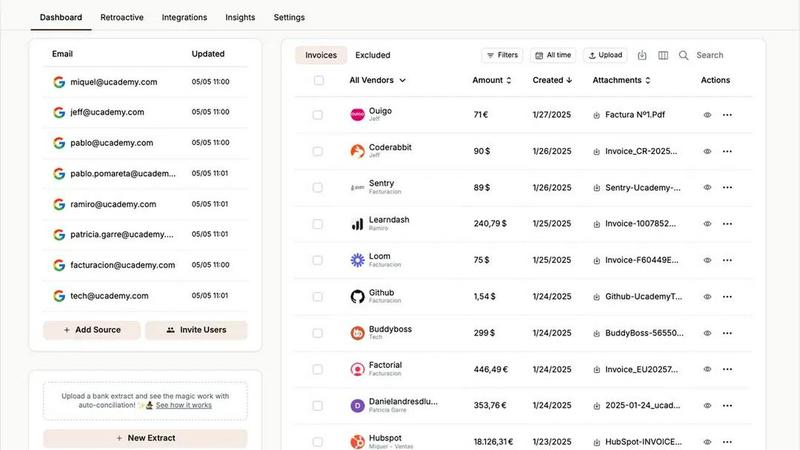
About Tailride
Tailride is an AI-powered accounting automation platform designed to eliminate the manual work of finding, extracting, and organizing invoices and receipts. At its core, the platform connects directly to your email inbox, whether you use Gmail, Outlook, or any IMAP-compatible service, and automatically scans for invoices and receipts within emails and attachments. It processes these documents using intelligent document recognition, which means it can identify key data points like vendor names, amounts, dates, and line items without any manual data entry from you.
The product is built for business owners, finance teams, and accountants who are overwhelmed by the sheer volume of invoices flowing into their inboxes every month. Instead of forwarding emails to random addresses or manually downloading PDFs, Tailride plugs directly into your existing email workflow. It can even scan retroactively, so you can catch up on past invoices from this month, this quarter, this year, or any custom date range you choose.
Beyond email scanning, Tailride includes a Chrome extension for one-click invoice extraction from over 20 online platforms, including Amazon, Meta Ads, Notion, ChatGPT, Adobe, and Microsoft. This means you can pull invoices directly from vendor portals without logging into each one separately. The platform also offers customizable AI rules for automatic categorization, seamless integrations with QuickBooks, Xero, and Google Drive, and bank reconciliation features that match transactions with invoices and identify missing documents. The main value proposition is simple: Tailride helps you completely forget about invoice management, saving hundreds of hours every month.
Features of Tailride
Inbox Scanning and Monitoring
Tailride connects natively to your email inbox and continuously monitors it for incoming invoices and receipts. It does not require you to forward emails to a separate address. Instead, it works directly with your existing Gmail, Outlook, or IMAP accounts. The system can detect invoices whether they are attached as PDFs, embedded as images, written in the body of the email, or hidden behind a URL link. You can also connect your colleagues' inboxes, so all invoices from your entire team are captured in one central dashboard. This eliminates the chaos of missing invoices at the end of the quarter and ensures your accountant always has everything they need.
Retroactive Scanning for Past Invoices
When you first connect Tailride to your inbox, you have the option to scan retroactively for past invoices. This feature is invaluable for catching up on months or even years of backlogged invoices. You can choose to scan for invoices from this month, this quarter, this year, all time, or a custom date range. The AI automatically identifies and extracts all relevant documents from your email history, so you do not have to manually search through thousands of old emails. This retroactive capability means you can get your entire invoice history organized within minutes of setting up the platform.
Chrome Extension for Online Portals
Tailride includes a powerful Chrome extension that lets you extract invoices from over 20 online platforms with a single click. Supported portals include Amazon, Meta Ads, Adobe, Notion, Microsoft, ChatGPT, and many more. Instead of logging into each vendor portal, searching for past invoices, and downloading them one by one, you simply click the extension button while on the platform's billing page. The extension automatically detects and extracts the invoice data, sending it directly to your Tailride dashboard. This feature replaces tools like GetMyInvoices and saves significant time for businesses that use multiple software subscriptions and online services.
AI Processing and Custom Rules
Once invoices are captured, Tailride uses intelligent document recognition to process them automatically. The AI extracts key fields such as vendor name, invoice number, date, total amount, tax, and line items. Beyond basic extraction, you can set up customizable AI rules to automatically categorize invoices based on your business's needs. For example, you can create rules that route all Amazon purchases to an "Office Supplies" category or all Meta Ads invoices to a "Marketing" category. These rules learn from your behavior over time and reduce the need for manual sorting. The processed invoices can then be forwarded automatically to QuickBooks, Xero, Google Drive, or your accountant.
Use Cases of Tailride
End-of-Quarter Invoice Catch-Up
For businesses that struggle to find all invoices at the end of each quarter, Tailride provides a complete solution. Instead of asking colleagues to forward missing invoices or manually searching through email archives, you simply use the retroactive scanning feature. Connect your inbox and your team's inboxes, select the quarter you need, and let the AI find every invoice automatically. This use case is especially valuable for fast-growing companies where invoice volume increases rapidly and manual tracking becomes impossible.
Employee Expense Management with Paper Receipts
Tailride handles physical receipts through a Telegram or WhatsApp bot. Employees can take pictures of paper receipts and send them to the bot, which processes the images and adds them to the central dashboard. You can link as many users as you want, making it easy for team members to submit expenses without holding onto physical receipts or filling out spreadsheets. This use case is ideal for companies with remote or field employees who frequently incur out-of-pocket expenses.
Automated Invoice Extraction from Vendor Portals
Businesses that subscribe to multiple software services like Amazon, Meta Ads, Notion, and ChatGPT can use the Chrome extension to extract invoices from all these portals in minutes. Instead of logging into each platform separately at the end of the month, you click the extension while browsing your billing pages. The invoices are automatically captured, categorized, and stored in your Tailride dashboard. This use case eliminates the tedious task of manual downloading and ensures you never miss a subscription invoice for tax purposes.
Accountant Collaboration and Tax Preparation
Accountants can use Tailride to streamline tax preparation for multiple clients. By connecting to each client's inbox (with permission), the accountant gains instant visibility into all incoming invoices and receipts. The platform automatically organizes documents by date, vendor, and category, making it easy to prepare financial statements and tax filings. Clients no longer need to forward invoices or send paper documents. The accountant can focus on analysis and strategy instead of data entry, which is why many accountants report being much happier after adopting Tailride.
Frequently Asked Questions
How does Tailride connect to my email inbox without forwarding?
Tailride uses a native connection to your email provider, whether it is Gmail, Outlook, or any IMAP-compatible service. This means you do not need to forward invoices to a separate email address. The platform reads your inbox directly, but your emails never leave your inbox. Tailride only extracts invoice-related data and leaves your other emails untouched. You maintain full control over your email account at all times.
Can Tailride process invoices that are behind a URL link in an email?
Yes, Tailride can handle invoices that are embedded in the body of an email, attached as PDFs or images, or hidden behind a URL link. The AI scans the entire email content and follows links to download and process the invoice. This capability is particularly useful for invoices from platforms that send email notifications with a link to download the actual invoice rather than attaching it directly.
What happens if I have multiple email addresses or team members?
Tailride allows you to connect multiple inboxes, including those of your colleagues. You can invite team members to link their own email accounts, and all invoices from the entire team will be captured in a single dashboard. This is especially useful for companies where different employees receive invoices for different departments. The platform keeps track of which inbox each invoice came from, providing full visibility into the source of every document.
Is Tailride suitable for businesses that use paper receipts?
Absolutely. Tailride includes a Telegram and WhatsApp bot that handles paper receipts. Employees simply take a picture of the physical receipt and send it to the bot. The AI processes the image, extracts the relevant data, and adds the receipt to the dashboard. You can link as many users as you want, making it easy for field employees, delivery drivers, or remote workers to submit their expenses without needing to scan or upload files manually.
Pricing of Tailride
Tailride offers a straightforward pricing structure based on the number of invoices processed and the features you need. The platform provides a free tier that allows you to get started without a credit card, giving you immediate access to inbox scanning and basic extraction features. For businesses with higher volume or advanced needs, paid plans are available that include retroactive scanning, the Chrome extension for online portals, custom AI rules, integrations with QuickBooks and Xero, and bank reconciliation features. Specific pricing details for each tier are available on the Tailride website, and there is a dedicated pricing section for accountants managing ten or more clients. You can sign up with Google to begin your free trial and explore the platform before committing to a paid plan.
Similar to Tailride

All-in-One POS, Inventory & Accounting Software for Bangladeshi Businesses

Visual financial timelines for couples and young professionals: model cash flow, life events, and shared goals.


IZIPAY is a virtual and physical crypto card service that lets users top up with digital assets and pay online like with a regular card.

SnapPChart grades a trading chart screenshot A+ to F, with an entry, stop, targets, and risk/reward. Works on stocks, forex, crypto, futures.

Venduris is a renewal intelligence platform that gives mid-size companies control over SaaS & AI contract renewals before leverage disappears.