
SubtitlesFast
SubtitlesFast quickly adds animated subtitles to your videos, streamlining editing and publishing in under five minutes.
VisitPublished on:
August 30, 2025
Pricing:
About SubtitlesFast
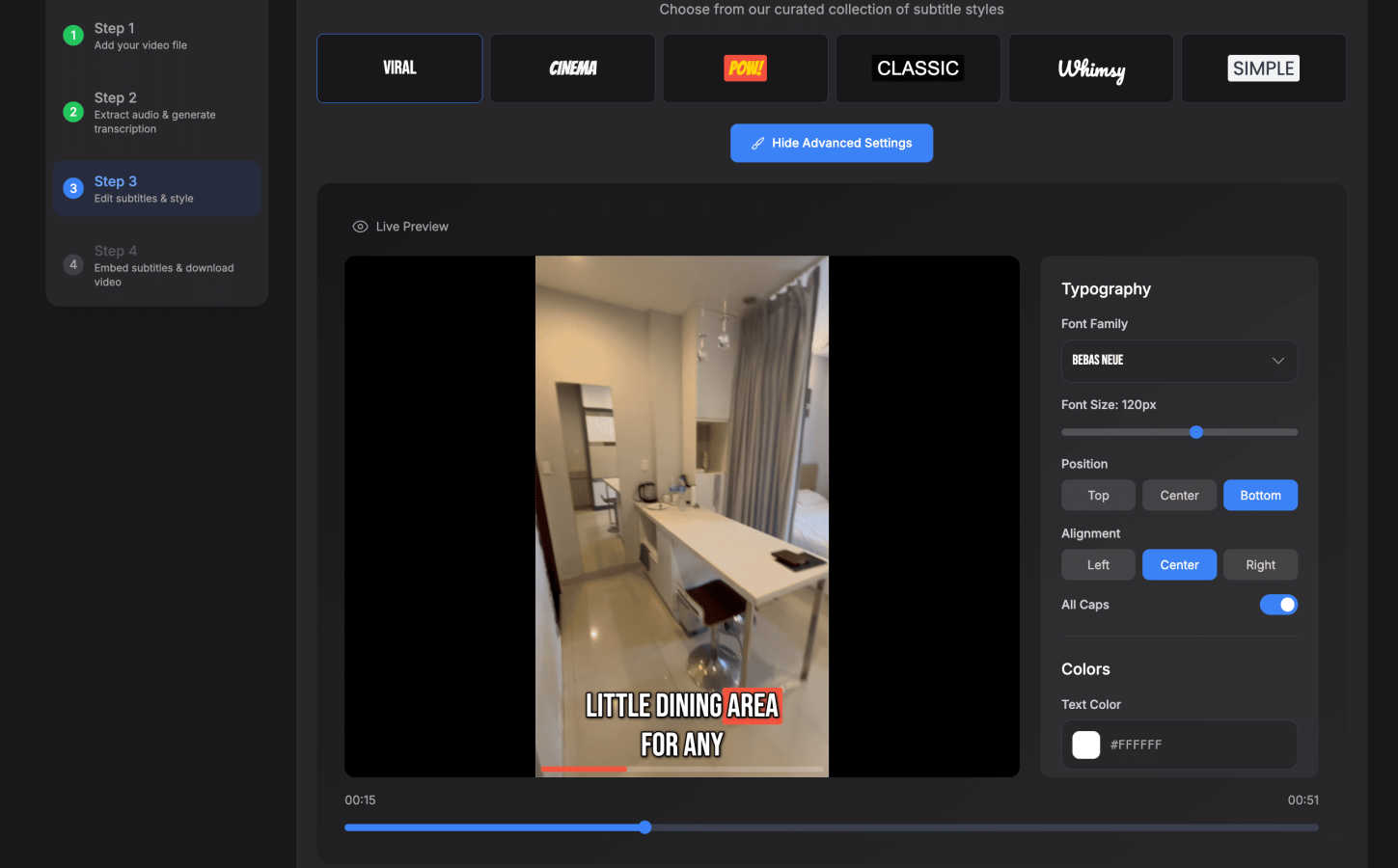
SubtitlesFast is an innovative, browser-based application tailored for video creators who aim to enhance their content with professional subtitles quickly and effortlessly. In today's digital landscape, subtitles are essential for increasing viewer engagement, improving accessibility, and optimizing content for silent autoplay on platforms such as TikTok, Instagram, YouTube, and X. Designed for creators who post daily, SubtitlesFast simplifies the subtitle creation process by eliminating the complexities associated with traditional video editing software. Users simply upload their video, and the AI automatically transcribes the audio. They can then customize the styling of the subtitles before downloading the video with the subtitles burned in. This streamlined approach ensures that creators can transition from recording to publishing in under five minutes, making it a perfect tool for those who need to produce high-quality content swiftly. With no software downloads, no watermarks, and a user-friendly interface, SubtitlesFast provides a faster, cleaner, and more private alternative to traditional subtitle editing tools.
Features of SubtitlesFast
Auto-Transcription
SubtitlesFast offers auto-transcription capabilities in over 50 languages. This feature allows users to quickly convert spoken content into text, saving time and effort. The AI technology ensures that the transcriptions are accurate and easy to read, making it ideal for creators targeting diverse audiences.
Customizable Styling
Once the transcription is complete, users have the option to customize their subtitles with over 30 animated styles. This flexibility ensures that the subtitles match the creator's branding and visual preferences, enhancing the overall aesthetic of the video.
Simple Editing Interface
The application features a straightforward editing interface that allows users to make adjustments without a steep learning curve. Creators can easily edit the timeline, add images and music, and make other modifications to ensure that their videos are polished and professional.
One-Click Export
With a single click, users can export their finished videos with subtitles burned directly into the footage. This feature allows for quick and seamless publishing on various platforms, ensuring that creators can share their content efficiently and effectively.
Use Cases of SubtitlesFast
Daily Video Creators
For creators who produce daily content, SubtitlesFast provides a quick and efficient way to add subtitles. The streamlined process allows them to focus on creativity instead of complex editing, enabling them to publish high-quality videos consistently.
Social Media Marketers
Social media marketers can leverage SubtitlesFast to enhance their promotional videos. By adding subtitles, they can improve viewer engagement and ensure that their messages are conveyed clearly, even when videos are viewed on mute.
Vloggers
Vloggers can benefit from SubtitlesFast by easily adding subtitles to their video diaries. This inclusion not only makes the content more accessible but also helps retain viewer attention, especially in noisy environments.
Educators and Trainers
Educators can use SubtitlesFast to create instructional videos with clear subtitles. This improves accessibility for diverse learners and ensures that key concepts are communicated effectively, enhancing the overall learning experience.
Frequently Asked Questions
How does SubtitlesFast ensure accuracy in transcription?
SubtitlesFast utilizes advanced AI technology to automatically transcribe audio into text. The system is designed to accurately capture spoken content in over 50 languages, making it reliable for various types of videos.
Is there a watermark on the free trial?
No, SubtitlesFast offers a free trial with no watermarks on the videos. This allows users to test the application thoroughly and evaluate its features without any limitations.
Can I customize the appearance of my subtitles?
Yes, SubtitlesFast provides a variety of customizable styling options, including over 30 animated styles. Users can tailor the appearance of their subtitles to match their branding and personal preferences.
What platforms can I publish my videos to?
Videos edited with SubtitlesFast can be easily published on popular platforms such as TikTok, Instagram, YouTube, and X. The one-click export feature ensures that the videos are ready for sharing without additional steps.
Similar to SubtitlesFast

Create and edit AI images, generate videos, and compare models in one creative workbench.

Fast file search for the Mac. Results as you type, files inside Mail and Photos, works with Wi-Fi off. $19 once.

Eighteen PDF tools in one native Mac window: merge, split, compress, OCR, Bates numbering, forms, signing and redaction. Offline. $29 once.

Hold a key, say what you mean, let go. Clean, punctuated text lands at the cursor in any app on your Mac or iPhone.

Mainspring turns the settings macOS hides into 90+ one-click, fully reversible power-ups for Finder, Dock, screenshots and more. $29 once.

A Mac menu bar app for a full disk. See what is using your space, read whether it comes back on its own, and remove only what you tick.

Catch a thought without leaving what you are doing. Notes, checklists and a little companion in your Mac's notch. $12 once.

A Mac app that opens damaged video, PDFs, archives and documents and writes out everything it can still read. $9 once, no uploads.