
Storyloft
Storyloft helps authors write, edit, format, and publish books in one seamless AI-native platform without breaking their flow.
Visit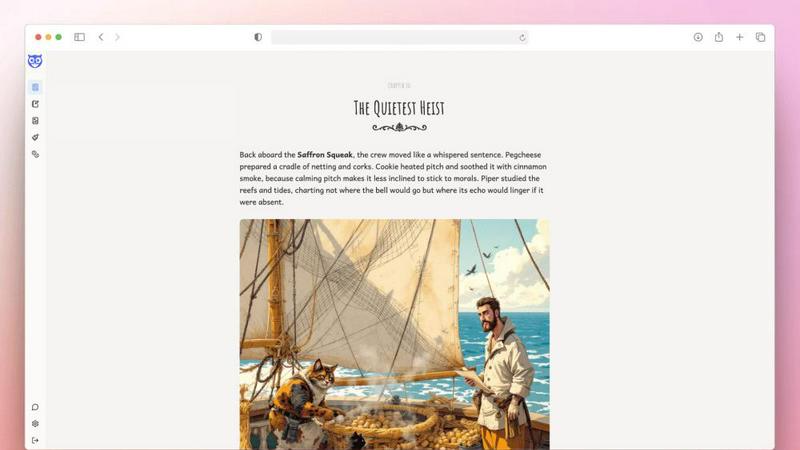
About Storyloft
Storyloft is an AI-native writing application designed specifically for authors who want to write, edit, design, and publish a book from a single, unified platform. Unlike general-purpose word processors or content generators, Storyloft is built around the realities of long-form writing. It supports the entire book creation process, from the first draft to the final publication files. The core value proposition is simplicity and focus: instead of juggling separate tools for drafting, editing, design, and formatting, authors can do everything within one editor. At the heart of the platform is Eddy, a manuscript-aware AI assistant. Eddy reads your entire work before responding, which allows it to provide suggestions that preserve your unique voice, maintain story continuity, and improve structural flow without sounding generic. This approach is fundamentally different from traditional AI tools that treat each prompt in isolation. Storyloft is for fiction and nonfiction authors, including those writing biographies, epic fantasy, true crime, philosophy, young adult, self-help, historical narratives, and sci-fi worldbuilding. It replaces the need for multiple software subscriptions like document editors, design software, and formatting platforms, making it a complete solution for authors serious about finishing and publishing their books.
Features of Storyloft
Eddy AI Assistant
Eddy is a manuscript-aware AI that reads your entire book before offering suggestions. This means it understands your characters, plot, setting, and narrative voice. Instead of generic text generation, Eddy provides context-aware feedback on continuity, pacing, and structure. It helps you refine dialogue, strengthen chapters, and overcome writer's block while keeping your personal style intact. This feature is built specifically for long-form writing, not short content.
Book Cover Studio
Storyloft includes a built-in cover design tool that allows authors to create professional book covers without leaving the editor. You can design covers for both print and ebook formats. The tool provides templates and customization options that align with industry standards. This eliminates the need for separate graphic design software or hiring a designer for initial concepts, giving you full control over your book's visual identity.
Print-Ready Export
When your manuscript is complete, Storyloft handles the final formatting for both print and ebook. It produces clean, production-ready files with proper layout, typography, and styling. This feature ensures your book meets the technical requirements of major publishing platforms. You do not need additional formatting software like Vellum or Atticus. The export process is streamlined to save time and reduce errors.
Research Hub and Source Manager
For nonfiction authors, Storyloft provides a dedicated research hub and source manager. You can organize notes, manage citations, and keep track of sources directly within your manuscript. This feature supports auto-citations, which helps maintain academic integrity and proper attribution. It keeps all your research connected to your writing, so you never lose a reference or idea.
Use Cases of Storyloft
Writing a Complete Fiction Novel
An author writing a fantasy or young adult novel can use Storyloft to draft, edit, and publish the entire book. The Eddy AI assistant helps maintain continuity across chapters, ensuring character arcs remain consistent. The world-building tools and character creator assist in developing rich settings and personalities. When the book is finished, the print-ready export produces files that are ready for distribution.
Publishing a Nonfiction Book with Citations
Nonfiction authors writing biographies, self-help, or historical narratives benefit from the research hub and source manager. They can organize interviews, articles, and books as sources. The auto-citations feature saves time on formatting references. The entire workflow, from initial outline to final publication, stays within one platform, reducing the complexity of managing multiple documents and citation tools.
Designing a Book Cover Without External Software
An author who wants to self-publish but lacks design skills can use the Book Cover Studio to create a professional cover. This use case eliminates the need to learn Photoshop or hire a designer. The author can experiment with different layouts, fonts, and colors until the cover matches the book's tone. The final design is ready for upload to print-on-demand services.
Editing a Manuscript with Context-Aware Feedback
An author stuck on a specific scene or struggling with pacing can use Eddy to get targeted feedback. Because Eddy reads the entire manuscript, it can suggest changes that fit the overall narrative. For example, it can point out a plot hole introduced in chapter three that affects chapter ten. This use case helps authors refine their work without losing their voice or spending hours rereading their own text.
Frequently Asked Questions
What makes Storyloft different from other writing tools like Scrivener or Google Docs?
Storyloft is built specifically for the complete book creation process, from first draft to final publication. Unlike Scrivener, which is primarily an organizational and drafting tool, Storyloft includes built-in AI assistance, cover design, and print-ready export. Unlike Google Docs, which is a general document editor, Storyloft is optimized for long-form writing with features like manuscript-aware AI, chapter management, and professional formatting. It replaces multiple tools with one unified platform.
How does the Eddy AI assistant work without making my writing sound generic?
Eddy is manuscript-aware, meaning it reads your entire book before generating a response. This allows it to understand your unique voice, character names, setting details, and plot structure. Instead of producing generic text, Eddy offers suggestions that fit within your existing narrative. It focuses on maintaining continuity, improving flow, and providing structure-based feedback, not on replacing your writing style with a standard template.
Can I use Storyloft for both fiction and nonfiction books?
Yes, Storyloft supports both fiction and nonfiction genres. For fiction, it offers features like world-building bibles, character creators, and continuity checks. For nonfiction, it provides a research hub, source manager, and auto-citations. The platform is designed to handle the specific needs of each genre, whether you are writing a fantasy novel, a biography, a self-help book, or a historical narrative.
Is Storyloft suitable for authors who are not tech-savvy?
Yes, Storyloft is designed with simplicity in mind. The interface is clean and focused on writing. All features, including the AI assistant, cover studio, and export tools, are accessible from within the editor. You do not need technical skills to format a book or design a cover. The platform guides you through each step, making it suitable for authors who want to focus on their writing rather than learning complex software.
Similar to Storyloft

UndetectedGPT rewrites AI text to sound human, bypassing detectors like GPTZero and Turnitin with its Ghost-1 model.

Hold Your Voice analyzes your writing, spots where your voice drifted, and rewrites it to sound like you again.

Magic Resume optimizes your resume in just 2 minutes to help you stand out and land interviews faster with targeted keywords.

Shiru Notes is a secure minimalist app that effortlessly captures your thoughts while ensuring your privacy.

FuturePost lets you send private letters to your future self, fostering reflection and motivation without ads or fees.

SchoolGPT is an AI teaching assistant that saves educators hours on lesson plans and grading.

PlagiarismRemover.AI quickly transforms your text into original content that passes plagiarism checks while retaining.

CleanPaste.org is a free tool that instantly removes invisible characters and AI watermarks from your text.