
QuickSigner
QuickSigner simplifies eSigning with secure, legally binding signatures online, streamlining your document workflow in seconds.
Visit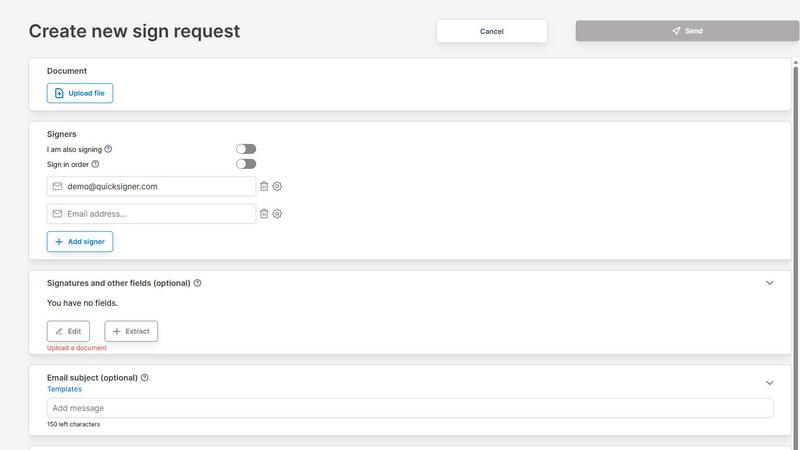
About QuickSigner
QuickSigner is a powerful online platform designed to simplify the process of signing, sending, and finalizing documents electronically. This tool is tailored for individuals and businesses seeking to reduce the time and effort spent on manual document handling, transforming days of back-and-forth communication into a matter of minutes. With features such as Adobe Approved Trust List (AATL) electronic signatures and ISO 27001 certification, QuickSigner ensures that your documents are not only signed quickly but also securely and legally. Whether you are a freelancer, a small business, or part of a larger organization, QuickSigner caters to your needs by providing an intuitive interface that allows anyone to manage electronic signatures effortlessly. The main value proposition of QuickSigner lies in its ability to streamline workflows, enhance operational efficiency, and protect sensitive information while maintaining compliance with legal standards.
Features of QuickSigner
User-Friendly Document Upload
QuickSigner allows users to easily upload documents through a simple drag-and-drop interface. It supports common formats such as PDF and Word, making it convenient for users to get started without needing extensive technical knowledge.
Customizable Signature Fields
Users can personalize their documents by adding recipient emails and placing signature, date, or text fields precisely where needed. This customization ensures that signers know exactly where to sign, reducing confusion and enhancing the signing experience.
Secure Online Signing
Recipients can sign documents securely from any device using a unique link. There is no need for signers to create an account or install any software, making the process quick and accessible for everyone involved.
Real-Time Tracking and Finalization
QuickSigner offers a feature that allows users to monitor the signing progress in real time. Once all parties have signed, users receive the completed document instantly, ensuring that important agreements are finalized without delay.
Use Cases of QuickSigner
Streamlining Contract Management
Small businesses can use QuickSigner to manage their contract agreements efficiently. By utilizing the platform, they can reduce the time taken to finalize contracts, enabling them to focus more on their core business activities instead of administrative tasks.
Facilitating Remote Work
For teams working remotely, QuickSigner serves as an essential tool for collecting signatures on important documents. With its mobile-friendly design and accessibility, team members can sign documents from anywhere, enhancing collaboration and productivity.
Enhancing Client Communications
Freelancers and consultants can leverage QuickSigner to send proposals and contracts to clients quickly. This immediate response capability helps create a professional image and improves client satisfaction by reducing wait times.
Improving Compliance and Security
Organizations that handle sensitive information can benefit from QuickSigner’s ISO 27001 certification, which assures compliance with international security standards. This feature is particularly valuable for industries that have stringent data protection requirements.
Frequently Asked Questions
How does QuickSigner ensure document security?
QuickSigner is ISO 27001 certified, which means it follows strict international standards for information security management. Additionally, AATL electronic signatures provide an added layer of security, ensuring that your documents are legally binding and protected.
Can I use QuickSigner on my mobile device?
Yes, QuickSigner is designed to be mobile-friendly. Users can sign documents and manage their workflows from any device, making it convenient for those who are frequently on the go.
What document formats does QuickSigner support?
QuickSigner supports popular document formats, including PDF and Word files. This flexibility allows users to upload various types of documents without worrying about compatibility issues.
Is there a limit to the number of documents I can sign with QuickSigner?
The free plan allows for signing up to 3 documents per month, while the business plan offers unlimited signing. This tiered structure lets users choose a plan that best fits their signing frequency and business needs.
Explore more in this category:
Similar to QuickSigner

Private email. Pure. Secure. Exclusive. No ads, no tracking, no data selling. GDPR compliant, EU-hosted.


Apps and files on an infinite canvas where people and AI agents work together.

Jev turns text or JSON into Choice, Score and Noul answers with probabilities. Build decision flows, process batches and call the API from one Console

Panzoe is an all-in-one AI platform for personal productivity, business automation, AI assistants, content creation, and custom AI solutions.

Free online Markdown to text converter. Strip formatting, copy readable plain text instantly, and keep every conversion private in your browser.


AI Email Filter sorts incoming mail into folders using plain-language prompts you write. Works with any IMAP mailbox; bring your own LLM if you want.