
Paperchat - AI customer support
PaperChat trains AI agents on your business data to handle customer support, collect leads, and integrate with your CRM.
Visit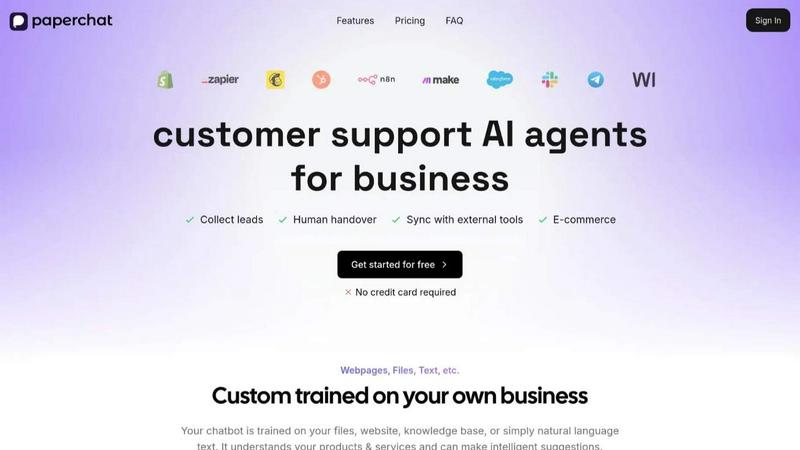
About Paperchat - AI customer support
Paperchat is a practical AI powered customer support platform that helps businesses create custom chatbots and document assistants. The core idea is simple: you give it your information, and it learns from that information to answer questions for your customers. This is not a generic chatbot that gives vague answers. Instead, Paperchat builds a chatbot that is trained specifically on your own data. This data can come from many places. You can upload files like PDFs and text documents. You can point it to your website pages. You can connect it to your knowledge base. The chatbot then reads, searches, summarizes, and answers questions based only on what you have provided. It uses large language models to do this work, but the answers are sourced from your content. This means the chatbot does not make up information. It sticks to what you have taught it.
The main value proposition of Paperchat is that it makes customer support faster and more efficient without requiring any coding skills. You can set up a chatbot in minutes. It is designed for businesses of all sizes, from small online stores to larger companies. It is also useful for individuals who need to get quick insights from their documents. The platform includes features like multilingual support, so your chatbot can speak over 95 languages. It also offers analytics to help you see what your customers are asking about. You can collect leads through conversations, hand over complex issues to a human agent when needed, and connect the chatbot to tools like Shopify, Webflow, and WordPress. The goal is to help you boost sales, save resources, and keep your customers happy with a reliable AI assistant that works on your terms.
Features of Paperchat - AI customer support
Custom Training on Your Data
Your chatbot is not a one size fits all solution. It is trained specifically on your files, website pages, knowledge base articles, or plain text. This means it understands your products, your services, and the way you do business. It can make intelligent suggestions to your customers based on the specific information you have provided. You are in full control of what the chatbot knows.
Analytics and Reporting
Paperchat gives you the tools to review every conversation your chatbot has. You can use the advanced analytics to identify trends in what customers are asking. This helps you uncover common questions, spot areas where your content might be lacking, and optimize your chatbot to perform better over time. You get clear data on how your chatbot is helping your business.
Multilingual AI Models
Your chatbot can speak over 95 different languages. This feature allows you to serve customers from all over the world in their native language. The AI models are built to understand everything from complex technical queries to casual, informal remarks. It then responds in an appropriate and natural manner for the language being used. This removes language barriers from your customer support.
No-Code Integrations
You do not need to be a developer to connect Paperchat with the tools you already use. The platform offers no-code integrations with popular platforms. You can connect Paperchat to your favorite no-code tools to automate your workflows. This makes it easy to sync customer data, update records, and trigger actions based on chatbot conversations without writing a single line of code.
Use Cases of Paperchat - AI customer support
Automating E-commerce Customer Support
An online store can use Paperchat to handle common customer questions around the clock. The chatbot can answer questions about shipping policies, return procedures, product specifications, and order status. It is trained on the store's own product pages and policies. This frees up human staff to focus on more complex issues and helps customers get instant answers, which can lead to higher satisfaction and more sales.
Lead Collection and Qualification
Businesses can configure their chatbot to collect leads during conversations. When a visitor asks a question or shows interest in a product, the chatbot can ask for their contact information. It can qualify these leads by asking relevant questions before passing them on to the sales team. This turns a simple support tool into a proactive sales assistant that works 24/7 to grow your business.
Internal Document Research and Summarization
Teams can use Paperchat as a document assistant for internal purposes. Instead of searching through hundreds of PDFs or pages of documentation, employees can ask the chatbot questions. The chatbot will find the relevant information, summarize it, and provide a sourced answer. This speeds up research, onboarding of new employees, and access to company knowledge without needing to remember where every file is stored.
Human Handover for Complex Issues
Paperchat is designed to know its limits. When a customer has a complex issue that requires a personal touch, the chatbot can seamlessly hand over the conversation to a human support agent. This ensures that customers are not stuck talking to a bot when they need real human help. The transition is smooth, and the human agent gets the full context of the conversation, so the customer does not have to repeat themselves.
Frequently Asked Questions
What is PaperChat?
PaperChat is an AI powered customer support platform. It allows you to build a custom chatbot that is trained on your own data. This data can include files like PDFs, your website content, your knowledge base, or plain text. The chatbot uses large language models to read, search, summarize, and answer questions based on that data. It is designed to help businesses automate support, collect leads, and get insights from their documents without needing any coding skills.
Do I need a website to use PaperChat?
No, you do not need a website to use PaperChat. While the platform integrates well with websites and e-commerce platforms like Shopify and WordPress, you can also train your chatbot on files and documents. If you have a collection of PDFs or text documents with information you want to share, you can upload them directly. The chatbot will then be able to answer questions based on those files, making it useful for internal knowledge bases or document heavy projects.
Do I need an OpenAI API key?
No, you do not need your own OpenAI API key to use PaperChat. The platform manages the underlying AI models for you. When you sign up and build your chatbot, you can start using it immediately without setting up any external accounts or managing API keys. This simplifies the setup process and removes a common technical barrier for users who want a straightforward AI solution.
Is there a trial period for the paid plans?
Yes, PaperChat offers a free plan to get you started. You can begin using the platform without providing a credit card. This allows you to test the features, train a chatbot on your data, and see if it meets your needs. If you decide you need more advanced features, higher usage limits, or priority support, you can then look at the paid plans. The free plan gives you a solid opportunity to evaluate the service before committing.
Explore more in this category:
Similar to Paperchat - AI customer support

Signage and kiosk infrastructure for AI agents. Your agent publishes images, video, streams, web pages and apps to screens via one plugin.screenRIG is

Free YouTube transcripts on the web, a Chrome extension, and an API + MCP server so AI assistants can read YouTube.

Soul Cinema is a cinematic AI image generator that turns a written shot into a film-grade still, with cinematographer lighting, Soul ID character cons

High-performance custom PHP websites, ecommerce stores, and AI discovery infrastructure that make your site readable by AI.


Turn any image into editable layers with AI

