
On Music AI
On Music AI teaches you to turn your words into complete songs with vocals, beats, and instrumentals using simple tools.
Visit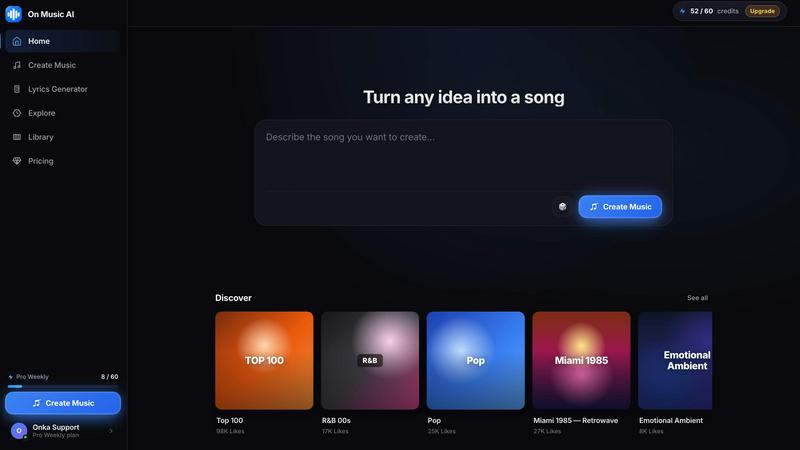
About On Music AI
On Music AI is an AI music generator that helps anyone create full songs from simple text prompts, lyrics, or ideas. You do not need a studio, instruments, production skills, or music theory. Just describe the song you want, choose your direction, and generate music with vocals, beats, melodies, and instrumentals in minutes. It is built for creators, musicians, marketers, content producers, and anyone who wants to turn inspiration into listenable music fast. Whether you want to create a rap track, pop song, background music, demo idea, social media audio, or experimental track, On Music AI makes music creation simple and accessible. The platform is free to start and designed to make AI music generation easy for beginners while still being useful for creative workflows. The core idea is that you bring the idea, mood, or lyrics. On Music AI turns it into music you can play, edit, and share without a long learning curve. You can start with a real idea like a birthday message, a late night hook, or a few lines from your notes. These can become a finished piece of music. You do not need to learn chords, arrange parts, or piece together loops just to hear your idea come alive. Your words, your mood, and your style stay at the center. Instead of settling for background music that sounds like everyone else, you can create something specific to a person, moment, joke, memory, or feeling. If one version feels too slow, too bright, or too polished, you can make another and compare. That makes it easy to explore different sounds, reshape the vibe, and land on music that matches what you meant. The goal is not just a rough sketch. It is a complete piece of music you made yourself, with enough polish to send to friends, post online, save for later, or keep as a personal idea you finally turned into sound.
Features of On Music AI
Text to Music Generation
Type a mood, moment, or lyric and hear your music take shape. You can enter simple text prompts like "upbeat birthday pop with female vocals" or paste your own lyrics. The AI engine interprets your input and generates a complete song structure with vocals, beats, melodies, and instrumentals. This feature removes the need for any music theory knowledge or production experience.
Full Song Creation with Vocals
Create verses, hooks, and melodies in one simple flow. On Music AI does not just generate instrumental loops. It produces full songs with sung or rapped vocals. You can describe the genre, mood, and vocal style you want. The AI then constructs a complete arrangement that includes verse sections, chorus sections, and a finished structure ready to listen to or share.
Easy Editing and Style Swapping
Try new styles, swap parts, and shape the sound with easy tools. If a generated track feels too slow, too bright, or too polished, you can make another version and compare them side by side. This lets you explore different musical directions quickly without starting over from scratch. You can change the genre, adjust the tempo, or modify the vocal style with simple controls.
Royalty Free Music Output
All music generated on On Music AI is royalty free. This means you can use your creations for social media posts, videos, podcasts, background music, or any other project without worrying about copyright claims or licensing fees. You own the output and can share it freely across platforms and commercial projects.
Use Cases of On Music AI
Creating Original Songs for Social Media
Content creators can generate custom background music and full songs for TikTok, Instagram Reels, YouTube Shorts, and other platforms. Instead of searching through stock music libraries for the perfect track, you can type a prompt describing the exact mood and style you need. The AI produces a unique piece of music that fits your content and avoids copyright issues.
Music Production and Demo Creation
Musicians and songwriters can use On Music AI to quickly turn lyrical ideas into demo recordings. You can paste a few lines of lyrics, choose a genre like pop or rap, and get a fully produced demo with vocals and instrumentation. This helps you hear how a song might sound before booking studio time or working with other musicians. It is a fast way to test ideas and refine arrangements.
Background Music for Videos and Podcasts
Marketers and video producers can generate custom background music for commercials, explainer videos, presentations, and podcast intros. You can specify the desired mood, length, and instrumentation. The AI creates a track that matches your project's tone without the hassle of licensing existing music or hiring a composer. The royalty free nature of the output makes it safe for commercial use.
Personal Music Projects and Gifts
Anyone can create personalized music for special occasions like birthdays, anniversaries, or celebrations. You can write a few personal lines about the person or event, choose a fitting style, and generate a unique song. This turns a simple idea or memory into a finished piece of music that feels personal and meaningful. It is a new way to express feelings and create memorable gifts.
Frequently Asked Questions
Do I need any music skills to use On Music AI?
No, you do not need any music skills, production experience, or knowledge of music theory. The platform is designed for complete beginners. You simply type a text prompt describing the song you want, choose a direction, and the AI generates the music for you. The tool handles all the technical aspects of song creation.
Is the music I create on On Music AI royalty free?
Yes, all music generated on On Music AI is royalty free. You can use your creations for personal projects, social media content, commercial videos, podcasts, and any other purpose without worrying about copyright claims or paying additional licensing fees. You retain full ownership of the output.
What kind of music can I create with this tool?
You can create a wide variety of music genres including pop, rap, lo-fi, EDM, acoustic, cinematic, and more. You can generate full songs with vocals, instrumental background music, beat tracks, and experimental pieces. The tool supports different moods like happy, sad, romantic, energetic, dark, and chill. You can also generate music from your own lyrics.
How long does it take to generate a song?
Generating a song on On Music AI takes just minutes. You type your prompt or paste your lyrics, select your desired style and mood, and the AI produces a complete piece of music with vocals, beats, melodies, and instrumentals quickly. You can then listen, edit, or generate new versions as needed.
Explore more in this category:
Similar to On Music AI

A game show board for the TV, with real buzzers on every player's phone

Most likely to, would you rather and more: the TV shows it, every phone votes

Upload a Dancer photo and a Partner photo and get your own AI Tip Toe barn-dance video. Free 5s preview, 12s HD from $4.90. No subscription.

Turn one photo into the viral Özil goal meme video: you, your dog, a toy or a drawing scores. Free 5s preview, 10s 720p from $4.90. No subscription.

Wheel of Names Spin Wheel Picker tool for classrooms or events

Wery is an AI-powered virtual creative studio for entertainment content.

Snapkin is a calorie tracker you use by photographing your plate.

Adopt a virtual baby who grows, learns, and remembers you.