
MyImageUpscaler
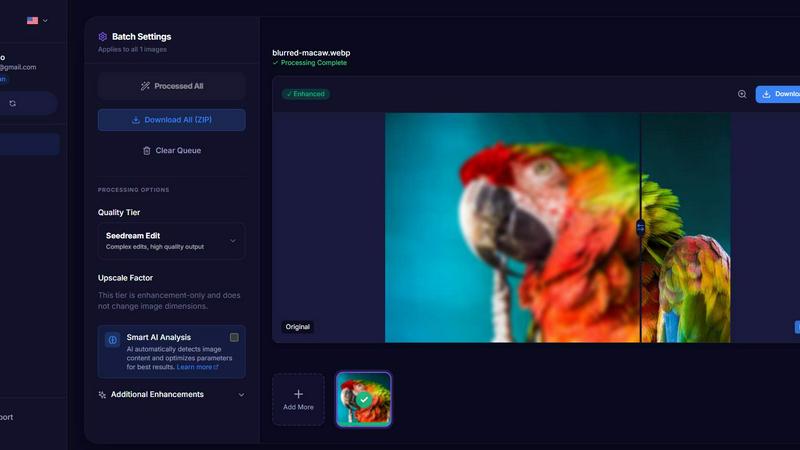
MyImageUpscaler enhances and upscales images to 4K resolution in seconds while preserving sharp text and details.
VisitPublished on:
February 10, 2026
Pricing:
About MyImageUpscaler
MyImageUpscaler is an innovative AI-powered platform designed to enhance and upscale images efficiently, catering to the needs of businesses and content creators alike. This cutting-edge technology allows users to upscale images by 2x to 4x while maintaining sharpness and enhancing fine details, ensuring the highest quality results. MyImageUpscaler is ideal for various professionals, including e-commerce sellers looking to improve product images, photographers needing to process large batches, and social media managers resizing images for platforms like Instagram and TikTok. The platform's main value proposition lies in its ability to deliver professional-grade image enhancements swiftly, with processing times of under 10 seconds, making it both a time-efficient and cost-effective solution. With a user-friendly interface, MyImageUpscaler simplifies the image enhancement process, allowing users to achieve stunning results without the need for complicated software or extensive technical knowledge.
Features of MyImageUpscaler
Advanced Detail Preservation
MyImageUpscaler employs sophisticated algorithms that preserve real detail in images, ensuring crisp and high-quality results. This feature prevents blurring and artifacts, allowing for professional-quality images that maintain their original essence even after upscaling.
Rapid Processing Time
The platform processes images in under 10 seconds, enabling users to enhance and upscale multiple images quickly. This feature is particularly beneficial for professionals who require swift turnaround times without compromising on quality.
Batch Processing Capability
With the ability to process up to 500 images at once, MyImageUpscaler’s batch processing feature saves users significant time and effort on large projects. This capability is essential for businesses that need to enhance multiple images simultaneously, streamlining their workflow.
Multiple Upscaling Options
Users can choose between 2x and 4x upscaling options, allowing for flexibility based on their specific needs. This feature ensures that images are upscaled to the desired resolution while still maintaining clarity and sharpness, regardless of the use case.
Use Cases of MyImageUpscaler
E-Commerce Product Images
E-commerce sellers can leverage MyImageUpscaler to enhance product images, making them more appealing to potential customers. By improving image quality, sellers can effectively showcase their products, leading to higher conversion rates and increased sales.
Content Creation for Social Media
Content creators can use MyImageUpscaler to resize and enhance images for various social media platforms. The platform’s presets for Amazon, Instagram, YouTube, and TikTok ensure that images are optimized for each platform, enhancing their visual appeal and engagement potential.
Real Estate Listings
Real estate agents can prepare high-quality MLS listings with MyImageUpscaler. By enhancing property images, agents can attract more potential buyers and convey a sense of professionalism, which is crucial in a competitive market.
Photography Enhancement
Photographers can utilize MyImageUpscaler to process large batches of images efficiently. This allows for quick enhancements and adjustments, enabling photographers to focus on creativity while ensuring their images are of the highest quality for client presentations and portfolios.
Frequently Asked Questions
How does MyImageUpscaler maintain image quality while upscaling?
MyImageUpscaler utilizes advanced neural networks that intelligently upscale images by preserving details, edges, and text clarity. Unlike traditional upscaling methods that create blurry pixels, our AI reconstructs realistic details based on high-quality image pairs, resulting in sharp and professional 4K outputs.
What makes MyImageUpscaler different from other image upscaling tools?
MyImageUpscaler stands out for its combination of web convenience, superior text preservation, and affordable pricing. Unlike desktop software that often costs over $99, our online solution offers comparable quality without installation hassles, along with free credits to get started.
Is there a limit on the number of images I can enhance at once?
Yes, MyImageUpscaler allows batch processing for up to 500 images in a single session. This feature is designed to save time and streamline the workflow for users who need to enhance multiple images simultaneously.
Do I need to provide payment information to start using MyImageUpscaler?
No, MyImageUpscaler offers a free tier that includes 10 credits for users to try out the service. You can start enhancing images without the need for a credit card, making it easy to explore the platform's capabilities risk-free.
Similar to MyImageUpscaler

AI Email Filter sorts incoming mail into folders using plain-language prompts you write. Works with any IMAP mailbox; bring your own LLM if you want.

No-code 2D game editor: visual node logic, drag-and-drop scenes, live preview. Exports to Windows, macOS, Linux, Android, iOS, Web.

A free launch checklist for SaaS, apps, AI tools and more. Every step says why it matters and when you can skip it.

Free collection of online developer utilities, code formatters, and digital converters designed to streamline your daily workflow.

Visual financial timelines for couples and young professionals: model cash flow, life events, and shared goals.

The #1 Native Form Builder Plugin for Framer - No Code, No Embeds, No External Platforms.

Free AI attractiveness test and face analysis with private, on-device photo processing.

Generate and edit production-ready images with GPT Image 2 using prompts, reference images, clear text rendering, and a developer-friendly API.