
JustPDF
JustPDF is a free, privacy-first PDF toolkit that offers 17 powerful tools to manage your PDFs securely and efficiently in your browser.
Visit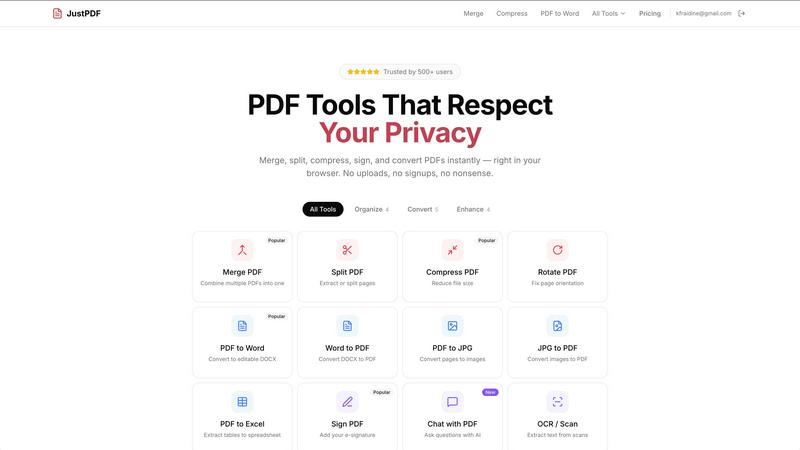
About JustPDF
JustPDF is a comprehensive online platform that provides users with 17 professional-grade PDF tools designed to enhance document management and manipulation. What sets JustPDF apart from its competitors, such as Smallpdf and iLovePDF, is its unique approach to file processing. All operations are conducted entirely within the user's browser through JavaScript and WebAssembly, ensuring that files do not leave the device. This local processing guarantees privacy and security, as users can verify this by checking the Network tab in their browser's DevTools. JustPDF is ideal for a wide range of users, including students, educators, professionals, and anyone who frequently works with PDF documents. Its main value proposition lies in providing fast, efficient, and secure PDF processing tools without the need for account creation, allowing users to perform three operations per day for free. For those requiring unlimited access, a pro subscription is available at a competitive rate.
Features of JustPDF
Merge PDF
The Merge PDF feature allows users to easily combine multiple PDF files into a single document. This is particularly useful for organizing related documents or creating comprehensive reports. With a simple drag-and-drop interface, users can select the files they wish to merge, and the tool will quickly process the files without uploading them to any external server.
Split PDF
The Split PDF feature enables users to extract specific pages from a PDF document or divide a large PDF into smaller, more manageable files. This functionality is essential for anyone needing to share only certain sections of a document or for breaking down lengthy reports into concise parts. The process is fast and secure, ensuring that the original document remains intact.
Compress PDF
JustPDF provides a powerful Compress PDF tool that reduces the file size of PDF documents without compromising quality. This feature is especially beneficial for users who need to share large files via email or upload them to online platforms with size restrictions. The compression process is quick and takes place entirely in the browser, ensuring users maintain control over their files.
Sign PDF
The Sign PDF feature allows users to add their electronic signature to documents, facilitating the signing process without the need for printing. This is particularly useful for professionals who require signatures on contracts or agreements. Users can easily create and apply their signature directly within the browser, making the process efficient and hassle-free.
Use Cases of JustPDF
Academic Use
Students and educators can leverage JustPDF for a variety of academic tasks. Whether merging research papers, converting lecture notes from PDF to Word for editing, or compressing large documents for submission, JustPDF provides essential tools that enhance productivity in educational settings.
Business Documentation
Professionals can utilize JustPDF to manage their business documentation needs. From merging invoices to compressing reports for emailing, the suite of tools allows for efficient document handling. The ability to sign PDFs directly also streamlines processes that require official signatures.
Creative Projects
Artists and designers can benefit from JustPDF by converting image files like JPG and PNG into PDFs for portfolio presentations. This feature allows for easy sharing of visual work in a professional format, ensuring that the integrity of the designs is maintained.
Personal Organization
Individuals looking to organize their personal files can use JustPDF to manage their documents effectively. Whether it is compressing family photos into a PDF album or splitting travel itineraries into separate pages, JustPDF provides a user-friendly platform for personal document management.
Frequently Asked Questions
Is JustPDF free to use?
Yes, JustPDF offers a free tier that allows users to perform three operations per day without needing to sign up. This makes it accessible for casual users who occasionally need to process PDF files.
How does JustPDF ensure my files remain private?
JustPDF processes all files locally within the user's browser using JavaScript and WebAssembly. This means files never leave the device, providing a high level of privacy and security that can be verified by users.
What tools are included in the JustPDF suite?
JustPDF includes 17 professional-grade tools such as Merge PDF, Split PDF, Compress PDF, Sign PDF, PDF to Word, JPG to PDF, and many more. This variety covers a wide range of PDF processing needs.
Can I use JustPDF offline?
While JustPDF is primarily a browser-based tool, it works offline, allowing users to access its features without an internet connection. This is particularly useful for users who may not always have reliable internet access.
Explore more in this category:
Similar to JustPDF

Apps and files on an infinite canvas where people and AI agents work together.

Jev turns text or JSON into Choice, Score and Noul answers with probabilities. Build decision flows, process batches and call the API from one Console

Panzoe is an all-in-one AI platform for personal productivity, business automation, AI assistants, content creation, and custom AI solutions.

Free online Markdown to text converter. Strip formatting, copy readable plain text instantly, and keep every conversion private in your browser.

AI Email Filter sorts incoming mail into folders using plain-language prompts you write. Works with any IMAP mailbox; bring your own LLM if you want.

No-code 2D game editor: visual node logic, drag-and-drop scenes, live preview. Exports to Windows, macOS, Linux, Android, iOS, Web.

A free launch checklist for SaaS, apps, AI tools and more. Every step says why it matters and when you can skip it.

Free collection of online developer utilities, code formatters, and digital converters designed to streamline your daily workflow.