
GIF Face Swap
GIF Face Swap lets you replace any face in an animated GIF with your own photo using AI, no editing skills needed.
Visit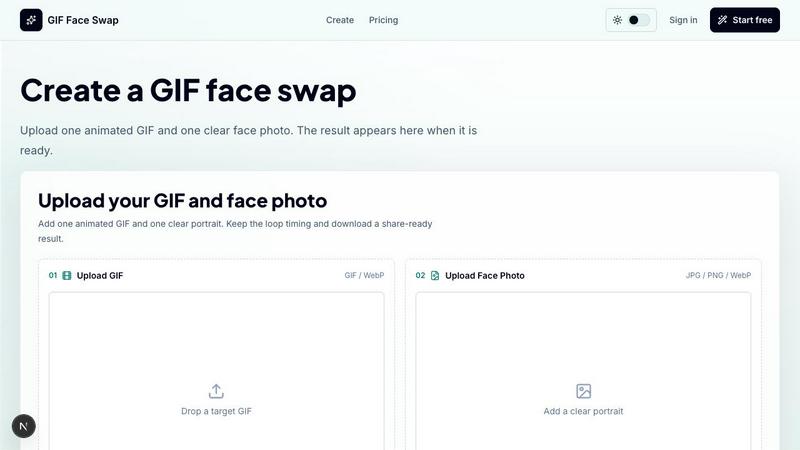
About GIF Face Swap
GIF Face Swap is an online tool designed for creating personalized animated GIFs by swapping a face from your own photo into a short animation. At its core, this product solves a simple problem: how to take a familiar reaction GIF, movie clip, or meme loop and make it personal without learning complex video editing software. The tool focuses on a straightforward workflow that anyone can follow. You start by uploading a short animated file in GIF or WebP format. Then you add one clear, front-facing photo of a person. The AI processes the animation and replaces the original face with the one from your photo, while keeping the original timing, motion, and expression energy of the loop intact. The result is a share-ready animated GIF that looks natural and maintains the feel of the original clip.
This product is built for a wide range of users. Meme creators and social media users can turn reaction loops into fast posts and group chat replies. Community managers and marketing teams can create lightweight campaign moments and internal celebration loops. Fandom editors can put a friend or character face into anime, movie, or sports clips. Indie filmmakers can test quick expressions before committing to heavier video work. The main value proposition is simplicity. There is no timeline to learn, no layers to manage, and no rendering settings to configure. You upload, swap, and download. The tool also respects privacy. Uploads and finished GIFs stay private, with guest download links that expire. You can try the tool for free before committing, then use credits when you need more generations without watermarks. The entire experience is built around the idea that creating a face-swapped GIF should be as easy as sending a message.
Features of GIF Face Swap
Built for Animated GIFs and WebP
This feature focuses on supporting the specific file formats that make reaction GIFs work. GIF Face Swap accepts both GIF and WebP animations, with a maximum file size of 20MB. Short loops work best because they keep the animation tight and the face swap more consistent across frames. The tool preserves the original loop timing, expression, and share-ready feel that make reaction GIFs effective. You do not have to worry about frame rates or compression settings. The AI handles the technical details so you can focus on choosing the right clip and face photo.
Cleaner Face Results with Clear Source Photos
The quality of the final face swap depends heavily on the source photo you provide. This feature emphasizes the importance of using a sharp, front-facing, well-lit portrait. When you upload a clear photo, the AI produces a more natural swap with less blur and fewer missed frames across the animation. The tool is optimized for close-up loops where the face is centered and prominent. This means you get better results when the original GIF has one clear subject and your photo matches the angle and lighting conditions of the clip.
Private by Default with Expiring Links
Privacy is built into the workflow from the start. When you upload a GIF and a face photo, both files remain private. The finished GIF is not publicly searchable or visible to other users. When you download the result, you receive a guest download link that expires after a set period. This design ensures that your personal photos and the animations you create stay under your control. You can share the link with specific people, and once the link expires, the file is no longer accessible. This is especially important for users who want to create personal jokes or internal team content without worrying about permanent public exposure.
Fast First Try Without Signing Up
You can test the tool immediately without creating an account. The workflow is simple: upload one GIF and one face photo, then generate your first watermarked result. This allows you to see the quality of the face swap and decide if the tool meets your needs before committing to a paid plan. The watermarked version gives you a clear preview of what the final result will look like. If you are satisfied, you can sign up and upgrade to remove the watermark and access more generations. This low-friction entry point makes it easy for new users to evaluate the product.
Use Cases of GIF Face Swap
Creating Fast Reaction Memes for Social Media
Social media moves quickly, and reaction GIFs are a staple of online conversation. This use case focuses on turning familiar reaction loops into personalized responses. You take a popular reaction GIF, such as a laugh, a confused look, or a shocked expression, and swap in a friend's face or your own face. The result is a custom animated reply that feels personal and timely. Meme creators can use this to generate content while a trend is still active. Social media users can surprise their friends with a personalized reaction in group chats or comment threads. The speed of the tool means you can go from idea to share-ready GIF in minutes.
Making Private Jokes for Teams and Communities
Teams and communities often have inside jokes that rely on specific moments or expressions. This use case involves creating private, shareable loops for wins, retros, birthdays, and other community moments. A community manager can take a celebratory GIF and swap in a team member's face to congratulate them on a project milestone. A group of friends can create a series of personalized reaction GIFs for their group chat. The privacy features of the tool ensure that these creations stay within the intended group. The speed of creation matters more than a full video editor, so the tool fits naturally into fast-paced communication channels.
Testing Character Expressions for Indie Filmmakers
Indie filmmakers and previs artists often need to test how a character might react in a scene before committing to full production. This use case involves using GIF Face Swap to quickly swap an actor's face into a pre-existing animation or loop. The result is a rough preview of the expression and timing. This helps filmmakers evaluate whether a specific reaction works for the scene without spending time on complex compositing or rendering. The tool is not a replacement for professional VFX, but it serves as a rapid prototyping tool for early-stage creative decisions.
Producing Lightweight Campaign Content for Marketing Teams
Marketing teams and brands need to create engaging, shareable content quickly. This use case involves using GIF Face Swap to produce lightweight campaign replies, launch reactions, mascot moments, and internal celebration loops. A brand can take a popular reaction GIF and swap in a mascot or product face to create a branded response. Marketing teams can create a series of personalized GIFs for a product launch, each featuring a different team member or customer. The tool allows teams to work from approved source files and generate multiple variations without a full production pipeline. The result is fast, cost-effective content that feels authentic and timely.
Frequently Asked Questions
What file formats and sizes does GIF Face Swap support?
GIF Face Swap supports animated GIF and WebP files for the target animation. The maximum file size for the animation is 20MB. Short loops work best because they keep the animation tight and the face swap more consistent across frames. For the face photo, the tool accepts JPG, PNG, and WebP formats with a maximum size of 8MB per photo. Clear, front-facing, well-lit portraits produce the best results. If your file exceeds these limits, you can use the free GIF utilities on the site, such as the GIF Compressor, to reduce the file size before swapping.
How does the face swap process work?
The process is straightforward and follows four steps. First, you upload a short animated GIF or WebP file that contains one clear face. Second, you upload a sharp portrait photo of the person whose face you want to swap in. Third, you select the single-face output option and start the swap. The AI analyzes the animation frames and the source photo, then replaces the original face with the one from your photo while preserving the timing, motion, and expression of the original loop. Fourth, you preview the swapped loop and download the result when it is ready. The entire process takes only a few minutes.
Is my uploaded content private and secure?
Yes, privacy is a core feature of GIF Face Swap. All uploads, including the target animation and the face photo, remain private. They are not publicly searchable or visible to other users. The finished GIF is also private by default. When you download the result, you receive a guest download link that expires after a set period. This means you control who has access to the file. Once the link expires, the file is no longer accessible. This design ensures that your personal photos and the animations you create stay under your control and are not permanently stored or shared without your permission.
Can I try the tool before paying?
Yes, you can try the tool immediately without signing up or paying. The free trial allows you to upload one GIF and one face photo and generate a watermarked result. This watermarked version gives you a clear preview of the quality and output of the face swap. If you are satisfied with the result, you can sign up and upgrade to a paid plan to remove the watermark and access more generations. This low-friction entry point lets you evaluate the tool and see if it meets your needs before making any financial commitment.
Pricing of GIF Face Swap
GIF Face Swap operates on a simple credit-based pricing model. You can start with a free trial that generates a watermarked result. When you need more generations without watermarks, you upgrade to a paid plan. The specific pricing tiers and credit amounts are available on the pricing page of the website. The core idea is that you pay only when you need more output. There is no monthly subscription required for basic use. You can buy credits as needed, and credits are consumed per generation. Upgrading removes the watermark from your downloads. For users who need to create multiple GIFs regularly, such as creators or marketing teams, there are batch editing options and higher credit plans available. The exact costs and plan details are listed on the official pricing page.
Similar to GIF Face Swap

AIPetGen turns a photo of your dog, cat, or other pet, or a written description, into a new picture or a short animation.

Remove unwanted people, objects, text and watermarks from photos with AI

Make images look low quality online for free. Compress, downscale, and pixelate photos right in your browser with no sign-up required.

Genjutsu AI turns ideas into cinematic videos, product ads, social shorts, and quality images in minutes. Built for TikTok, Reels, Shorts.

ImageGPT is an all-in-one AI creative platform for generating, editing and transforming images and videos using AI.

Create release-ready album covers from a prompt or photo. Generate, refine, and export art for singles, EPs, mixtapes, and playlists.

Generate and edit production-ready images with GPT Image 2 using prompts, reference images, clear text rendering, and a developer-friendly API.

Explore Flux LoRA workflows in a browser-based AI Studio, with a roadmap for models, generation, and guided training.