
EditTextImage
EditTextImage replaces text in your images online, keeping the original font, color, and style in under 30 seconds.
Visit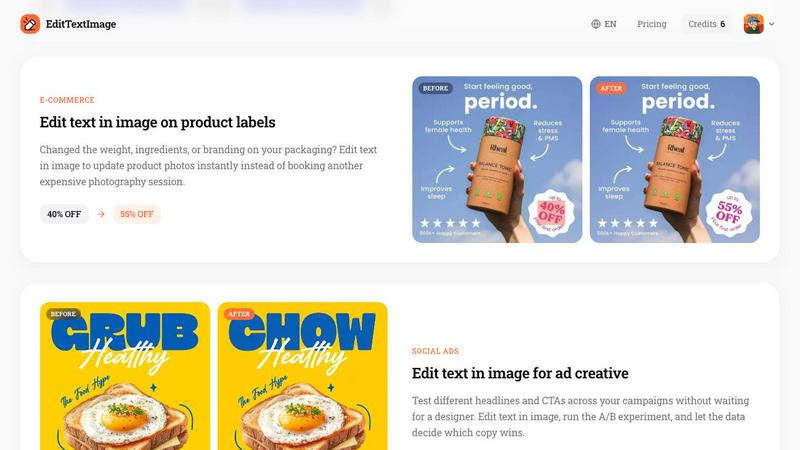
About EditTextImage
EditTextImage is an online AI tool that lets you edit text in image files without needing Photoshop, design skills, or the original source file. The core idea is simple: you upload an image, tell the tool what text you want to change and what you want to replace it with, and the AI handles the rest. It samples the typeface, color, size, perspective, drop shadow, and background directly from the pixels of your image. This means the new text blends in seamlessly, as if it was always there. The tool is built for anyone who has ever needed to fix a typo on a finished poster, swap a date on a product label, update a headline on a social media ad, or localize an app screenshot into another language. You do not need to hunt down font files, recreate layouts, or pay for a monthly subscription. The process takes about 10 seconds and outputs a high-resolution 2K image. You get one free edit to start with no credit card required, and then you can purchase a pack of 30 edits for a one-time fee of $9.90. Those credits never expire, and commercial use is included. This tool is not for creating new designs from scratch; it is for making precise, pixel-perfect text changes on images you already have.
Features of EditTextImage
AI-Powered Font Sampling from Pixels
The core technology behind EditTextImage is its ability to analyze the pixels around the text you want to replace. Instead of requiring you to upload a specific font file, the AI studies the shape, weight, spacing, and style of the existing characters. It then generates replacement text that matches the original typeface, even if that font is a paid, licensed, or hand-lettered design you do not have installed on your computer. This ensures the new text looks natural and consistent with the rest of the image.
Pixel-Perfect Layout and Color Preservation
When you change text in an image, the surrounding elements like background textures, gradients, drop shadows, and lighting effects are often disturbed. EditTextImage is designed to keep every pixel around the text exactly where it should be. The AI reconstructs the background behind the old text and then places the new text on top. The color, size, and perspective of the new text are matched to the original, so the final result looks like a native part of the image, not a pasted overlay.
Fast Processing with High-Resolution Output
Speed and quality are both priorities. The average time to edit text in an image is approximately 12 seconds. This makes the tool practical for quick fixes and production workflows alike. Despite the fast processing, the output resolution is 2K, which is suitable for printing, publishing online, or using in professional presentations. You get a clean, high-quality result without waiting for long rendering times.
Simple Three-Step Workflow
The user interface is designed for clarity and ease of use. There are no complex menus or layers to learn. The process follows three straightforward steps. First, you upload your image file in PNG, JPEG, or WebP format, up to 10 MB. Second, you enter the exact text you want to replace and the new text you want to insert. Third, you click generate. The tool handles the rest, and you can download the edited image in seconds. This simplicity makes it accessible to anyone, regardless of technical skill.
Use Cases of EditTextImage
Document Corrections and Updates
If you have a scanned contract, a screenshot of an invoice, or a PDF of a report with a typo or an incorrect number, EditTextImage provides a quick fix. You do not need the original design software or the source file. Simply upload the image, identify the text that needs changing, and let the AI update it. This is useful for correcting invoice numbers, fixing dates on certificates, or updating names on official-looking documents without recreating the entire file from scratch.
Poster and Flyer Revisions
Event details often change after a poster has been finalized. A date gets moved, a speaker drops out, or a venue changes. If your designer is unavailable or you do not have the original design file, EditTextImage allows you to make those updates directly on the finished image. You can change the date, time, or location text while keeping the entire visual design intact. This saves time and money, especially for recurring events where only a few details need updating each season.
App Screenshot Localization
When launching an app in multiple countries, you need screenshots for the App Store or Google Play in different languages. Rebuilding every UI mockup for each language is time-consuming. With EditTextImage, you can take an existing screenshot and swap the on-screen text to another language. The AI preserves the look of the interface, so the localized screenshots look professional and consistent. This streamlines the localization process and helps you get to market faster.
E-Commerce Product Photo Updates
Product packaging and labels change over time. You might update the weight, ingredients, or a promotional offer like a discount percentage. Instead of booking a new photography session or recreating the product image in design software, you can use EditTextImage to edit the text directly on the product photo. This allows you to update existing images instantly, keeping your online store listings accurate and current with minimal effort and cost.
Frequently Asked Questions
What file formats and sizes does EditTextImage support?
EditTextImage accepts PNG, JPEG, and WebP file formats. The maximum file size for upload is 10 MB. This covers the most common image types used for posters, screenshots, product photos, and documents. If your image is larger than 10 MB, you may need to compress it or use a different format before uploading.
How does the AI preserve the original font if I do not have it installed?
The AI does not require you to have the font file. Instead, it analyzes the pixels of the text in your uploaded image. It studies the shape of each character, the stroke width, the spacing, and the overall style. It then generates the replacement text to visually match that analysis. This works for standard fonts, paid fonts, and even unique hand-lettering, as long as the original text is clear enough in the image.
Is there a free trial, and how does the credit system work?
Yes, you get one free credit to edit an image without needing to provide a credit card. This allows you to test the tool and see the quality of the result. After that, you can purchase a pack of 30 edits for a one-time fee of $9.90. These credits never expire, so you can use them over time as needed. There is no monthly subscription. Commercial use of the edited images is included with your credits.
What types of images are not allowed to be edited with this tool?
EditTextImage has strict rules about acceptable use. You cannot edit images that are intended to deceive a third party. This includes visa or immigration submissions, fake refund or transaction proofs, and email or chat screenshots altered to falsify sender, content, or timestamp. The tool also does not process IDs, passports, visa support letters, official seals, bank statements, or tampered receipts. Violating these rules can result in account termination and your request logs may be shared with law enforcement.
Pricing of EditTextImage
EditTextImage offers a simple, straightforward pricing model. You start with one free credit to edit an image, which requires no credit card to activate. After using your free credit, you can purchase a pack of 30 additional edits for a one-time payment of $9.90. There are no monthly subscriptions or recurring fees. The credits you purchase never expire, so you can use them at your own pace. Commercial use of the images you edit is included in the price.
Similar to EditTextImage

Generate and edit production-ready images with GPT Image 2 using prompts, reference images, clear text rendering, and a developer-friendly API.

Explore Flux LoRA workflows in a browser-based AI Studio, with a roadmap for models, generation, and guided training.


One AI enhancer for photos, images, videos, and creative effects.

Create text-perfect logos, posters, ads, packaging, and ecommerce visuals with Ideogram 4 workflows, references, and API tools.

AI image and video studio. Generate from a prompt, animate stills, swap faces, restyle clips and edit — one credit pool, no subscription.

An AI video and AI image platform for creating visual content in the browser and scaling production with stable APIs.

Create polished AI images and videos from prompts or references for social posts, ads, flyers, album covers, and campaigns.