
CheckoutReceipt
CheckoutReceipt helps you create professional, realistic receipts instantly with free templates and no account required.
Visit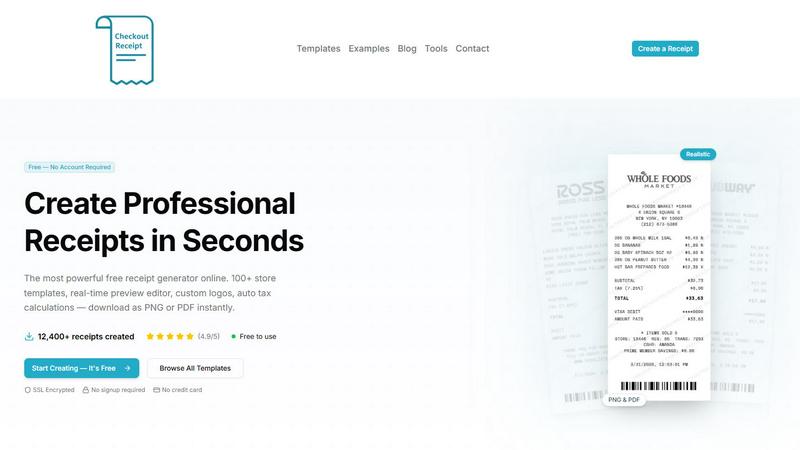
About CheckoutReceipt
CheckoutReceipt is a free, browser-based receipt generator and maker designed to help individuals and businesses create professional, realistic receipts instantly. At its core, this tool solves a simple but important problem: you need a receipt quickly, but you do not have the right software, templates, or design skills to make one that looks authentic and professional. CheckoutReceipt removes all those barriers by providing over 100 customizable store-specific templates, a real-time preview editor, and instant download options for PNG or PDF formats. There is no software to install, no account to create, and no credit card required. The entire process runs securely in your browser, meaning your data stays private and is never stored on external servers.
The product is for a wide audience. Small business owners can use it to generate receipts for clients who lose their originals. Freelancers and independent contractors can create expense receipts for tax documentation and reimbursement. Teachers and students can use it for educational projects that require realistic receipt samples. Event planners, landlords, and service providers all find value in having a fast, reliable way to produce receipts on demand. The main value proposition is simplicity and speed. You can go from zero to a finished receipt in under sixty seconds. The tool handles all the formatting, barcode generation, tax calculations, and layout decisions for you. You simply fill in the details, and the live preview shows you exactly what your receipt will look like before you download it. CheckoutReceipt is built for legitimate business, creative, and educational use only. The platform explicitly prohibits using the tool to commit fraud or deceive others. It is a tool for documentation, record-keeping, and professional communication, not for deception.
Features of CheckoutReceipt
100+ Store-Specific Receipt Templates
The foundation of CheckoutReceipt is its extensive library of over one hundred store-specific receipt templates. These are not generic receipt layouts. They are designed to match the look and feel of receipts from well-known retailers like Target, Walmart, Home Depot, Whole Foods, Subway, Publix, Ross, and Dunkin. There are also specialized templates for various receipt types including automotive services, hospitality and travel, food and dining, health and personal care, financial and administrative documents, retail, professional services, bills and utilities, and entertainment. This variety means you can find a template that closely matches the business or service you are documenting. Each template comes pre-configured with the correct layout, font styles, and structural elements so you do not have to start from scratch.
Real-Time Live Preview Editor
Every change you make in the editor is reflected instantly in a live preview panel. This feature eliminates guesswork and saves time because you can see exactly how your receipt will look before you download it. When you add a store name, enter line items, adjust prices, change tax rates, or modify the payment method, the preview updates immediately. This real-time feedback loop allows you to experiment with different layouts and content arrangements without committing to a download. You can see how fonts, paper textures, and logo placement affect the overall appearance. The live preview ensures that your final receipt matches your expectations and looks professional.
Fully Customizable Receipt Content
CheckoutReceipt gives you complete control over every piece of information on your receipt. You can edit the store name, store address, phone number, and website. You can add individual line items with descriptions, quantities, unit prices, and total amounts. Tax rates can be set manually or calculated automatically. Payment methods, dates, receipt numbers, and custom messages are all editable fields. This level of customization means you are not locked into a rigid template. You can create a receipt that perfectly matches the transaction you are documenting, whether it is a simple cash sale or a complex invoice with multiple line items and discounts.
Instant PNG and PDF Export with High Resolution
Once you finish customizing your receipt, you can download it instantly as either a PNG image or a PDF document. Both formats are optimized for high resolution, meaning the text remains crisp and clear whether you view the receipt on a screen or print it on paper. PNG files are ideal for digital sharing, embedding in emails, or uploading to expense reporting systems. PDF files are better for printing, archiving, or sending as official documents. The download process takes only a few seconds and requires no additional software. This instant export capability is a major time-saver compared to traditional receipt creation methods that involve multiple steps and applications.
Use Cases of CheckoutReceipt
Small Business Receipt Documentation
Small business owners frequently need to provide receipts to customers who have lost their original copies or who require documentation for warranty claims, insurance reimbursements, or expense reports. With CheckoutReceipt, a business owner can quickly recreate a lost receipt using the store-specific template that matches their business. They can enter the exact items, prices, and transaction details from their records. The resulting receipt looks professional and matches the format customers expect. This capability helps maintain good customer relationships by providing prompt service without requiring the business owner to dig through old point-of-sale systems or manual records.
Freelance and Contractor Expense Tracking
Freelancers, independent contractors, and gig economy workers often need to document expenses for tax deductions or client reimbursement. For example, a plumber who buys supplies at a hardware store, a delivery driver who pays for gas, or a graphic designer who purchases software subscriptions all need receipts to prove their expenses. CheckoutReceipt allows these professionals to create a receipt for any purchase, even if the original receipt was lost or damaged. They can use the appropriate retail template, enter the correct amounts, and generate a clean, organized receipt that meets accounting standards. This practice supports accurate bookkeeping and simplifies tax preparation.
Educational and Training Simulations
Teachers, professors, and corporate trainers often use realistic documents in their lessons. For example, a business class might require students to analyze receipts as part of a budgeting exercise. A vocational training program might use receipts to teach inventory management or customer service skills. CheckoutReceipt provides a safe, legal way to generate realistic-looking receipts for these educational purposes. Instructors can create custom receipts that match their lesson plans without using real customer data or violating privacy policies. The tool enables hands-on learning experiences that are both engaging and practical.
Event Planning and Reimbursement Management
Event planners, corporate travel coordinators, and administrative assistants frequently handle reimbursement requests from employees or vendors. These requests often require receipts for expenses like meals, transportation, hotel stays, and supplies. If an original receipt is missing or illegible, CheckoutReceipt provides a way to create a replacement document that contains all the necessary information. The planner can use the appropriate template for a restaurant, hotel, taxi, or retail store. This process streamlines the reimbursement workflow and ensures that all expense documentation meets company policies and accounting requirements.
Frequently Asked Questions
Is CheckoutReceipt really free to use?
Yes, CheckoutReceipt is completely free to use. There are no hidden fees, no subscription plans, and no credit card required. You can access all one hundred plus templates, use the real-time preview editor, customize every detail, and download your receipts as PNG or PDF files without paying anything. The tool is supported by its user base and operates as a free service for legitimate business, creative, and educational purposes. You do not need to create an account or provide any personal information to start creating receipts.
Do I need to create an account or sign up?
No, you do not need to create an account or sign up to use CheckoutReceipt. The entire tool runs directly in your web browser without any registration process. You can visit the website, choose a template, customize your receipt, and download it immediately. There is no login page, no email verification, and no password to remember. This no-signup approach is designed to save you time and protect your privacy. Your data stays on your device and is never uploaded to external servers.
Can I use CheckoutReceipt for any type of business or store?
Yes, CheckoutReceipt offers over one hundred templates covering a wide range of businesses, stores, and service types. You will find templates for retail giants like Target, Walmart, and Home Depot. There are templates for restaurants, cafes, fast food chains, and bars. Service-based businesses like plumbers, electricians, mechanics, and salons are also covered. Additionally, there are templates for hotels, airlines, taxis, gas stations, and more. If you need a receipt type that is not listed, you can use a generic template and customize it to match your specific needs.
Is it legal to use CheckoutReceipt to create receipts for lost documents?
Yes, it is legal to use CheckoutReceipt to create replacement receipts for legitimate documentation purposes. The tool is designed for business, creative, and educational use. For example, if a customer loses their original receipt and you need to provide a duplicate for a return or warranty claim, using CheckoutReceipt to recreate that receipt is acceptable. However, it is strictly prohibited to use the tool to create fake receipts for fraudulent purposes, such as falsely claiming expenses, deceiving insurance companies, or committing tax fraud. You must always use the tool ethically and in accordance with the Terms of Service.
Explore more in this category:
Similar to CheckoutReceipt

Free collection of online developer utilities, code formatters, and digital converters designed to streamline your daily workflow.

Visual financial timelines for couples and young professionals: model cash flow, life events, and shared goals.

The #1 Native Form Builder Plugin for Framer - No Code, No Embeds, No External Platforms.

Practical, independent guides to home repairs, maintenance, costs, troubleshooting, and everyday fixes.

Highlight faster. Study in flow with custom shortcuts and a workflow built around you. Print smarter, or turn any page into a tiled poster.


Turn videos, images, and files into secure direct links for sharing, embedding, and automated workflows.

Build Mode is a Mac app that turns focused sessions into visible progress, so you can see the work adding up before the results arrive.