
Bantr: Offline & Unlimited TTS for Mac
Bantr is an offline text-to-speech app for Mac that offers unlimited, private access to over 150 natural-sounding.
Visit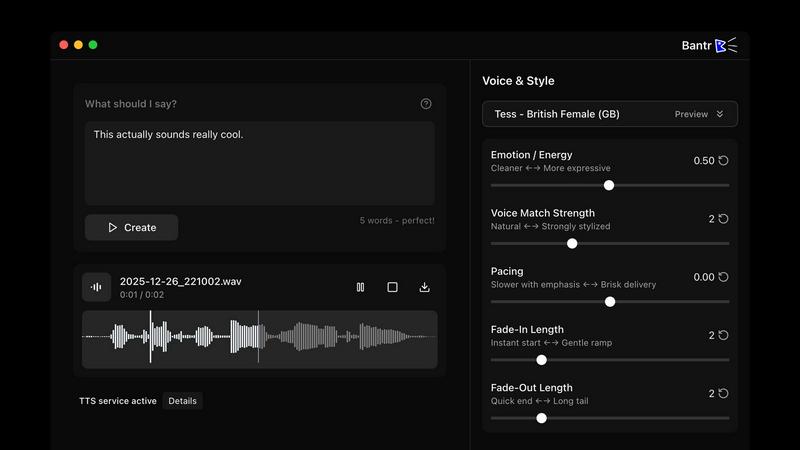
About Bantr: Offline & Unlimited TTS for Mac
Bantr is an innovative text-to-speech application developed exclusively for Mac computers powered by Apple Silicon. It revolutionizes voice synthesis by operating entirely on your local machine, eliminating the need for internet connectivity that many traditional TTS tools require. Utilizing Apple's MLX framework, Bantr runs efficient machine learning models directly on your device, ensuring that voice generation is both fast and reliable. This application is designed for a diverse audience, including content creators, educators, developers, students, and professionals who demand high-quality voiceovers without compromising their privacy. The core value proposition of Bantr lies in its commitment to complete privacy—no data is transmitted outside your computer. Users benefit from true ownership with a one-time purchase and enjoy unlimited usage without any quotas or login requirements. With over 150 natural-sounding voices, Bantr empowers users to create studio-quality audio for a wide range of applications such as videos, tutorials, animations, and more, all from the comfort of their desktop.
Features of Bantr: Offline & Unlimited TTS for Mac
Extensive Voice Library
Bantr offers an impressive selection of over 150 natural-sounding voices, providing users with a diverse range of options for their projects. Whether you need a soothing narrator or a lively character voice, Bantr has you covered, ensuring every audio creation is tailored to your needs.
Complete Privacy and Security
Unlike many cloud-based TTS services, Bantr guarantees that no user data leaves your machine. This commitment to privacy ensures that your projects remain confidential and secure, allowing you to focus on creating without worrying about data breaches or privacy violations.
One-Time Purchase Model
Bantr operates on a straightforward one-time purchase model, eliminating the need for ongoing subscriptions. This means you pay once for lifetime access, giving you the freedom to use the software without worrying about recurring fees or hidden costs.
Offline Functionality
With Bantr, users can generate high-quality voiceovers without an internet connection. This offline functionality is particularly beneficial for those in areas with limited connectivity or for users who prefer to work without relying on external servers.
Use Cases of Bantr: Offline & Unlimited TTS for Mac
Educational Content Creation
Educators can utilize Bantr to create engaging audio content for their students. From narrated lessons to interactive tutorials, the high-quality voices help enhance the learning experience and make complex subjects more accessible.
Video Production
Content creators and video producers can leverage Bantr to generate voiceovers for their projects. Whether it's for YouTube videos, promotional content, or instructional videos, the application provides a seamless way to add professional audio without the hassle of hiring voice talent.
Accessibility Solutions
Bantr serves as an excellent tool for individuals with disabilities, such as dyslexia. By converting written text into spoken words, it helps improve comprehension and makes information more accessible to everyone, fostering inclusivity.
Game Development
Developers can use Bantr to create character voices and dialogues for video games. With the ability to generate multiple voice styles and emotions, Bantr enhances the gaming experience, making characters more relatable and engaging for players.
Frequently Asked Questions
How does Bantr ensure user privacy?
Bantr guarantees user privacy by operating entirely on your local machine. No data is sent to external servers, ensuring that your projects and personal information remain confidential and secure.
Is there a subscription fee for using Bantr?
No, Bantr is offered as a one-time purchase. Once you buy the application, you have lifetime access without any recurring fees or hidden costs, making it a cost-effective solution for users.
What are the system requirements for Bantr?
Bantr is compatible with macOS 15 and above, specifically for devices powered by Apple Silicon, such as M1, M2, M3, M4, and M5 chips. Ensure your Mac meets these requirements for optimal performance.
Can I use Bantr offline?
Yes, Bantr is designed to function fully offline. This feature allows users to generate voiceovers without needing an internet connection, making it a reliable choice for various environments and situations.
Similar to Bantr: Offline & Unlimited TTS for Mac

Turn text ideas or reference images into videos through conversation, with agent-assisted prompts and a choice of video models.

Open-source Android comic & manga reader with encrypted cloud streaming and AI ad-page stripping.

Turn two portraits into a lip-synced AI rap video. Pick framing and length, get a share-ready 9:16 MP4 for TikTok and Reels.

Plan content, get client approvals, publish to nine social platforms, manage your inbox and report from one workspace.

All-in-one AI workspace to generate images, videos, and audio with multiple leading AI models.

An adaptive AI tutor that turns topics or your materials into courses, lessons, and answers tailored to how you learn.


Hold a key, say what you mean, let go. Clean, punctuated text lands at the cursor in any app on your Mac or iPhone.