
AskFormulas
AskFormulas creates and tests your spreadsheet formulas for you, guaranteeing accuracy and saving time.
Visit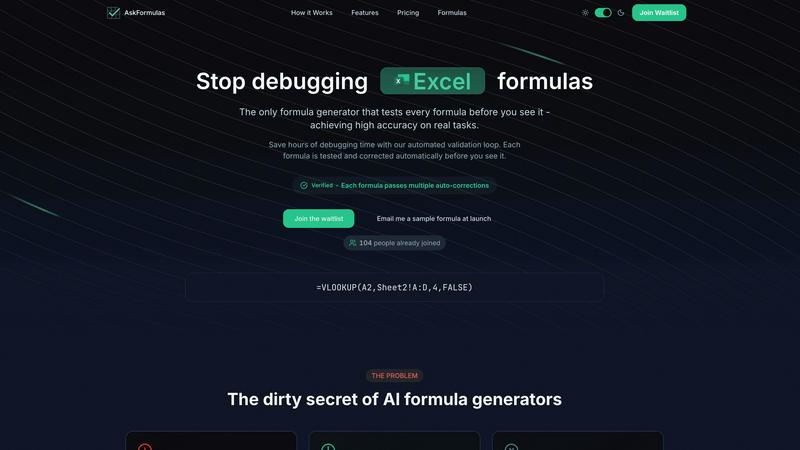
About AskFormulas
AskFormulas is a fundamental tool designed to solve the most common and frustrating problem in spreadsheet work: broken formulas. It is an AI-powered formula generator that goes beyond simple text-to-code conversion. Its core innovation is a rigorous, automated validation process that tests and corrects every single formula before it is presented to you. This ensures the formulas you receive are not just syntactically correct, but functionally accurate and ready to use. Unlike other generators that can have error rates of 40-60%, AskFormulas delivers reliable results you can trust immediately.
The tool is built for anyone who uses Excel or Google Sheets, from complete beginners to seasoned professionals. If you are a financial analyst building complex models, a business manager automating reports, a marketer analyzing data, or a small business owner without deep technical expertise, AskFormulas simplifies your workflow. You describe what you need in plain English through a natural language input. The AI interprets your request, generates the appropriate formula, and then runs it through a secure sandbox environment with synthetic test data. If errors are found, the system auto-corrects them in an iterative loop until the formula is verified. The final output comes with a clear "Verified" badge, guaranteeing it has been tested and works. By eliminating the hours typically spent debugging #REF! and #VALUE! errors, AskFormulas returns the focus to your actual work, making spreadsheet management more efficient and less stressful.
Features of AskFormulas
Verified Formula Validation
Every formula generated by AskFormulas undergoes a strict, automated three-step validation process before you see it. First, your natural language request is parsed into precise formula intent. Second, the proposed formula is executed in a secure sandbox using template data to simulate real-world conditions. Third, any errors detected are automatically corrected through multiple iterations. This loop continues until the formula passes all tests, at which point it earns the "Verified" badge, ensuring high accuracy and reliability for your real tasks.
Natural Language to Formula Conversion
You do not need to know spreadsheet syntax to use AskFormulas. The platform features an intuitive input system where you simply describe your goal in plain English. For example, you can type "sum all values in column B where column A contains the word Sales" and the AI will handle the complex task of translating that intent into the correct formula syntax, such as =SUMIF(A:A,"*Sales*",B:B). This removes the barrier of memorizing function names and structures.
Cross-Platform Syntax Handling
AskFormulas seamlessly supports both Microsoft Excel and Google Sheets. A simple one-click toggle allows you to switch between the two platforms. The system automatically adjusts the formula syntax to match the conventions and specific functions of your chosen spreadsheet software, whether it's VLOOKUP for Excel or ARRAYFORMULA for Sheets. This ensures you get a formula that works correctly in your specific environment without manual adjustments.
Smart Error Detection and Correction
The tool proactively identifies and fixes common formula errors as part of its validation loop. When a generated formula results in an error like #REF! or #VALUE! during testing, the system doesn't just report it. It analyzes the cause and automatically creates a corrected version, retesting it until it works. This smart correction mechanism is what drives the high accuracy rate, saving you from the manual debugging process.
Use Cases of AskFormulas
Financial Modeling and Analysis
Financial analysts and accountants can use AskFormulas to quickly build accurate and complex models. Instead of manually constructing error-prone formulas for projections, valuations, or ratio analysis, they can describe the logic in plain language. The tool generates validated formulas for functions like XNPV, IRR, or sophisticated INDEX-MATCH combinations, ensuring data integrity and saving significant time in model development and auditing.
Business Reporting Automation
Managers and revenue operations teams often spend hours compiling weekly or monthly reports. AskFormulas streamlines this by automating formula creation for summarizing sales data, calculating growth percentages, or pulling specific records with VLOOKUP. By generating verified formulas to aggregate and analyze data from multiple sheets, it enables faster report generation with reduced risk of manual errors.
Data Cleaning and Organization
Marketing professionals, researchers, or administrators frequently need to clean and organize large datasets. AskFormulas can instantly create formulas for tasks like extracting text, converting date formats, removing duplicates, or categorizing data based on conditions. Describing the cleanup goal, such as "combine first name and last name from columns A and B," yields a ready-to-use, validated formula, speeding up data preparation.
Accessibility for Non-Experts
Small business owners, students, or professionals in non-technical roles who lack deep Excel or Sheets expertise can achieve advanced results. They can perform tasks like calculating inventory totals, creating simple budgets, or finding specific customer information without learning complex syntax. AskFormulas acts as an on-demand expert, translating their business needs into working formulas with guaranteed accuracy.
Frequently Asked Questions
How accurate are the generated formulas?
AskFormulas is designed for exceptionally high accuracy. Unlike standard AI generators, every formula undergoes an automated validation and correction loop in a simulated spreadsheet environment. This process tests the formula with synthetic data and auto-corrects any errors multiple times until it works perfectly. The result is a "Verified" formula that has been proven functional before you ever see it, drastically reducing the 40-60% error rate common in other tools.
Does it work with both Excel and Google Sheets?
Yes, AskFormulas provides full support for both Microsoft Excel and Google Sheets. The interface includes a simple toggle to switch between the two platforms. When you select your preferred software, the system automatically generates the formula using the correct syntax and function names specific to that platform, ensuring seamless compatibility whether you use =VLOOKUP in Excel or =ARRAYFORMULA(VLOOKUP(...)) in Sheets.
How many formulas can I generate?
The number of formulas you can generate per month depends on your chosen subscription plan. The Starter plan includes 500 formulas per month, the Pro plan offers 2,000, and the Team plan provides 6,000 formulas to be shared among up to 5 team members. This tiered structure ensures there is a suitable plan for individual users, power users, and small teams with varying needs.
What happens if my formula has an error?
If a generated formula contains an error during AskFormulas's internal validation testing, you will never see the broken version. The system's smart error detection identifies issues like #REF! or #VALUE! and automatically initiates corrections. It iteratively adjusts the formula and retests it within the secure sandbox until a fully functional, error-free version is achieved. Only this validated, working formula is then presented to you with the "Verified" badge.
Pricing of AskFormulas
AskFormulas offers simple, transparent pricing with three main plans. All plans include access to the core validated formula generation, formula history, and priority queue access.
Starter Plan: Priced at $9 per month, this plan is for individual users. It includes 500 formulas per month, support for all formula types, and email support.
Pro Plan: Priced at $19 per month, this popular plan is designed for power users. It includes 2,000 formulas per month, priority support, and additional export features.
Team Plan: Priced at $39 per month, this plan is for small teams of up to 5 members. It includes 6,000 shared formulas per month, a team workspace, admin controls, SSO integration, audit logs, and dedicated support.
All plans can be billed monthly or yearly, and enterprise pricing is available for organizations with greater needs.
Explore more in this category:
Similar to AskFormulas

Free collection of online developer utilities, code formatters, and digital converters designed to streamline your daily workflow.

Visual financial timelines for couples and young professionals: model cash flow, life events, and shared goals.

The #1 Native Form Builder Plugin for Framer - No Code, No Embeds, No External Platforms.

Practical, independent guides to home repairs, maintenance, costs, troubleshooting, and everyday fixes.

Highlight faster. Study in flow with custom shortcuts and a workflow built around you. Print smarter, or turn any page into a tiled poster.


Turn videos, images, and files into secure direct links for sharing, embedding, and automated workflows.

Build Mode is a Mac app that turns focused sessions into visible progress, so you can see the work adding up before the results arrive.