
AI Formatter
AI Formatter transforms your raw text into professional documents instantly using customizable templates.
VisitPublished on:
October 14, 2025
Pricing:
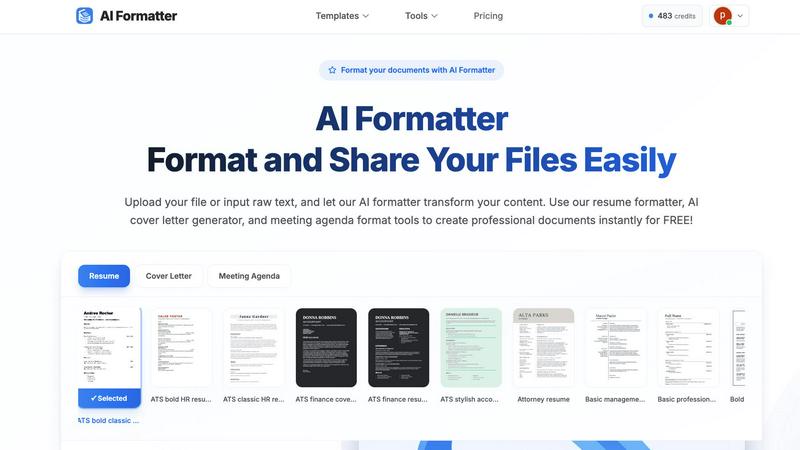
About AI Formatter
AI Formatter is a cloud-based software tool designed to simplify and accelerate the process of creating professional documents. At its core, it is an intelligent formatting assistant that uses artificial intelligence to transform unformatted text or uploaded files into polished, ready-to-use documents. The fundamental value of AI Formatter lies in its ability to save significant time and effort, automating a task that is often tedious and complex. It is built for a wide range of users, including job seekers needing ATS-friendly resumes, professionals preparing business reports or meeting agendas, academics formatting papers, and small businesses creating invoices. By providing a straightforward platform where users can upload content, select a professional template, and receive a perfectly formatted document in seconds, AI Formatter removes the technical barriers of document design. This allows individuals and organizations to focus on their content's substance rather than its style, ensuring their documents always make a strong, positive impression.
Features of AI Formatter
AI-Powered Formatting Engine
The central feature of AI Formatter is its intelligent formatting engine. This technology analyzes the raw text or content from uploaded documents, understands its structure and context, and automatically applies appropriate styling, layout, and organization. It intelligently distinguishes between headings, body text, lists, and other elements, transforming a basic text file into a professionally structured document that adheres to standard formatting conventions, all without manual intervention.
Extensive Template Library
AI Formatter provides access to a vast library of over 100 professionally designed templates. This library covers essential document types such as resumes, cover letters, meeting agendas, and invoices. Each template is crafted to meet industry standards and is optimized for specific purposes, like ensuring resumes pass through Applicant Tracking Systems (ATS). This gives users a strong, visually appealing starting point tailored to their exact needs.
Real-Time Online Editor
After the AI formats the content into a selected template, users have full control through the integrated real-time online editor. This tool allows for complete customization, enabling users to adjust fonts, colors, spacing, and layout elements. You can tweak the AI-generated format, add or remove sections, and fine-tune the document until it meets your personal or organizational branding requirements, all within your web browser.
Multi-Format Export and Sharing
Once a document is finalized, AI Formatter offers flexible output options. Users can download their formatted documents in multiple common file formats, including Microsoft Word (.docx), PDF, and plain text (.txt). This ensures compatibility with any application or submission system. Additionally, the platform includes secure sharing capabilities, allowing users to generate shareable links for their documents, streamlining collaboration and distribution.
Use Cases of AI Formatter
Job Application Preparation
Job seekers can use AI Formatter to quickly convert their work history and skills into a polished, ATS-optimized resume and a matching cover letter. By uploading an old resume or pasting raw text, the tool formats the content into a professional template designed to pass automated screenings and catch a recruiter's eye, significantly improving application quality and saving hours of manual formatting work.
Business Meeting Management
Professionals and team leaders can streamline their meeting preparation. By inputting rough notes or bullet points, AI Formatter's meeting agenda tool structures the information into a clear, formal agenda with sections for topics, objectives, time allocations, and action items. This creates a professional document that sets clear expectations and improves meeting efficiency.
Academic Paper Formatting
Students and researchers can utilize AI Formatter to ensure their essays, reports, and research papers meet strict formatting guidelines. Instead of manually adjusting margins, headings, citations, and references, they can input their content and let the AI apply a consistent and correct academic format, allowing them to concentrate on their research and writing.
Small Business Administration
Small business owners and freelancers can generate professional invoices and receipts effortlessly. By inputting client details, services rendered, amounts due, and payment terms, the AI invoice generator creates a clean, branded invoice document. This presents a professional image to clients and helps maintain organized financial records without needing complex accounting software.
Frequently Asked Questions
What file formats can I upload to AI Formatter?
AI Formatter supports a variety of common document formats for upload. You can directly upload files in PDF, Microsoft Word (.doc and .docx), and plain text (.txt) formats. The platform is designed to extract and process the text content from these files to be reformatted according to your chosen template.
How does AI Formatter help with ATS (Applicant Tracking Systems)?
AI Formatter templates are specifically designed to be ATS-optimized. This means they use clean, simple layouts, standard fonts, and proper heading structures that automated resume screening software can easily read and parse. By formatting your resume with one of these templates, you significantly increase the chances that your resume's content will be correctly interpreted and ranked by an ATS.
Is my document content secure and private?
Yes, AI Formatter is a cloud-based SaaS tool developed with security in mind. The platform processes your documents securely. You maintain ownership of your content, and it is not shared with third parties. The secure sharing feature also allows you to control access when you generate shareable links for your formatted documents.
Can I customize the document after the AI formats it?
Absolutely. The AI provides a perfectly formatted first draft based on your content and selected template. You then have full access to a real-time online editor where you can make any adjustments you need. This includes changing text, fonts, colors, spacing, and layout, giving you complete control over the final appearance of your document.
Similar to AI Formatter

Apps and files on an infinite canvas where people and AI agents work together.

Jev turns text or JSON into Choice, Score and Noul answers with probabilities. Build decision flows, process batches and call the API from one Console

Panzoe is an all-in-one AI platform for personal productivity, business automation, AI assistants, content creation, and custom AI solutions.

Free online Markdown to text converter. Strip formatting, copy readable plain text instantly, and keep every conversion private in your browser.

Clever AI Humanizer is a free tool that makes AI-generated text sound more human.

AI Email Filter sorts incoming mail into folders using plain-language prompts you write. Works with any IMAP mailbox; bring your own LLM if you want.

No-code 2D game editor: visual node logic, drag-and-drop scenes, live preview. Exports to Windows, macOS, Linux, Android, iOS, Web.

A free launch checklist for SaaS, apps, AI tools and more. Every step says why it matters and when you can skip it.