LLMWise vs URL to Any
Side-by-side comparison to help you choose the right product.

LLMWise offers a single API to access top AI models like GPT and Claude, optimizing costs with pay-per-use pricing.
Last updated: February 26, 2026

URL to Any
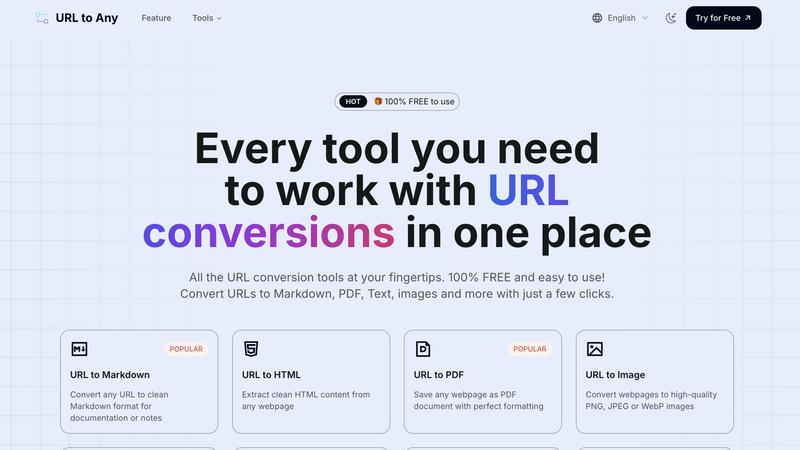
URL to Any is a free toolkit that converts any webpage into formats like PDF, Markdown, and images.
Last updated: March 2, 2026
Visual Comparison
LLMWise

URL to Any
Feature Comparison
LLMWise
Smart Routing
With LLMWise's smart routing feature, users can send a prompt and automatically receive the optimal model for their needs. This means that technical queries can be directed to GPT, creative writing prompts can go to Claude, and translation tasks can be handled by Gemini. This intelligent model selection minimizes the need for manual intervention, saving time and ensuring that tasks are handled by the most capable AI.
Compare & Blend
The compare and blend feature allows users to run prompts across different models simultaneously. This capability not only enables side-by-side comparisons of outputs but also allows for the blending of responses into a single, more robust answer. The judge mode lets models evaluate one another, providing insights into which responses are most accurate or relevant, enhancing the decision-making process.
Always Resilient
LLMWise is designed with resilience in mind. The circuit-breaker failover system automatically reroutes requests to backup models if a primary provider goes down. This ensures that applications remain operational and reliable, even during outages, preventing disruptions in user experience and maintaining service continuity.
Test & Optimize
The test and optimize feature offers comprehensive benchmarking suites, batch testing capabilities, and optimization policies tailored for speed, cost, or reliability. Automated regression checks help maintain quality over time, ensuring that users can continuously monitor and improve the performance of their AI applications without excessive manual input.
URL to Any
Multi-Format Conversion Engine
The platform's central feature is its ability to convert a single URL into over ten different formats. This includes practical document types like PDF and Markdown, visual outputs like PNG or WebP images, machine-readable formats like JSON and XML, and even audio via MP3 conversion. This versatility ensures that regardless of your project requirements—whether for archiving, content creation, development, or sharing—there is a suitable output format available directly within the same tool.
Intuitive, No-Login Interface
URL to Any is designed with a fundamental commitment to ease of use. The interface is clean and task-oriented, guiding users through a simple three-step process: paste, select, convert. Crucially, it requires no user registration or login, removing a significant barrier to entry. This design philosophy ensures that anyone can start using the tool immediately without committing personal information or remembering passwords, focusing purely on the utility of the conversion task.
Secure Cloud Processing
All conversion processes are handled securely in the cloud. This means users do not need to download or install any software, and the tool is accessible from any device with a web browser. The service emphasizes privacy by stating that your data and the content of converted URLs are not stored on their servers after processing. This cloud-based approach also enables the "lightning fast" conversions, as the processing leverages optimized server-side engines.
Advanced Extraction Tools
Beyond basic format conversion, URL to Any includes specialized tools for web development and SEO analysis. Features like the Meta Tags Extractor and Heading Extractor allow users to analyze a website's SEO structure, Open Graph, and Twitter Card data. The URL Extractor tool can crawl a site and provide a complete list of all URLs in TXT or CSV format. These utilities provide deeper insights and data gathering capabilities from webpages, extending the tool's usefulness beyond simple format translation.
Use Cases
LLMWise
Software Development
Developers can utilize LLMWise to quickly test various AI models for coding assistance. By comparing outputs from different models like GPT and Claude, they can determine which AI provides the best support for specific programming tasks, significantly reducing debugging time and enhancing productivity.
Content Creation
Content creators can leverage LLMWise for diverse writing tasks. Whether crafting articles, marketing copy, or social media posts, they can route prompts to the most effective models, compare creative outputs, and blend them into cohesive content that resonates with their audience, elevating quality while saving time.
Translation Services
For businesses requiring accurate translations, LLMWise facilitates access to the best translation models. Users can input text and compare translations from different models, ensuring that they select the most precise and contextually relevant translations for their needs, thereby improving communication with global audiences.
AI Research
Researchers can benefit from LLMWise by exploring and experimenting with various LLMs without the constraints of individual subscriptions. They can conduct side-by-side comparisons of model outputs, analyze their strengths and weaknesses, and ultimately choose the most suitable model for their research objectives.
URL to Any
Academic Research and Study
Students and researchers can use URL to Any to efficiently save online journals, articles, and reference materials. Converting a lengthy article to a well-formatted PDF or extracting just the pure text allows for offline reading, highlighting, and annotation without the distractions of website ads or layouts. This creates a clean, portable library of research materials directly from web sources.
Content Creation and Blogging
Writers, bloggers, and digital marketers can streamline their workflow by converting source material from the web into Markdown format. This is ideal for drafting posts, as Markdown cleanly captures headings, lists, and links from the original page, making it easy to quote, reference, or repurpose content while maintaining proper formatting within their own content management systems.
Web Development and Data Projects
Developers can utilize the tool to extract structured data from websites. Converting a webpage to JSON or XML format provides a machine-readable data snapshot that can be used for prototyping, testing APIs, or analyzing site structure. The URL Extractor is also valuable for tasks like building sitemaps or auditing all links on a given domain.
Professional Reporting and Presentations
Professionals needing to reference web content in reports or meetings can quickly generate high-quality screenshots (images) of webpages or save dynamic content as static PDF documents to ensure consistent formatting. Furthermore, generating a QR code for a relevant URL with the built-in tool makes it easy to share links directly within presentation slides or printed materials.
Overview
About LLMWise
LLMWise is an innovative API solution designed to simplify the management of multiple AI language models. It provides seamless access to a variety of leading models, including those from OpenAI, Anthropic, Google, Meta, xAI, and DeepSeek, all through one unified interface. This platform is tailored for developers who want to leverage the best AI models for their specific tasks without the hassle of managing multiple subscriptions or API keys. By incorporating intelligent routing capabilities, LLMWise ensures that each prompt is directed to the most suitable model based on its unique strengths. The main value proposition of LLMWise lies in its ability to optimize AI model selection, streamline requests, and deliver superior outputs, enabling developers to enhance application performance and efficiency, all while reducing costs associated with multiple subscriptions.
About URL to Any
URL to Any is a comprehensive, web-based toolkit designed to solve a fundamental digital task: converting the content of any webpage into a different, more usable format. At its core, it transforms a simple web address (URL) into a wide array of outputs like Markdown documents, PDF files, images, plain text, and structured data formats such as JSON and XML. This process is built for simplicity and speed, requiring no software installation, account registration, or technical expertise. Users simply paste a URL, select their desired format, and receive a converted result within seconds.
This tool is built for a wide audience. Students can save online articles as clean PDFs for offline study. Content creators and bloggers can convert web research into Markdown for easy integration into their own work. Developers can extract structured data (JSON/XML) from websites for projects. Professionals can generate QR codes for presentations or capture webpage screenshots for reports. The primary value proposition is consolidation and accessibility. Instead of searching for and learning multiple specialized tools, URL to Any provides a single, free platform that handles numerous conversion needs with a consistent, straightforward interface. It emphasizes utility, privacy by not storing processed data, and efficiency, making it an essential asset for anyone who regularly works with or archives information from the web.
Frequently Asked Questions
LLMWise FAQ
How does LLMWise determine the optimal model for a prompt?
LLMWise employs intelligent routing algorithms that analyze the nature of each prompt and direct it to the model best suited for the task. This ensures that users receive the most relevant and high-quality output available.
Can I use my existing API keys with LLMWise?
Yes, LLMWise allows users to bring their own API keys. This feature enables developers to maintain cost control while benefiting from LLMWise's routing and optimization capabilities without losing access to their preferred providers.
What happens if a model I rely on is temporarily unavailable?
LLMWise features a circuit-breaker failover system that automatically reroutes requests to backup models if the primary model is down. This ensures that your applications remain functional and accessible, minimizing potential downtime and disruption.
Is there a free trial available for LLMWise?
Yes, LLMWise offers a free trial with 20 credits that never expire. Users can explore the platform and test various models without any upfront costs, allowing them to assess the service before committing to any paid usage.
URL to Any FAQ
Is URL to Any really free to use?
Yes, URL to Any is 100% free to use. The platform states clearly that every conversion tool is available without any cost, registration, or hidden fees. You can convert URLs to Markdown, PDF, images, and all other listed formats as many times as you need without encountering paywalls or subscription plans.
What happens to the data from the URLs I convert?
According to the provided information, your data is processed securely and is never stored on their servers. The conversion happens in real-time through their cloud processing engine. Once the conversion is complete and you have downloaded or copied your result, the data from your session is not retained, prioritizing user privacy.
What formats can I convert a URL into?
URL to Any supports a wide range of output formats. The most popular include Markdown, PDF, HTML, and high-quality images (PNG, JPEG, WebP). It also supports text extraction, JSON, XML, MP3 audio, and QR code generation. Additionally, it offers utility tools for encoding/decoding text and extracting meta tags or headings from URLs.
Do I need to install any software or browser extension?
No software installation is required to use the main website tools; everything runs in your web browser. However, the service does offer an optional browser extension for even quicker access. Using the core conversion features is completely web-based and does not depend on having the extension installed.
Alternatives
LLMWise Alternatives
LLMWise is an innovative API solution that falls under the category of AI assistants. It consolidates access to various major language models, allowing users to leverage advanced AI capabilities without the hassle of managing multiple providers. With its smart routing feature, LLMWise optimally selects the best model for each specific task, making it a versatile tool for developers and businesses alike. Users often seek alternatives to LLMWise for various reasons, including pricing structures, desired features, and specific platform requirements. When looking for an alternative, it is crucial to consider the flexibility of the pricing model, the range of supported AI models, the ease of integration, and the overall user experience. A good alternative should streamline operations and enhance the ability to harness AI effectively.
URL to Any Alternatives
URL to Any is a web-based tool in the AI Assistants category that converts online content into various formats like PDF, Markdown, and images. It is known for its straightforward, no-registration approach, allowing users to quickly transform a webpage link into a usable file. People often look for other tools for several common reasons. They might need specific features not offered, such as advanced editing or integration with other software. Others may require a tool that works on a different platform, like a mobile app or a desktop program, or they might be evaluating options against future pricing changes. When choosing a different conversion tool, focus on your core needs. Consider the specific formats you require, the importance of processing speed, and whether you need additional functions like batch conversions or data security measures. The goal is to find a solution that matches your workflow without unnecessary complexity.