Fusedash vs Threat Watch
Side-by-side comparison to help you choose the right product.

Fusedash transforms raw data into intuitive dashboards and charts, enabling your team to act on insights swiftly.
Last updated: March 4, 2026

Threat Watch
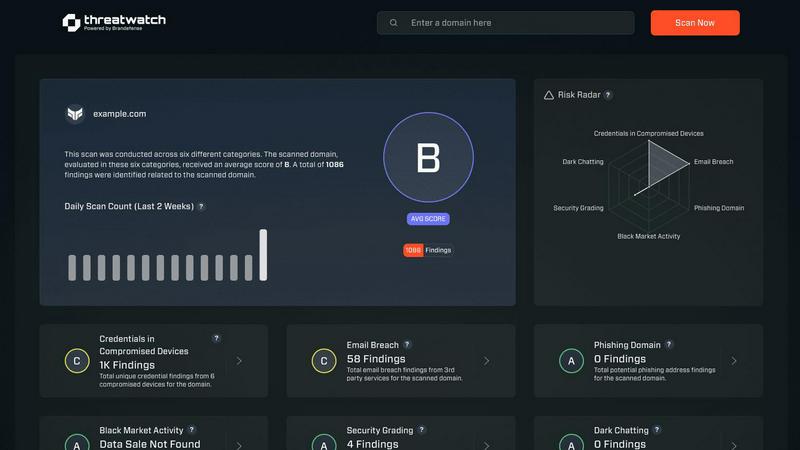
Threat Watch quickly evaluates your cybersecurity health by identifying compromised accounts, devices, and dark web.
Last updated: March 1, 2026
Visual Comparison
Fusedash

Threat Watch
Feature Comparison
Fusedash
Flexible Views
Fusedash provides a versatile platform where users can create tailored dashboard views for different audiences. This feature enables stakeholders to visualize the data in formats that are most relevant to them—whether through dashboards, charts, maps, or narrative reports. By allowing teams to customize layouts, filters, and time ranges, Fusedash ensures that everyone sees the information that matters most without unnecessary back and forth.
AI Chart Generator
The AI Chart Generator feature allows users to quickly create clear and engaging visuals from their datasets, whether sourced from CSV files or APIs. In mere minutes, users can select the appropriate chart type, apply comparisons, and refine labels, ensuring that each chart effectively communicates the intended story. This tool not only accelerates visual creation but also facilitates the reuse of charts across different dashboards and reports.
Dashboard Software
Fusedash offers a comprehensive workspace for both dashboards and reports, integrating performance views with contextual storytelling. This feature ensures that users can monitor key performance indicators while also understanding the narratives behind the data. By providing a seamless blend of visuals and insights, teams can maintain alignment and reduce discrepancies in reporting.
AI Chat
The AI Chat functionality enables users to interact with their data in a conversational manner. By asking questions in plain language, users can swiftly explore breakdowns and receive intelligent suggestions for the best metrics and visualizations. This interactive feature not only makes data exploration more intuitive but also allows users to transform insights into shareable dashboard views quickly.
Threat Watch
Compromised Credentials Assessment
This feature allows organizations to automatically check for compromised credentials across various platforms. By monitoring leaked passwords and associated accounts, Threat Watch helps businesses identify accounts at risk, enabling them to take immediate action to secure their systems.
Vulnerable Device Identification
Threat Watch scans an organization's infrastructure to identify devices that are vulnerable to attacks. This includes evaluating the security status of all connected devices, ensuring that any potential weak points are addressed before they can be exploited by malicious actors.
Breached Account Monitoring
This feature continuously monitors known data breaches for any accounts associated with an organization. By providing alerts on compromised accounts, Threat Watch enables businesses to act swiftly to reset passwords and secure their digital assets, reducing the risk of unauthorized access.
Phishing Address Detection
Threat Watch actively identifies and flags known phishing addresses that may target the organization. By providing insights into potential phishing threats, businesses can educate their employees on recognizing these attempts, thus enhancing overall cybersecurity awareness.
Use Cases
Fusedash
Marketing Performance Monitoring
Marketing teams can leverage Fusedash to create dashboards that track campaign performance across multiple channels. By visualizing engagement metrics and conversion rates in real-time, teams can make informed decisions about where to allocate resources and which strategies to optimize.
Financial Reporting
Finance departments can utilize Fusedash to compile comprehensive financial reports that integrate data from various sources. With the ability to create interactive charts and narrative insights, stakeholders can easily grasp the financial health of the organization and identify areas for improvement.
Sales Pipeline Management
Sales teams can benefit from Fusedash by utilizing its visualization capabilities to monitor sales pipelines. By visualizing key metrics such as lead conversion rates and sales forecasts, teams can identify trends and adjust their strategies to maximize revenue.
Operations Performance Analysis
Operations teams can use Fusedash to analyze performance metrics across different departments. By creating dashboards that visualize operational efficiency and productivity, teams can pinpoint areas for enhancement and align their efforts towards achieving organizational goals.
Threat Watch
Small Business Cybersecurity
Small businesses often lack the resources for extensive cybersecurity measures. Threat Watch provides them with essential tools to monitor their cyber health, ensuring that they can identify vulnerabilities without overwhelming their limited resources.
Enterprise Risk Management
Large enterprises can utilize Threat Watch to maintain a comprehensive overview of their cybersecurity landscape. The tool’s real-time monitoring and assessment capabilities help in prioritizing risks across multiple departments and locations.
Incident Response Planning
Organizations can leverage Threat Watch to improve their incident response strategies. By understanding the vulnerabilities within their systems, businesses can develop tailored response plans, ensuring they are prepared to address potential cyber incidents effectively.
Cybersecurity Training and Awareness
Threat Watch helps organizations enhance employee awareness of cybersecurity threats. By identifying phishing addresses and compromised credentials, businesses can create training sessions that educate staff on recognizing and reporting potential threats.
Overview
About Fusedash
Fusedash is an innovative AI-powered data visualization platform designed to streamline how teams analyze and present their data. By transforming connected data into insightful visual representations, Fusedash enables organizations to create decision-ready dashboards, interactive charts, detailed maps, and comprehensive narrative reports all within a single workspace. This unified approach eliminates the need to duplicate logic across various disconnected tools, driving consistency and efficiency. The core value proposition of Fusedash lies in its ability to allow users to define key metrics and KPIs just once, ensuring that everyone across the organization—from leadership to marketing to operations—accesses the same trusted data. This consistency helps teams move beyond tedious manual reporting cycles and conflicting narratives, empowering them to monitor real-time information while gaining insights into the reasons behind the data. With integrated AI features like natural language data chat and smart visualization assistance, Fusedash simplifies data exploration and reporting, turning raw data into a shared source of truth that fosters alignment and informed decision-making.
About Threat Watch
Threat Watch is a comprehensive cybersecurity intelligence solution aimed at empowering organizations to actively monitor and enhance their cyber health. By evaluating critical security categories such as compromised credentials, vulnerable devices, breached accounts, and phishing addresses, Threat Watch provides users with a holistic view of their cybersecurity landscape. This tool is designed for businesses of all sizes, from small startups to large enterprises, helping them identify and prioritize potential risks effectively. The main value proposition of Threat Watch lies in its ability to deliver real-time insights and automated assessments, enabling organizations to quickly uncover vulnerabilities and exposures. By doing so, businesses can take proactive measures to mitigate risks and safeguard sensitive information, ensuring that they remain resilient against cyber threats. With Threat Watch, users gain clarity in their cybersecurity posture, allowing for swifter and more efficient responses to emerging threats.
Frequently Asked Questions
Fusedash FAQ
What types of data can I connect to Fusedash?
Fusedash allows users to connect a variety of data sources, including CSV files, APIs, and public datasets. This flexibility enables users to consolidate their data into a unified platform for comprehensive analysis and reporting.
How does Fusedash ensure data consistency across reports?
Fusedash promotes data consistency by allowing users to define key metrics and KPIs once. These definitions can then be reused across all dashboards, charts, and reports, ensuring that every team in the organization is referencing the same reliable data.
Can I customize the visualizations in Fusedash?
Yes, Fusedash offers extensive customization options for visualizations. Users can adjust layouts, filters, and time ranges to create tailored views that meet the specific needs of different stakeholders.
Is Fusedash suitable for non-technical users?
Absolutely. Fusedash is designed to be user-friendly and accessible, even for those without technical backgrounds. With features like AI Chat and the AI Chart Generator, users can easily explore data and create visualizations without needing advanced technical skills.
Threat Watch FAQ
How does Threat Watch evaluate cyber health?
Threat Watch evaluates cyber health by analyzing critical security categories such as compromised credentials, vulnerable devices, breached accounts, and phishing addresses, providing a comprehensive assessment of an organization's cybersecurity posture.
Is Threat Watch suitable for all business sizes?
Yes, Threat Watch is designed to be beneficial for organizations of all sizes, from small businesses to large enterprises. Its scalable features allow it to adapt to various cybersecurity needs.
How often does Threat Watch update its assessments?
Threat Watch provides real-time insights and assessments, ensuring that organizations receive the most current information about their cybersecurity status and any emerging threats.
Can Threat Watch integrate with other cybersecurity tools?
Yes, Threat Watch is designed to integrate seamlessly with other cybersecurity tools and platforms, allowing organizations to create a cohesive cybersecurity strategy that enhances their overall protection.
Alternatives
Fusedash Alternatives
Fusedash is an AI-powered data visualization platform that falls under the categories of Analytics & Data and Business Intelligence. It enables teams to transform their raw data into clear, actionable insights through decision-ready dashboards, interactive charts, and detailed reports, all within a unified workspace. Users often seek alternatives to Fusedash for various reasons, including pricing concerns, specific feature requirements, or compatibility with existing platforms. When choosing an alternative, it's essential to consider factors such as ease of use, the ability to integrate with other tools, the quality of customer support, and the overall flexibility of the platform to meet your team's unique data needs.
Threat Watch Alternatives
Threat Watch is a cybersecurity intelligence solution designed to provide organizations with insights into their cyber health. It falls under the category of business intelligence, focusing specifically on enhancing cybersecurity through real-time assessments and comprehensive vulnerability scanning. Users often seek alternatives to Threat Watch for various reasons, including pricing, specific feature sets, or compatibility with their existing platforms and systems. When looking for an alternative, it is essential to consider factors such as the comprehensiveness of the security assessments, the capability for real-time monitoring, and the overall usability of the platform. Prioritizing features that align with your organization’s unique security needs can help ensure that the alternative chosen effectively safeguards sensitive information and mitigates potential risks.