SupaSidebar vs SureThing.io
Side-by-side comparison to help you choose the right product.

SupaSidebar
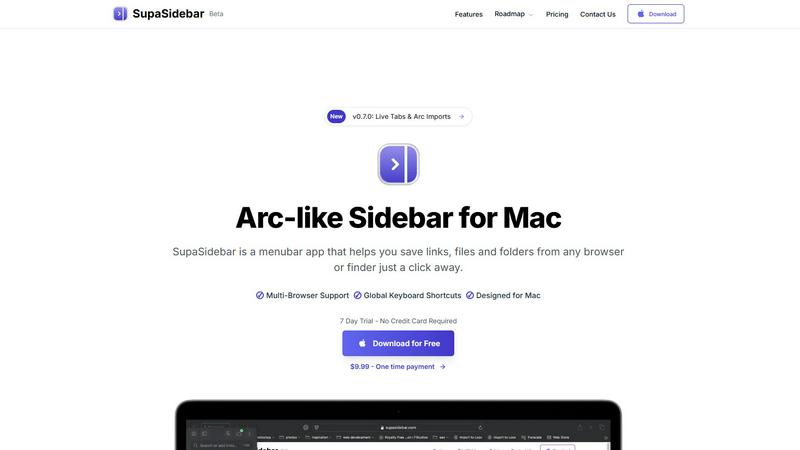
SupaSidebar gives you instant keyboard access to your links, files, and folders on Mac.
Last updated: February 28, 2026

SureThing.io
SureThing.io is an autonomous business agent that learns your preferences and securely manages tasks for you.
Last updated: March 19, 2026
Visual Comparison
SupaSidebar
SureThing.io

Feature Comparison
SupaSidebar
Universal Capture with Keyboard Shortcuts
SupaSidebar empowers you to save content without interrupting your flow. Using intuitive global keyboard shortcuts, you can instantly capture the current website link (CMD+CTRL+S) or copy it to your clipboard (CMD+CTRL+C) directly from any browser. This eliminates the tedious process of manually copying, switching apps, and pasting, making saving references, articles, or tools a seamless part of your browsing experience.
Recents History for Instant Recall
Never lose track of your digital trail. SupaSidebar automatically tracks every website you visit across all supported browsers for the past 48 hours, logging them in the "Recents" section. This feature acts as a short-term memory for your Mac, allowing you to instantly find and re-open that webpage you were viewing just a short while ago without digging through your browser history or countless open tabs.
Fast Universal Search
Access anything on your Mac with a single keystroke. By pressing CMD+CTRL+K, you activate a powerful search bar that scans across all your saved items—websites, files, folders, and applications. This centralized search function means you can launch apps, open documents, or navigate to saved links without ever taking your hands off the keyboard, dramatically speeding up task switching.
Organized Spaces and Pinned Favorites
Keep your most critical resources immediately accessible. You can pin important links, files, or folders to the top of your sidebar for one-click access. Furthermore, SupaSidebar organizes items into separate "Spaces," allowing you to categorize resources by project, topic, or context. This structure helps maintain order and ensures you can quickly find what you need for your current task.
SureThing.io
Proactive Autonomous Operation
SureThing.io does not wait for you to issue a command. It operates continuously in the background, monitoring your connected inboxes and applications. It identifies actionable items, drafts email replies in your personal tone, manages calendar invites, and tracks project milestones. This feature shifts the paradigm from reactive task management to a system where work is progressed automatically, allowing you to concentrate on deep work while the agent handles the administrative overhead.
State-of-the-Art Agentic Memory
This is the foundational feature that sets SureThing apart. The agent possesses a persistent, long-term memory that retains context across weeks and months of interaction. It remembers your specific goals, your communication preferences, your recurring patterns, and the details of your contacts and projects. This means the agent learns from every interaction, avoids repeating past mistakes, and requires less explicit instruction over time, becoming more efficient and personalized the longer you work together.
Enterprise-Grade Security & Reliability
SureThing.io is built for users who need to trust an agent with real, sensitive work. It is SOC 2 certified and Google CASA Tier 2 compliant, adhering to stringent data security and privacy standards. This focus on security and operational robustness ensures the platform is dependable for daily business use. It is designed not to fail when faced with complex, real-world tasks, providing a level of stability that goes beyond prototype or demo-stage AI tools.
Cross-Application Action & Integration
The agent is not confined to a single interface. It can take meaningful actions across a suite of connected apps that form your digital workspace. This includes email clients, calendar services, project management tools, and communication platforms. By operating across these integrated systems, SureThing can manage a workflow holistically—for example, reading an email about a project delay, updating the relevant task in a project tracker, and rescheduling a dependent meeting, all autonomously.
Use Cases
SupaSidebar
Academic Research and Study
For students and academics, SupaSidebar streamlines the research process. You can quickly save journal articles, reference websites, and PDF documents into dedicated project spaces while studying. The "Recents" history helps you backtrack through sources, and the universal search lets you instantly pull up any saved material when writing papers or preparing for exams, keeping all research materials consolidated and accessible.
Project Management and Development
Developers and project managers can use SupaSidebar to centralize all project-related assets. Create a space for each project to hold links to documentation, design mockups, task boards, repository pages, and local project folders. This eliminates the need to bookmark in multiple browsers or navigate deep into file systems, providing a single, persistent hub for all project resources right from the desktop.
Streamlined Content Creation
Writers, designers, and content creators can benefit greatly. Save inspiration links, stock photo folders, branding guidelines, and writing templates directly into the sidebar. When working, quickly jump between research tabs, asset folders, and writing apps using keyboard shortcuts, maintaining a focused creative workflow without the clutter of dozens of open windows and tabs.
Daily Personal Productivity
For everyday Mac users, SupaSidebar reduces digital friction. Keep your daily checklists, often-used finance websites, favorite news links, and personal document folders pinned and ready. It replaces the need for scattered bookmarks and desktop clutter, offering a clean, fast, and organized way to access the digital tools you use every day, saving time and mental energy.
SureThing.io
The Solo Founder or Entrepreneur
A solo founder executing a full go-to-market launch can use SureThing as a force multiplier. The agent manages inbound email inquiries, drafts responses to potential clients or partners, schedules demo calls, and tracks outreach campaigns. This allows the founder to focus on product development, strategy, and fundraising without letting critical communications fall through the cracks, effectively simulating a support team.
The Technical Director or Project Lead
For a technical leader managing complex projects, SureThing acts as a project coordinator. It monitors email threads for status updates, action items, and deadlines. It can draft technical meeting summaries, follow up on assigned tasks with team members, and track milestone progress across ongoing projects, ensuring nothing is missed and reducing the managerial overhead on the lead.
The Executive or Busy Professional
Executives and professionals overwhelmed by meeting scheduling and email triage benefit greatly. SureThing proactively manages their calendar, finds optimal meeting times, drafts polite declines or delegations, and summarizes lengthy email threads. It learns the user's priorities and communication style, ensuring all correspondence and scheduling reflects their professional voice and focus areas.
The Freelancer or Consultant
Freelancers juggling multiple clients use SureThing to maintain impeccable organization and communication. The agent can track billable hours mentioned in emails, send polite invoice reminders, schedule check-in calls across different client time zones, and draft project update emails. This ensures consistent, professional client management while the freelancer concentrates on delivering the core service.
Overview
About SupaSidebar
SupaSidebar is a dedicated menubar application for Mac, designed to fundamentally improve how you access and organize your digital work. Inspired by the efficient sidebar concept of the Arc browser, it provides a universal, always-accessible panel for your most important resources. At its core, SupaSidebar solves a simple but widespread problem: the time and effort wasted switching between apps, hunting for files, and managing countless browser tabs. It allows you to instantly save and retrieve links from any major web browser—including Safari, Chrome, Firefox, Brave, and Arc—as well as files and folders directly from your Finder. All data is stored locally on your Mac, ensuring privacy and speed. The application is built for anyone seeking a more organized and focused workflow, from students and researchers managing sources to professionals juggling multiple projects. Its main value proposition is delivering a clutter-free, keyboard-centric command center that keeps your essential tools at your fingertips, reducing distraction and significantly boosting daily productivity on macOS.
About SureThing.io
SureThing.io is an autonomous AI agent designed to function as a persistent, proactive partner for managing your digital work life. Unlike standard chatbots that require constant prompting, SureThing operates independently. It works on your behalf 24/7, monitoring your communications, managing tasks, and taking action across connected applications. Its core purpose is to handle routine and administrative work so you can maintain focus on high-value, strategic activities without distraction.
The product is built for professionals, founders, and teams who need a reliable, intelligent assistant they can truly delegate to. This includes solo entrepreneurs managing multiple business functions, technical leaders overseeing projects, and any knowledge worker inundated with email and scheduling. The fundamental value proposition is twofold: proactive autonomy and persistent memory. SureThing doesn't just wait for instructions; it anticipates needs based on your patterns. Furthermore, it remembers your preferences, your communication style, your contacts, and your ongoing goals across every interaction, eliminating the need to repeat context. It is engineered for real-world reliability with enterprise-grade security certifications, positioning it as a tool for trusted daily use, not just a conceptual demo.
Frequently Asked Questions
SupaSidebar FAQ
Is SupaSidebar a browser extension?
No, SupaSidebar is not a browser extension. It is a standalone menubar application installed directly on your macOS system. It works alongside your existing browsers by using system-level accessibility features to communicate with them, allowing it to capture links and history from Safari, Chrome, Firefox, Brave, Arc, and others without requiring individual extensions for each one.
Which browsers does SupaSidebar work with?
SupaSidebar is compatible with all major browsers on Mac. This includes Safari, Google Chrome, Mozilla Firefox, Brave, and the Arc browser. The application is designed to integrate seamlessly with these browsers to capture your current tab's link and track your browsing history directly from its sidebar interface.
What macOS version do I need?
SupaSidebar requires macOS 13 (Ventura) or a later version to function properly. This ensures compatibility with the necessary system frameworks and security features that allow the app to operate reliably across your applications and provide its full set of features, including global keyboard shortcuts and browser integration.
Where is my data stored?
All your data within SupaSidebar--including saved links, files, folders, and your browsing history--is stored locally on your Mac. Nothing is sent to or stored on external servers. This local-first approach prioritizes your privacy and security, ensures fast access to your information, and means your data remains entirely under your control.
SureThing.io FAQ
How is SureThing.io different from a standard AI chatbot?
Standard AI chatbots are reactive tools that require explicit, detailed prompts for every single task and have no memory between conversations. SureThing.io is an autonomous agent. It works proactively in the background based on learned preferences and goals. Its persistent, long-term memory allows it to build context over time, operate across applications, and execute multi-step workflows without constant instruction, acting as a true automated assistant.
What does "enterprise-grade security" mean for SureThing?
Enterprise-grade security means SureThing.io is built and audited to protect sensitive business and personal data. It is SOC 2 Type II certified, which is a rigorous audit of its security, availability, and confidentiality controls. Furthermore, its Google CASA Tier 2 compliance signifies it meets Google's high standards for data protection when accessing Google Workspace accounts. Your data and delegated permissions are handled with the highest level of trust and security.
How does SureThing learn my preferences and "voice"?
SureThing learns through continuous interaction and observation. As you work, it analyzes your email writing style, your scheduling habits, your priorities in communication, and your decision-making patterns. Its state-of-the-art agentic memory stores this information, allowing it to apply these preferences autonomously. For example, when drafting a reply, it mimics your tone, formality, and common phrases, ensuring communications feel authentic.
Can I control what actions SureThing takes autonomously?
Yes, control and trust are paramount. SureThing is designed to operate within guardrails and learn from your feedback. Initially, it may suggest actions or drafts for your approval. As trust builds, you can configure the level of autonomy for different tasks. You always maintain oversight, and the system is built to flag ambiguous or high-stakes items for your direct review, ensuring you remain in command of your workflow.
Alternatives
SupaSidebar Alternatives
SupaSidebar is a Mac productivity application designed to streamline your digital workspace. It acts as a central hub, providing instant access to your most-used links, files, and folders directly from your desktop sidebar. This tool helps users reduce clutter and maintain focus by keeping essential resources organized and just a click away. Users often explore alternatives for various practical reasons. Some may seek different pricing models, such as a free tier or a one-time purchase. Others might need specific features not offered, require compatibility with Windows, or simply prefer a different user interface and workflow. It's a normal part of finding the right tool for your individual needs. When evaluating an alternative, consider your core requirements. Key factors include the depth of browser integration, the efficiency of the search and command functions, and how well it organizes links and recent history. The goal is to find a solution that genuinely simplifies your daily computer use without adding complexity.
SureThing.io Alternatives
SureThing.io is an autonomous AI agent for business management, operating in the productivity and management software category. It proactively handles tasks like email, scheduling, and project tracking by learning your unique patterns and working continuously on your behalf. Users often explore alternatives for various reasons. These can include budget constraints, a need for different specific features, or a requirement to integrate with a particular set of existing tools and platforms. The search for the right fit is a normal part of selecting business software. When evaluating an alternative, key considerations should be its core functionality, how well it integrates with your current workflow, its approach to data security and reliability, and the overall value it provides for the investment. The goal is to find a solution that effectively automates tasks while aligning with your operational needs and trust thresholds.