Fond vs SupaSidebar
Side-by-side comparison to help you choose the right product.

Fond is your AI cooking companion that simplifies recipe management, meal planning, and smart shopping to enhance your cooking skills.
Last updated: March 19, 2026

SupaSidebar
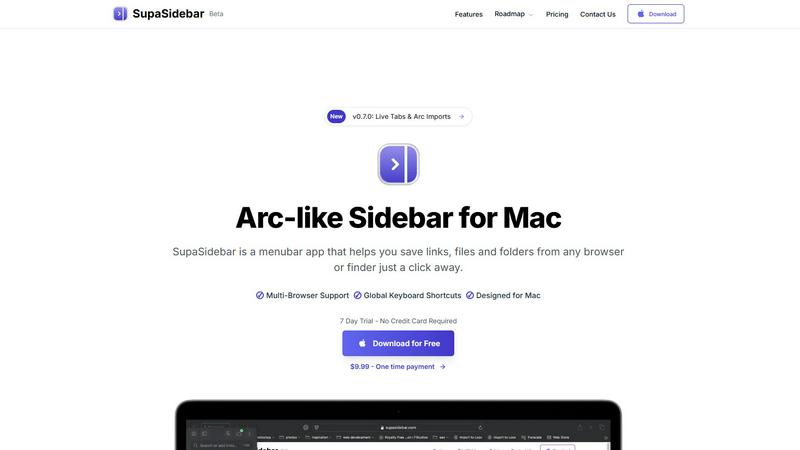
SupaSidebar gives you instant keyboard access to your links, files, and folders on Mac.
Last updated: February 28, 2026
Visual Comparison
Fond

SupaSidebar
Feature Comparison
Fond
AI Cooking Agent
Fond features an AI cooking assistant that adapts to your unique cooking style and goals. It learns from your interactions, becoming increasingly knowledgeable about your recipes and preferences. Whether you need advice on ingredient substitutions or cooking techniques, August is ready to assist, making your cooking journey more intuitive and enjoyable.
AI Recipe Import
With Fond's AI Recipe Import feature, you can easily paste any recipe URL, and the app will extract the essential ingredients, steps, and metadata while eliminating distracting ads and unnecessary content. This means you can save time and focus on what matters most—cooking delicious meals.
Meal Planner
The Meal Planner allows you to drag and drop your favorite recipes into your weekly schedule effortlessly. As you plan your meals, Fond automatically generates shopping lists based on the recipes you've chosen. By carrying over leftovers and minimizing food waste, this feature simplifies meal preparation and saves you valuable time.
Smart Shopping
Fond's Smart Shopping feature organizes your grocery list by aisle, making your shopping experience more efficient. Duplicate items are merged for clarity, and the list is synced across your household, ensuring that whoever is shopping has the most up-to-date list. This functionality helps you shop smarter and avoid unnecessary purchases.
SupaSidebar
Universal Capture with Keyboard Shortcuts
SupaSidebar empowers you to save content without interrupting your flow. Using intuitive global keyboard shortcuts, you can instantly capture the current website link (CMD+CTRL+S) or copy it to your clipboard (CMD+CTRL+C) directly from any browser. This eliminates the tedious process of manually copying, switching apps, and pasting, making saving references, articles, or tools a seamless part of your browsing experience.
Recents History for Instant Recall
Never lose track of your digital trail. SupaSidebar automatically tracks every website you visit across all supported browsers for the past 48 hours, logging them in the "Recents" section. This feature acts as a short-term memory for your Mac, allowing you to instantly find and re-open that webpage you were viewing just a short while ago without digging through your browser history or countless open tabs.
Fast Universal Search
Access anything on your Mac with a single keystroke. By pressing CMD+CTRL+K, you activate a powerful search bar that scans across all your saved items—websites, files, folders, and applications. This centralized search function means you can launch apps, open documents, or navigate to saved links without ever taking your hands off the keyboard, dramatically speeding up task switching.
Organized Spaces and Pinned Favorites
Keep your most critical resources immediately accessible. You can pin important links, files, or folders to the top of your sidebar for one-click access. Furthermore, SupaSidebar organizes items into separate "Spaces," allowing you to categorize resources by project, topic, or context. This structure helps maintain order and ensures you can quickly find what you need for your current task.
Use Cases
Fond
Streamlined Recipe Management
Fond allows users to consolidate their recipe collection in one place. Instead of sifting through bookmarks and handwritten notes, home cooks can easily access all their favorite recipes through the app. This centralization not only saves time but also enhances the overall cooking experience.
Personalized Meal Planning
Whether you are cooking for yourself or your family, Fond's personalized meal planning caters to various dietary preferences and skill levels. By inputting your unique requirements, the app generates tailored meal plans that ensure everyone enjoys nutritious and delicious dishes throughout the week.
Real-Time Cooking Assistance
While cooking, users can benefit from August's real-time assistance. If you encounter a question about a technique or ingredient, simply ask the AI, and it will provide you with instant guidance. This feature empowers home cooks to tackle unfamiliar recipes with confidence and ease.
Culinary Skill Development
For those looking to improve their cooking abilities, Fond's specialized Modules, such as the Pizza Workshop, offer in-depth resources and tools. These workshops guide users through advanced techniques, helping them develop their skills and deepen their understanding of culinary arts.
SupaSidebar
Academic Research and Study
For students and academics, SupaSidebar streamlines the research process. You can quickly save journal articles, reference websites, and PDF documents into dedicated project spaces while studying. The "Recents" history helps you backtrack through sources, and the universal search lets you instantly pull up any saved material when writing papers or preparing for exams, keeping all research materials consolidated and accessible.
Project Management and Development
Developers and project managers can use SupaSidebar to centralize all project-related assets. Create a space for each project to hold links to documentation, design mockups, task boards, repository pages, and local project folders. This eliminates the need to bookmark in multiple browsers or navigate deep into file systems, providing a single, persistent hub for all project resources right from the desktop.
Streamlined Content Creation
Writers, designers, and content creators can benefit greatly. Save inspiration links, stock photo folders, branding guidelines, and writing templates directly into the sidebar. When working, quickly jump between research tabs, asset folders, and writing apps using keyboard shortcuts, maintaining a focused creative workflow without the clutter of dozens of open windows and tabs.
Daily Personal Productivity
For everyday Mac users, SupaSidebar reduces digital friction. Keep your daily checklists, often-used finance websites, favorite news links, and personal document folders pinned and ready. It replaces the need for scattered bookmarks and desktop clutter, offering a clean, fast, and organized way to access the digital tools you use every day, saving time and mental energy.
Overview
About Fond
Fond is an innovative kitchen companion that revolutionizes the way home cooks manage recipes, plan meals, and enhance their culinary skills. Designed for individuals who find themselves overwhelmed by bookmarks, scattered notes, and hasty grocery runs, Fond offers a streamlined solution. At its core is August, an intelligent AI cooking assistant that serves as your personal guide through the culinary landscape. With Fond, you can effortlessly import recipes from any website, photo, or text while automatically filtering out irrelevant ads and lengthy narratives. The app crafts personalized weekly meal plans tailored to your dietary preferences and available ingredients, ensuring a customized cooking experience. As you prepare your meals, August provides real-time assistance by answering questions about cooking techniques and ingredient substitutions. Moreover, Fond includes features such as drag-and-drop meal planning, automatically generated shopping lists organized by grocery aisle, and a hands-free Cook Mode, all designed to simplify your cooking process. With specialized Modules like the Pizza Workshop, Fond caters to enthusiasts who want to delve deeper into specific culinary crafts. Available on all devices and seamlessly synced across platforms, Fond transforms cooking from a mundane task into a joyful and engaging craft.
About SupaSidebar
SupaSidebar is a dedicated menubar application for Mac, designed to fundamentally improve how you access and organize your digital work. Inspired by the efficient sidebar concept of the Arc browser, it provides a universal, always-accessible panel for your most important resources. At its core, SupaSidebar solves a simple but widespread problem: the time and effort wasted switching between apps, hunting for files, and managing countless browser tabs. It allows you to instantly save and retrieve links from any major web browser—including Safari, Chrome, Firefox, Brave, and Arc—as well as files and folders directly from your Finder. All data is stored locally on your Mac, ensuring privacy and speed. The application is built for anyone seeking a more organized and focused workflow, from students and researchers managing sources to professionals juggling multiple projects. Its main value proposition is delivering a clutter-free, keyboard-centric command center that keeps your essential tools at your fingertips, reducing distraction and significantly boosting daily productivity on macOS.
Frequently Asked Questions
Fond FAQ
How does Fond's AI cooking agent learn about my cooking style?
Fond's AI cooking agent learns by analyzing your interactions within the app, including the recipes you import, the meals you plan, and the questions you ask. Over time, it becomes more attuned to your preferences, helping to provide tailored recommendations and assistance.
Can I use Fond on multiple devices?
Yes, Fond is designed to be fully synced across all your devices. Whether you are using a smartphone, tablet, or computer, you will have access to your recipes, meal plans, and shopping lists, ensuring a seamless cooking experience.
What types of recipes can I import into Fond?
You can import recipes from any website, as well as from photos or text. Fond's AI Recipe Import feature extracts the necessary information while filtering out ads and extraneous details, making it easy to manage a diverse range of recipes.
Is there a cost associated with using Fond?
Fond offers a free starting plan with no credit card required and the option to cancel anytime. This allows users to explore the app and its features before committing to a paid plan, ensuring a risk-free experience in discovering how Fond can enhance their cooking journey.
SupaSidebar FAQ
Is SupaSidebar a browser extension?
No, SupaSidebar is not a browser extension. It is a standalone menubar application installed directly on your macOS system. It works alongside your existing browsers by using system-level accessibility features to communicate with them, allowing it to capture links and history from Safari, Chrome, Firefox, Brave, Arc, and others without requiring individual extensions for each one.
Which browsers does SupaSidebar work with?
SupaSidebar is compatible with all major browsers on Mac. This includes Safari, Google Chrome, Mozilla Firefox, Brave, and the Arc browser. The application is designed to integrate seamlessly with these browsers to capture your current tab's link and track your browsing history directly from its sidebar interface.
What macOS version do I need?
SupaSidebar requires macOS 13 (Ventura) or a later version to function properly. This ensures compatibility with the necessary system frameworks and security features that allow the app to operate reliably across your applications and provide its full set of features, including global keyboard shortcuts and browser integration.
Where is my data stored?
All your data within SupaSidebar--including saved links, files, folders, and your browsing history--is stored locally on your Mac. Nothing is sent to or stored on external servers. This local-first approach prioritizes your privacy and security, ensures fast access to your information, and means your data remains entirely under your control.
Alternatives
Fond Alternatives
Fond is an innovative AI cooking companion that simplifies meal planning, recipe management, and shopping, catering to home cooks seeking a streamlined kitchen experience. As a productivity and management tool, Fond helps users consolidate their cooking workflow, providing a comprehensive resource for planning meals and learning culinary techniques. Users often explore alternatives to Fond due to a variety of reasons, such as pricing, specific feature sets, or compatibility with their preferred devices. When searching for an alternative, consider factors like user interface, customization options, integration capabilities, and whether it meets your unique cooking needs and lifestyle.
SupaSidebar Alternatives
SupaSidebar is a Mac productivity application designed to streamline your digital workspace. It acts as a central hub, providing instant access to your most-used links, files, and folders directly from your desktop sidebar. This tool helps users reduce clutter and maintain focus by keeping essential resources organized and just a click away. Users often explore alternatives for various practical reasons. Some may seek different pricing models, such as a free tier or a one-time purchase. Others might need specific features not offered, require compatibility with Windows, or simply prefer a different user interface and workflow. It's a normal part of finding the right tool for your individual needs. When evaluating an alternative, consider your core requirements. Key factors include the depth of browser integration, the efficiency of the search and command functions, and how well it organizes links and recent history. The goal is to find a solution that genuinely simplifies your daily computer use without adding complexity.