One More Shot AI vs StatPecker
Side-by-side comparison to help you choose the right product.

One More Shot AI
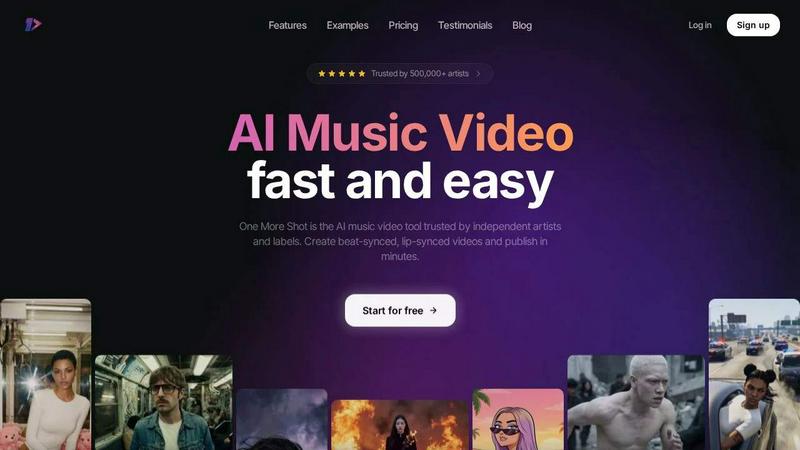
One More Shot AI transforms your songs into professional, lip-synced music videos in minutes, trusted by over 500,000 artists.
Last updated: April 4, 2026

StatPecker
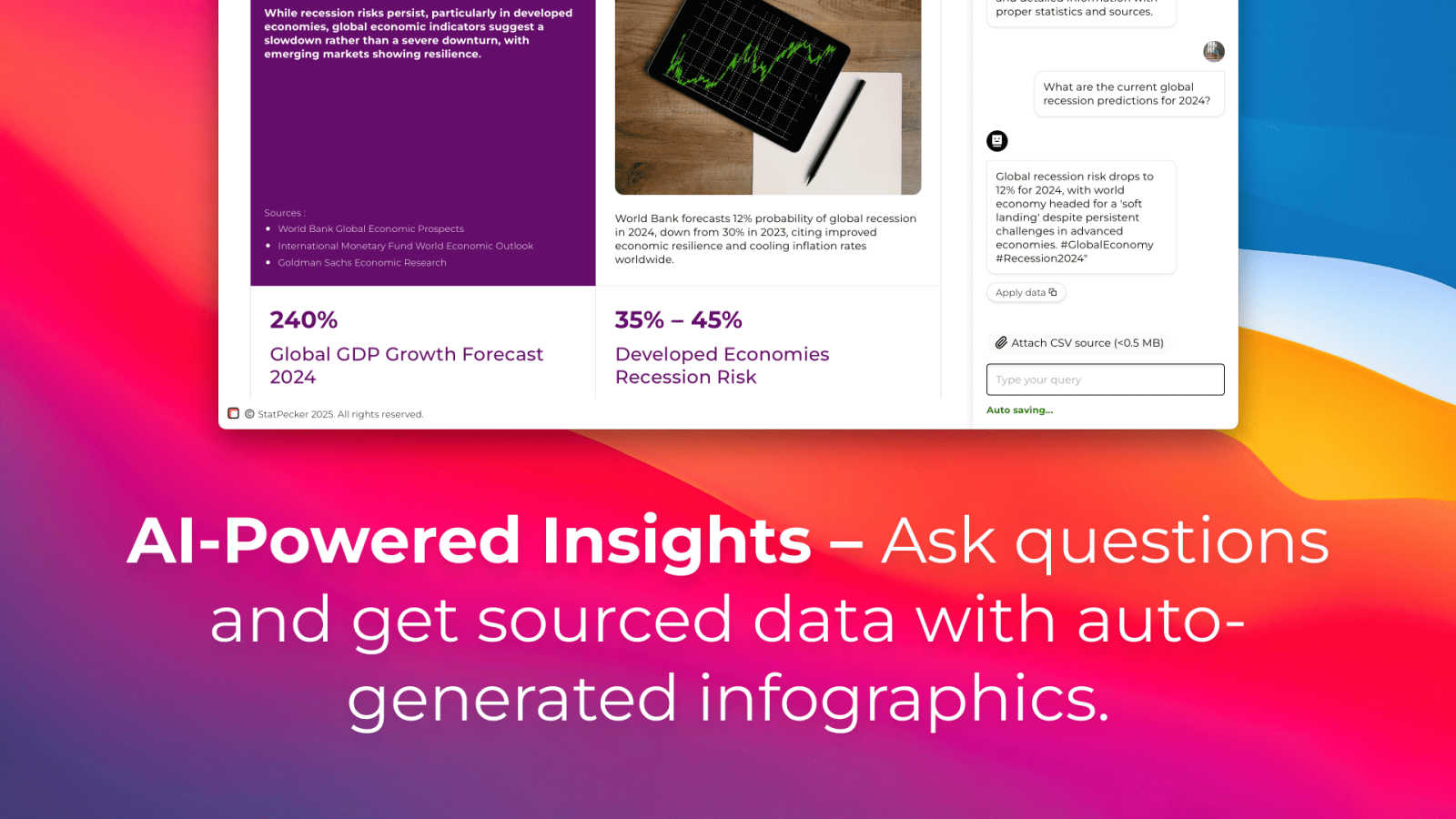
StatPecker transforms your data into stunning visuals, providing fast insights for effective storytelling and.
Last updated: March 1, 2026
Visual Comparison
One More Shot AI
StatPecker
Feature Comparison
One More Shot AI
AI Artist & Identity Consistency
This feature allows you to create a virtual artist or maintain a consistent character throughout your video. You can start with just a photo or a text description. The AI then uses this identity across all generated scenes, ensuring your artist or brand spokesperson is recognizable and coherent from shot to shot. This is fundamental for building a professional and trustworthy visual brand across all your music content, from social clips to full-length videos.
Auto Video Generation
Think of this as your AI production crew. In its simplest form, you input your song and a reference image or idea. The AI agents then take over, handling the complex tasks of scene creation, timing, and visual pacing to deliver a complete music video. This automated workflow is designed for speed and ease, providing a solid visual foundation that can be used as-is or as a starting point for more detailed customization.
Precise Project Editing Mode
For creators who want detailed control, Project Mode offers a back-to-basics, granular editing interface. You can build a video from scratch or deconstruct and modify an auto-generated one. This mode provides frame-by-frame and scene-by-scene control, allowing you to adjust visuals, timing, and transitions precisely to match your creative vision, much like a traditional video editor but built specifically for AI-generated music content.
Top-Tier AI Lip-Sync
A critical feature for believable music videos, this technology ensures the artist's mouth movements match the lyrics perfectly. The platform hosts advanced lip-syncing models that analyze the audio track to generate natural-looking singing and speaking scenes. This attention to a fundamental detail transforms still or AI-generated characters into convincing performers, greatly enhancing the professionalism and engagement of the final video.
StatPecker
Local SQL Agent
The Local SQL Agent feature empowers users to upload CSV files (up to 50 MB) for private analysis. Everything runs on the user's device, ensuring that data remains confidential while generating insightful visuals. This feature allows for local queries and instant visualizations, making it easy to uncover trends without risking data privacy.
Ask Your Query
With the Ask Your Query feature, users can obtain instant insights from validated sources using AI. This feature eliminates the need for complex tools, allowing users to simply ask questions about their data and receive immediate, accurate answers in a visually appealing format, enhancing data-driven decision-making.
Publish & Embed
StatPecker allows users to make their visuals interactive and seamlessly integrate them into various platforms such as blogs, articles, and websites. This publish and embed feature ensures that users can share their findings effortlessly, fostering better communication and collaboration among teams and audiences.
Download & Use Anywhere
The Download & Use Anywhere feature enables users to export infographics as images suitable for reports, presentations, and more. This flexibility ensures that users can utilize their visuals across different formats and contexts, enhancing the reach and impact of their data storytelling.
Use Cases
One More Shot AI
Social Media Music Promotion
Artists can quickly turn a single track into multiple formatted clips for platforms like TikTok, Instagram Reels, and YouTube Shorts. By using the platform's support for vertical, horizontal, and square outputs, you can create tailored, beat-synced content for each channel. This consistent stream of visual content helps in promoting new releases, engaging fans, and growing an online audience without requiring daily video production efforts.
Full-Length Music Video Creation
Independent musicians and labels can produce complete, official music videos to publish on YouTube or Vevo. Using either the Auto Video feature for a quick foundation or Project Mode for detailed direction, artists can create a visual narrative for their song. This use case replaces the need for expensive filming sessions, location scouting, and large crews, making professional video assets accessible.
Lyric Video and Visualizer Production
Beyond narrative videos, the tool is excellent for generating dynamic lyric videos or abstract audio visualizers. By syncing visuals directly to the beat and structure of the instrumentals, creators can produce engaging content that highlights the music itself. This is useful for Spotify Canvas, website backgrounds, or visual content for live performances.
Branded Content for Music Marketers
Marketing professionals and labels can use the platform to create consistent visual branding for multiple artists or campaigns. The AI Artist feature ensures brand spokespeople or animated mascots appear uniformly across different videos. This is fundamental for building a cohesive visual identity, launching marketing campaigns, and producing high volumes of promotional material efficiently.
StatPecker
Data Analysis for Businesses
StatPecker is ideal for businesses looking to analyze their performance metrics. Users can upload sales data to visualize trends and make data-driven decisions, enhancing overall business strategies and results.
Educational Presentations
Educators can utilize StatPecker to create engaging infographics for their presentations. By transforming complex information into visuals, teachers can enhance student understanding and retention of key concepts.
Marketing Campaign Reports
Marketers can leverage StatPecker to visualize the performance of their campaigns. By converting raw data into attractive graphics, they can effectively communicate results to stakeholders and improve future campaigns based on insights gained.
Research and Development
Researchers can benefit from StatPecker by visualizing their findings in a clear and concise manner. This tool allows them to present data effectively, facilitating better communication of their research outcomes to peers and the public.
Overview
About One More Shot AI
One More Shot AI is a foundational tool designed to transform audio tracks into complete, professional-looking music videos using artificial intelligence. At its core, the product serves musicians, independent artists, creators, and music marketers. Its primary purpose is to remove the traditional barriers of video production, such as high costs, complex equipment, and lengthy editing timelines. Instead, it provides a streamlined, accessible platform where a song can become a visual experience in minutes. The main value proposition lies in its combination of speed, creative flexibility, and specialized AI features tailored for music. By analyzing a song's rhythm, energy, and mood, the platform automatically generates beat-synced visuals. Users can choose between a simple, automated workflow for quick results or a detailed project mode for granular, scene-by-scene control. This makes it an essential tool for anyone needing to promote music on social media, build an artist brand, or simply bring a musical idea to life visually without a film crew.
About StatPecker
StatPecker is an innovative AI-driven platform designed to transform raw data into captivating infographics within seconds. It simplifies the complex data storytelling process, making it accessible to a vast audience, including content creators, analysts, marketers, and educators. By harnessing the power of advanced artificial intelligence, StatPecker enables users to create striking visuals without needing extensive design skills or costly software. This tool significantly streamlines the traditional reporting processes, saving time and reducing costs, allowing users to focus on deriving insights from their data. With StatPecker, anyone can convert intricate data sets into engaging graphics that enhance understanding and retention, establishing it as an essential resource for effective communication of information.
Frequently Asked Questions
One More Shot AI FAQ
What do I need to start creating a video?
You need just two fundamental things: an audio file of your song (in formats like MP3 or WAV) and a starting idea. This idea can be a text prompt describing the video's theme, a reference image for the visual style, or a photo to define your AI artist's appearance. The platform guides you through the simple upload and input process to begin generation.
How does the lip-sync technology work?
The lip-sync feature uses specialized AI models that analyze the vocal track of your uploaded song. It detects phonetic sounds and timing from the audio to automatically animate the mouth of your chosen AI artist or character. The result is precise synchronization that makes it appear as though the character is genuinely singing or speaking the lyrics, a foundational element for realistic music videos.
Can I edit the videos after they are generated?
Yes, there are two main paths. You can use the auto-generated video as a final product. For more control, you can enter Project Mode. This mode allows you to edit the video at a granular level, letting you modify individual scenes, change visuals, adjust timing, add new shots, and fine-tune the sequence to perfectly match your creative direction.
What audio sources or music platforms does it work with?
One More Shot AI is designed to work with your own audio files. This includes music created in Digital Audio Workstations (DAWs) like FL Studio and Ableton, tracks exported from AI music generators like Suno and Udio, or songs you have the rights to from any other source. You simply upload your audio file to begin the video creation process.
StatPecker FAQ
What types of files can I upload to StatPecker?
You can upload CSV files with a maximum size of 50 MB to StatPecker for analysis. This feature allows you to extract key insights from your data without the hassle of using spreadsheets.
Is my data safe when using StatPecker?
Yes, your data remains private and secure. The Local SQL Agent feature ensures that everything runs on your device, so your data is not shared or transmitted over the internet during analysis.
Do I need any design skills to create visuals with StatPecker?
No, StatPecker is designed for users without extensive design skills. The AI-driven platform simplifies the process of creating infographics, allowing anyone to produce professional-quality visuals effortlessly.
Can I integrate my visuals into my website?
Absolutely! StatPecker allows you to publish and embed your visuals seamlessly into blogs, articles, and websites, making it easy to share your insights with a wider audience.
Alternatives
One More Shot AI Alternatives
One More Shot AI is a tool in the content creation category, specifically designed to help musicians and artists generate AI-powered music videos. It simplifies the process by analyzing a song's rhythm and mood to produce synchronized visuals, offering a fast alternative to traditional video production. Users often explore other options for various reasons. These can include budget constraints, the need for different feature sets, or specific platform requirements like integration with other creative software. It's a normal part of finding the right tool for a unique creative workflow. When evaluating different solutions, consider a few key factors. Look at the core ability to sync visuals to audio beats, the level of creative control offered, and the output formats available for social media. The goal is to find a platform that balances ease of use with the quality and customization your music deserves.
StatPecker Alternatives
StatPecker is an innovative AI-powered tool within the analytics and data category, designed to convert raw data into visually appealing infographics almost instantly. It helps users, including content creators, analysts, marketers, and educators, simplify the data storytelling process without needing extensive design skills. As a result, many users actively seek alternatives to StatPecker to explore different pricing options, features that may better suit their specific needs, or platforms that integrate more seamlessly with their existing workflows. When looking for an alternative to StatPecker, users should consider several factors. These include the ease of use, the quality of visual outputs, the availability of customizable features, and the overall cost. Additionally, it is essential to evaluate the level of customer support provided and how well the tool can integrate with other software commonly used in data analysis and reporting.