
Nano Banana Pro vs Shrinkpad
Side-by-side comparison to help you choose the right product.

Nano Banana Pro
Nano Banana Pro is an AI image generator that creates stunning 4K visuals with exceptional detail and editing tools.
Last updated: February 28, 2026

Shrinkpad
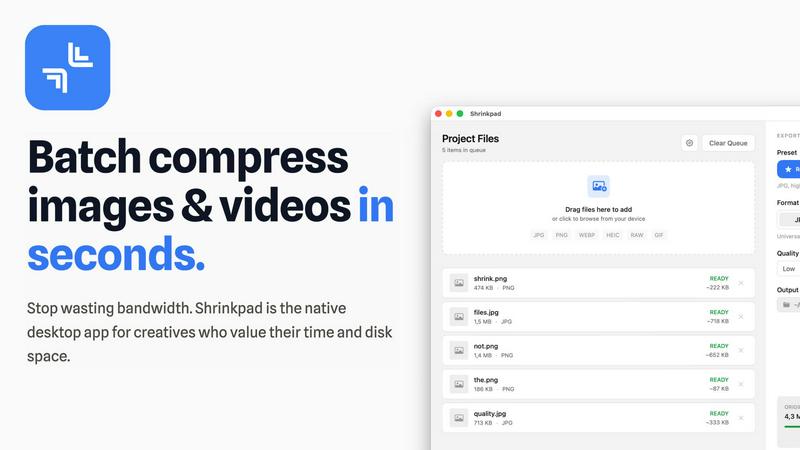
Effortlessly batch compress images and videos on Mac, optimizing your assets and saving valuable time and space.
Last updated: February 28, 2026
Visual Comparison
Nano Banana Pro

Shrinkpad
Feature Comparison
Nano Banana Pro
Character Consistency
Nano Banana Pro excels in maintaining character features across different images. This feature is essential for character design, storyboarding, and any series creation, ensuring that characters look uniform and recognizable in various contexts.
Text-to-Image Generation
With its advanced Text-to-Image capabilities, Nano Banana Pro allows users to input detailed descriptions and receive visually stunning images in return. The AI interprets the text to create art that aligns closely with user intentions, making it a powerful tool for creative expression.
Image-to-Image Editing
The Image-to-Image editing feature enables users to upload existing images and apply AI prompts to reimagine them. This functionality allows for artistic transformations, such as turning photos into artwork, adding elements, or completely altering scenes while maintaining key features.
Enhanced Text Rendering
Nano Banana Pro includes a high-fidelity text rendering engine that produces clear and crisp text within images. This feature is particularly beneficial for creating posters, logos, and other typography-centric designs, eliminating issues with distorted or unclear lettering.
Shrinkpad
Smart Compression Technology
Shrinkpad utilizes advanced algorithms that automatically analyze the visual complexity of each file. This ensures that the perfect compression ratio is applied without introducing artifacts, allowing users to maintain high-quality visuals while reducing file sizes significantly.
Unlimited Batching
With Shrinkpad, users can process thousands of images and videos simultaneously without crashing. Unlike web-based tools, this desktop application can handle massive queues, making it ideal for professionals who need to optimize large volumes of media efficiently.
One-Drop Folder Mode
Gone are the days of dragging files individually. Users can simply drop an entire folder into Shrinkpad, and the application will automatically detect all supported images and videos inside, ready for batch compression at the click of a button.
Privacy-Focused Processing
Shrinkpad places a strong emphasis on user privacy by ensuring that all processing is conducted locally on the user's machine. This means that sensitive assets never leave the device, providing peace of mind and security against potential data breaches associated with cloud services.
Use Cases
Nano Banana Pro
Character Design
Artists and illustrators can utilize Nano Banana Pro to create and refine character designs for comics, animations, or games. The tool’s character consistency ensures that characters retain their unique features across multiple illustrations, simplifying the design process.
Marketing Materials
Marketers can leverage Nano Banana Pro to generate eye-catching visuals for advertisements, social media campaigns, and promotional materials. The platform’s ability to create high-quality images quickly allows teams to produce content that stands out and engages audiences effectively.
Concept Art
Game developers and filmmakers can use Nano Banana Pro to produce concept art that captures their vision. Whether brainstorming ideas or visualizing scenes, the AI-generated images can serve as a foundation for further development and storytelling.
Personal Projects
Individuals looking to create unique artwork for personal projects, such as gifts or home decor, can benefit from Nano Banana Pro. The user-friendly interface and diverse features make it easy for anyone to produce professional-quality images tailored to their specific needs.
Shrinkpad
For Photographers
Photographers often deal with large image files that can slow down their workflow. Shrinkpad allows them to batch compress images quickly, ensuring high quality while saving disk space and enhancing load times for portfolios and galleries.
For Web Developers
Web developers need to optimize images and videos for faster loading times on websites. By using Shrinkpad, they can compress media assets efficiently, improving performance metrics such as loading speed and user experience without sacrificing visual fidelity.
For Graphic Designers
Graphic designers frequently export multiple assets from design software. Shrinkpad enables them to export and compress entire projects in bulk, saving time on manual processing and ensuring that all files are optimized for delivery.
For Content Creators
Content creators often juggle various media types for their projects. Shrinkpad's ability to handle mixed media batches allows them to compress images and videos together, streamlining their workflow and helping them meet tight deadlines.
Overview
About Nano Banana Pro
Nano Banana Pro is a cutting-edge AI image generator that seamlessly transforms text descriptions into high-quality visual art. This professional-grade tool is designed with creators, designers, marketers, and developers in mind, enabling them to generate stunning visuals without requiring extensive graphic design skills. At the heart of Nano Banana Pro is the advanced Gemini 3 Pro image preview engine, which powers the generation of 4K-ready images with remarkable speed and accuracy. The platform addresses common challenges in AI image generation, such as maintaining character consistency across multiple images, making it an invaluable asset for storytelling and branding. With its Text-to-Image and Image-to-Image capabilities, users can either create images from scratch or enhance existing photos. The intuitive interface and support for various aspect ratios further enhance usability, catering to diverse creative needs from social media posts to marketing materials and personal projects. Nano Banana Pro aims to offer a fast, efficient, and powerful solution for anyone looking to create professional-grade visuals effortlessly.
About Shrinkpad
Shrinkpad is a robust batch compression tool tailored for macOS users who require efficient optimization of images and videos without compromising on quality. This application streamlines the process of compressing multiple files or entire folders, allowing users to simply drag and drop their media assets, select preferred settings, and achieve significant reductions in file size within seconds. Designed with privacy in mind, all processing occurs locally on the user's device, eliminating the need for internet connectivity or reliance on cloud services. Shrinkpad supports over 50 file formats, including widely-used types like JPG, PNG, HEIC, MP4, and MOV, making it an essential tool for photographers, graphic designers, and content creators alike. By reducing file sizes by up to 90%, Shrinkpad not only conserves valuable disk space but also enhances the speed of website loading times and application performance. Its intuitive interface, combined with powerful features for customizing compression settings, empowers users to optimize their media management workflow effectively.
Frequently Asked Questions
Nano Banana Pro FAQ
What type of images can I create with Nano Banana Pro?
You can create a wide range of images, including character designs, concept art, marketing visuals, and personal artwork. The tool supports both Text-to-Image and Image-to-Image editing, providing versatility in your creative projects.
How does the character consistency feature work?
The character consistency feature ensures that characters maintain their distinctive features across multiple images. This is achieved through advanced AI algorithms that recognize and reproduce specific traits, making it ideal for storytelling and branding purposes.
Is it easy to use Nano Banana Pro for beginners?
Yes, Nano Banana Pro is designed with an intuitive interface that caters to users of all skill levels. Whether you are a seasoned designer or a beginner, you can quickly learn to navigate the platform and create stunning visuals.
What kind of support does Nano Banana Pro offer for its users?
Nano Banana Pro offers comprehensive support, including tutorials, user guides, and a community forum where creators can share tips and experiences. This support system helps users maximize their creative potential and troubleshoot any issues they may encounter.
Shrinkpad FAQ
Can I use Shrinkpad for free?
Yes, Shrinkpad offers a free starter version that includes essential tools for casual use, allowing users to experiment with the software before deciding to upgrade.
What file formats does Shrinkpad support?
Shrinkpad supports a wide range of file formats, including popular image formats like JPG, PNG, WEBP, and AVIF, as well as video formats such as MP4 and MOV, making it versatile for different media types.
Does Shrinkpad support video compression?
Absolutely. Shrinkpad is designed to handle both image and video files, allowing users to compress videos alongside images for a comprehensive media optimization solution.
How many files can I process at once?
Shrinkpad allows for unlimited batch processing, meaning users can compress thousands of files simultaneously without worrying about application crashes or performance issues. This feature is especially beneficial for users with large media libraries.
Alternatives
Nano Banana Pro Alternatives
Nano Banana Pro is a professional-grade AI image generator that falls into the category of design tools and image creation software. It excels in transforming text descriptions into high-quality, visually striking images, making it a go-to choice for creators, marketers, and developers alike. Users often seek alternatives to Nano Banana Pro for various reasons, including pricing concerns, specific feature needs, or compatibility with different platforms. When searching for an alternative, it is essential to consider factors such as the ease of use, the quality of outputs, the ability to maintain character consistency, and the range of editing capabilities offered. Additionally, evaluating user support, community resources, and the overall flexibility of the tool can help ensure that the chosen option meets individual requirements and enhances the creative process.
Shrinkpad Alternatives
Shrinkpad is a specialized batch compression tool designed for macOS users, focusing on optimizing images and videos. It allows users to compress large volumes of media files quickly while maintaining high visual quality. As the demand for efficient media management grows, many users often seek alternatives to Shrinkpad for various reasons, such as pricing, additional features, or compatibility with different operating systems. When exploring alternatives, it is essential to consider factors like ease of use, processing speed, and the range of supported file formats. Additionally, privacy and security features are crucial, especially for users dealing with sensitive content. Evaluating these aspects can help users find a suitable replacement that meets their specific needs.